
Your receptionist can't open the practice schedule. Someone in accounting is locked out of Microsoft 365. A lawyer is asking why a document share is crawling again. Your “IT guy” isn't picking up, or he's great at fixing printers but weak on security, backups, and cloud systems.
That's the moment many Ottawa businesses realise they don't have IT support. They have a patchwork.
If you run a clinic, law office, consultancy, retailer, or growing SMB, IT support in Ottawa has to do more than restart machines. It has to keep your team working, protect client data, meet compliance expectations, and respond fast when something breaks. In this city, it also has to work in both official languages when your staff, clients, or public-facing obligations require it.
Table of Contents
- Why Your Ottawa Business Needs More Than a 'Computer Guy'
- The Core Components of Managed IT Services
- Decoding IT Support Pricing Models and SLAs in Ottawa
- Specialized IT for Ottawa's Healthcare and Professional Services
- How to Choose the Right Local IT Support Partner
- From Chaos to Control
- Take the First Step to Worry-Free IT in Ottawa
- Frequently Asked Questions About Ottawa IT Support
Why Your Ottawa Business Needs More Than a 'Computer Guy'
A single server error at 10:00 a.m. can derail your whole day. Staff stop working. Clients wait. Everyone starts improvising, which usually makes the mess worse.

The old break-fix model doesn't cut it anymore. Calling someone after the crash is like hiring a roofer after the rain has already flooded the office. That approach leaves you exposed on uptime, security, user support, and planning.
Ottawa businesses are operating in a market that's getting more digital, more cloud-driven, and more demanding. The Canada IT services market reached USD 60.08 billion in 2025 and is projected to grow to USD 128.46 billion by 2030, reflecting a 16.23% CAGR, according to Mordor Intelligence's Canada IT services market analysis. That matters because it reflects a simple reality. Small and mid-sized businesses now depend on IT systems that used to be considered “enterprise”.
Reactive support costs more than it looks
A lot of owners still think managed support is a luxury. It isn't. It's basic operational control.
Here's what reactive support usually looks like in the world:
- No one's watching systems after hours: You find out about failures when staff arrive and complain.
- Patches happen late or not at all: That leaves gaps in Windows, Microsoft 365, firewalls, and line-of-business apps.
- Backups exist on paper only: Nobody knows whether a restore will work until there's a problem.
- Security is fragmented: Antivirus is present, but nobody is reviewing alerts, hardening access, or checking suspicious behaviour.
Practical rule: If your IT plan starts when something breaks, you don't have a plan.
Good IT support changes the business, not just the devices
Proper IT support in Ottawa should do three things at once. It should stabilise daily operations, reduce avoidable risk, and give you a roadmap for decisions like cloud migration, Microsoft 365 management, telecom changes, and device lifecycle planning.
That's why “a computer guy” is the wrong model. A business today needs a structured support function with monitoring, escalation, security controls, backups, and accountability. If you don't have that, you're running on luck.
The Core Components of Managed IT Services
Managed services are easiest to understand if you stop thinking about tech and think about a commercial building. You wouldn't hire one handyman and hope he can handle security, electrical issues, HVAC maintenance, emergency response, and long-term capital planning. You'd hire a proper building management team.
That's what managed IT is. You're not paying for random fixes. You're paying for organised oversight.
Think like a building owner
Your network, laptops, Microsoft 365 tenant, backups, internet connection, phones, and security tools all interact. If nobody owns the full picture, problems bounce between vendors and linger longer than they should.
A managed provider should act as the operational owner of that environment. Not the legal owner. The accountable operator.
Later in the process, it also helps to hear a plain-English overview of what a complete support model includes:
What belongs in the package
In Ottawa, structured managed service plans commonly include broad coverage rather than one-off tasks. Local providers often bundle user support, endpoint protection, Microsoft 365 management, disaster recovery, and 24/7 monitoring, with guaranteed response times as fast as 5 minutes on some plans, as shown on GamTech's Ottawa managed IT services page.
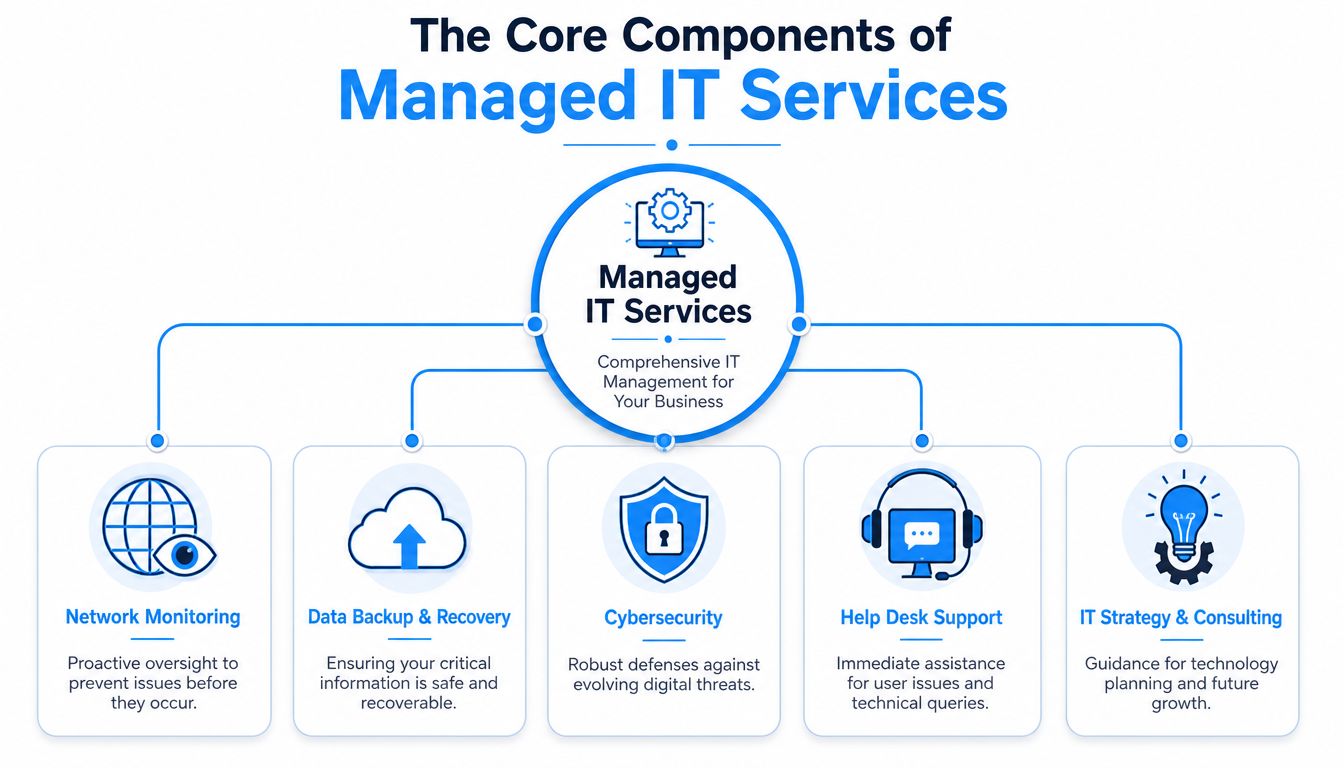
That package should cover several distinct functions:
- Help desk support: Staff need a fast path for login issues, email problems, printer failures, Teams glitches, and routine troubleshooting. Good help desk support protects productivity.
- Proactive monitoring: Servers, workstations, backups, and network gear should be watched continuously so issues get flagged before users feel them.
- Cybersecurity management: This includes endpoint protection, patching, access controls, web filtering, firewall review, and real attention to suspicious activity.
- Backup and disaster recovery: Backups are only useful if someone verifies them and can restore data cleanly under pressure.
- Cloud administration: Microsoft 365 and Google Workspace need real management, not just licences. Mail flow, user permissions, MFA, device policies, and collaboration settings all need attention.
- Telecom and connectivity oversight: Internet, VoIP, and carrier plans often drift into waste or mismatched service. A good provider cleans that up.
Good managed IT should feel boring in the best way. Systems stay available, users know where to get help, and owners stop chasing technical fires.
One practical example in the local market is IT Experts Canada, which provides managed IT, cybersecurity, cloud support, telecom services, and proactive monitoring for Ottawa-area businesses. That kind of bundled model is what SMBs should be looking for when they want one accountable partner instead of four disconnected vendors.
If a provider only talks about fixing issues when you call, you're not hearing a managed services pitch. You're hearing a handyman pitch.
Decoding IT Support Pricing Models and SLAs in Ottawa
Most Ottawa business owners start with the same question. What's this going to cost me every month?
Fair question. But if price is the only lens, you'll buy the wrong service.
What you're actually buying
Most managed support is priced in one of two ways:
| Pricing model | Best fit | Watch-out |
|---|---|---|
| Per-user | Offices where each employee uses several tools and devices | You need clarity on what's included for each user |
| Per-device | Environments with shared workstations, kiosks, or a small user base with lots of equipment | Cheap on paper can become expensive if support tasks fall outside the device count |
Per-user pricing usually makes more sense for professional services, clinics, and admin-heavy teams. One person may use a laptop, phone, Microsoft 365, Teams, cloud storage, and line-of-business software. Billing by device can understate the support load.
Per-device pricing can work for operations with shared stations or specialised equipment. But you need to read the scope carefully. If the contract excludes user support, onboarding, Microsoft 365 administration, or security response, you'll get hit with add-ons.
If you want a practical breakdown of how Canadian MSPs commonly structure these models, review this managed IT pricing overview for Ottawa businesses.
Why the SLA matters more than the sticker price
An SLA, or service level agreement, is where the truth lives. It tells you how fast the provider responds, what qualifies as urgent, how support is delivered, and what they're committed to.
A cheap plan without a strong SLA is usually a false economy.
Look for these details:
- Response commitments: How quickly do they answer critical issues, not just acknowledge tickets?
- Coverage hours: Is support business-hours only, or is there genuine after-hours coverage?
- Escalation path: Who handles server outages, security incidents, or failed backups?
- Included services: Are Microsoft 365 admin tasks, endpoint security, and backup oversight covered, or billed separately?
Some Ottawa providers offer tiered packages with named plans and fast response commitments. That's useful, but the tier name doesn't matter. The service boundaries do.
Ask this directly: “When my team can't work, how fast do you engage, and what happens next?” If the answer is vague, move on.
Specialized IT for Ottawa's Healthcare and Professional Services
Generic IT support is risky in regulated environments. That's especially true in Ottawa, where healthcare, legal, accounting, and consulting firms handle sensitive information every day and can't afford sloppy process.
Healthcare can't afford sloppy IT
A clinic doesn't just need internet and printers to work. It needs secure access to patient information, reliable backups, controlled permissions, stable Wi-Fi, and clean device management at the front desk, in exam rooms, and for practitioners working remotely.
The technical issue is only half the problem. The bigger issue is whether the provider understands how people use the systems in practice. A waiting room computer left logged in, an unmanaged mobile device with email access, or a backup nobody has tested can turn into an operational and compliance problem fast.
Healthcare businesses should expect their IT partner to handle:
- Access discipline: Unique accounts, controlled permissions, and multi-factor authentication where appropriate.
- Device oversight: Workstations, laptops, and mobile devices need consistent policies and patching.
- Recovery readiness: Backups have to be monitored and restore procedures need to be understood before a bad day hits.
- Documentation: Staff should know what to do during outages, account lockouts, or suspected phishing events.
Law and accounting firms need discipline
Law offices and accounting firms face a different kind of pressure. They live on documents, deadlines, confidentiality, and audit trails. If file shares are disorganised, email permissions are loose, or remote access is improvised, the business starts leaking risk.
That's why legal and financial firms should avoid providers who only talk about hardware and ticket volume. The right provider asks tougher questions. How are files shared? Who can access what? How are archived emails handled? What happens when a partner's laptop is lost? How are remote users secured?
A regulated business shouldn't need to teach its IT provider why confidentiality matters.
In these sectors, good IT support isn't just support. It's operational discipline applied through systems, access controls, backups, and user process. If your provider doesn't understand your obligations, they're not a fit.
How to Choose the Right Local IT Support Partner
Ottawa businesses make a common mistake when shopping for IT support. They compare vendors as if they're all selling the same thing. They aren't.
One provider gives you a fast remote help desk with weak onsite presence. Another offers decent infrastructure skills but no industry knowledge. Another promises “bilingual service” but can't tell you whether a French-speaking technician is available when a real issue hits.
The questions that separate serious providers from amateurs
Start with local response. Ottawa businesses need a provider that knows the region, can support onsite when needed, and doesn't treat every problem as a remote-only ticket.
Then ask about bilingual readiness. This city is different. Canada's only official bilingual capital has a real operational need for French-speaking support, and 22% of Ottawa businesses cite language barriers as a top procurement hurdle, especially where French-language obligations matter, as noted in the provided regional procurement data. If a provider can't define how French support works in practice, don't accept a vague promise.
Ask these questions in the first meeting:
- Who answers urgent calls: Is it a local team, a national queue, or an outsourced night desk?
- What's your French support plan: Can they guarantee French-speaking technician availability and French-language SLA handling when needed?
- What regulated sectors do you support: Healthcare, legal, accounting, and public-facing firms have different expectations.
- How do you handle escalation: You want a clear chain for security incidents, cloud issues, and site outages.
- What do you monitor proactively: Endpoints, backups, firewalls, Microsoft 365, and network devices shouldn't be optional extras.
IT Provider Evaluation Checklist for Ottawa Businesses
| Question Category | Key Question to Ask | Why It Matters |
|---|---|---|
| Local presence | Do you provide onsite support in Ottawa when remote support isn't enough? | Some issues need hands on keyboards, not another email thread |
| Response standards | What are your guaranteed response times for critical incidents? | Speed matters when staff can't work or systems are down |
| Bilingual readiness | How do you guarantee French-speaking support and documentation? | Ottawa organisations may need operational support in both official languages |
| Compliance fit | What experience do you have with healthcare or professional services environments? | Regulated data needs more than generic troubleshooting |
| Security depth | What do you actively manage besides antivirus? | Real protection includes monitoring, access control, patching, and alert response |
| Backup accountability | Who checks backups and who owns restore testing? | Backup failure is usually discovered at the worst possible moment |
| Strategic guidance | How do you advise on Microsoft 365, cloud changes, and lifecycle planning? | You need planning, not just ticket closure |
If a provider gets defensive when you ask operational questions, that's your answer.
The best local partner usually isn't the one with the slickest sales deck. It's the one that can explain, plainly and specifically, how your business stays supported on a bad day.
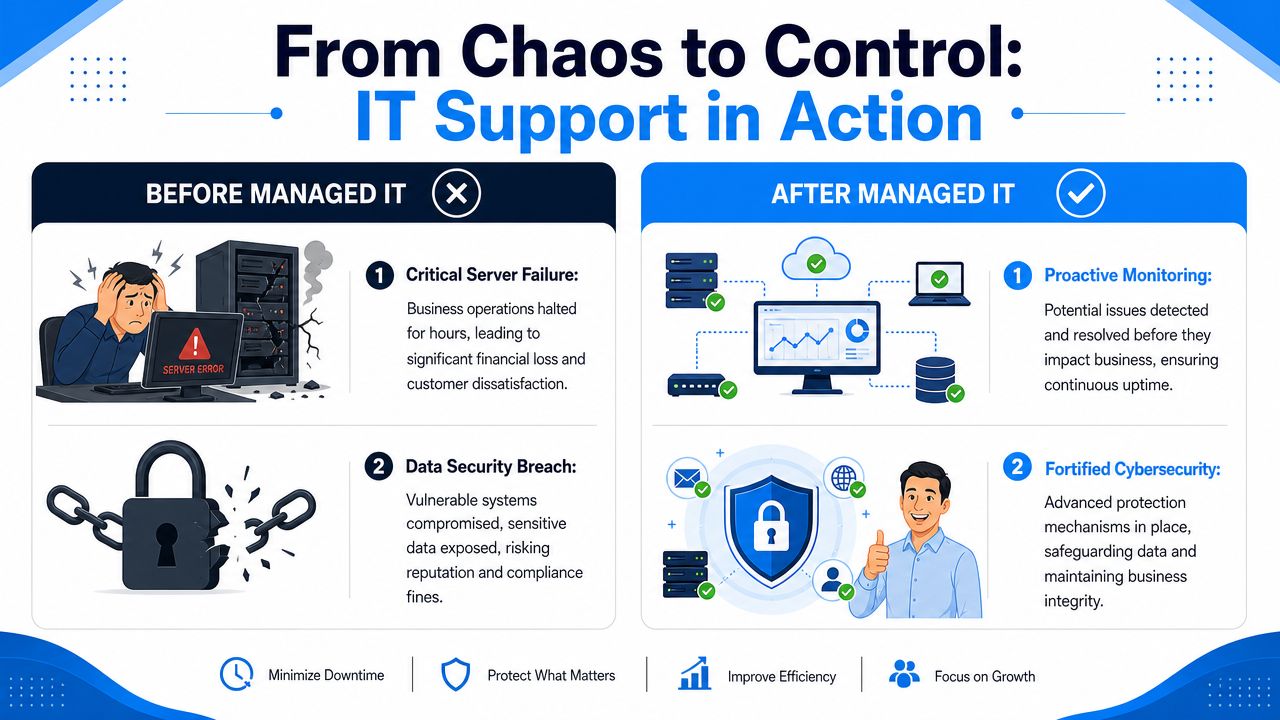
From Chaos to Control
The value of managed support gets obvious when you look at normal business frustrations, not fantasy success stories.
A dental clinic with constant interruptions
An Ottawa dental clinic runs on appointments, imaging, email, and a stable front-desk workflow. But the environment is messy. Workstations update at random, the Wi-Fi drops in parts of the office, and nobody knows whether the backup jobs are healthy. Every small interruption slows patient flow.
After moving to a managed model, the clinic gets routine patching, monitored backups, consistent endpoint protection, and one support path for staff. Front-desk issues stop bouncing between the internet provider, software vendor, and a part-time technician. The office manager finally knows who owns the problem.
For environments like this, continuous oversight matters more than heroics. A provider that offers systems and network monitoring for Ottawa businesses can spot issues before they turn into a waiting room problem.
A consulting firm with risky file handling
A growing consulting firm has a different problem. Staff work from home, in client offices, and on the road. Files are scattered across laptops, email threads, and cloud folders with inconsistent permissions. Security is more assumed than managed.
Proactive security can change the outcome. Ottawa businesses that adopt a proactive, managed security approach can see a 50% reduction in successful ransomware attacks compared to relying on legacy firewalls alone, according to Convergence Networks' Ottawa IT support page. That's not an abstract security talking point. It's the difference between a contained incident and a business-wide disruption.
Once the consulting firm standardises access, tightens endpoint controls, and gets real monitoring in place, the workday becomes less chaotic. Less guessing. Fewer blind spots. More confidence that client data isn't one bad click away from a crisis.
Take the First Step to Worry-Free IT in Ottawa
If your business still relies on ad hoc fixes, inconsistent backups, vague security practices, or one overextended technician, you're carrying more risk than you need to.
Good IT support in Ottawa should be local, responsive, bilingual where required, and capable of supporting regulated environments without hand-holding from your team. It should reduce downtime, clean up operational confusion, and give you a clearer path on Microsoft 365, cybersecurity, cloud systems, and day-to-day support.
The next logical move isn't signing a long contract blindly. It's getting a proper assessment of what you have now, what's exposed, and what needs attention first. A practical starting point is a free IT infrastructure analysis for Ottawa-area businesses. That gives you a clearer view of your current environment before you make any support decision.
Frequently Asked Questions About Ottawa IT Support
How do I measure ROI from managed IT services
Start with downtime. In Ottawa, business disruptions can cost up to $427 per minute, and many SMBs still judge support only by generic monthly pricing. A better approach is to compare your monthly support cost against reduced downtime, fewer recurring incidents, and stronger prevention. The provided regional guidance also notes that many businesses still look at generic per-user pricing in the $55 to $95 range, but that number means very little unless you track outcomes.
In practical terms, measure things your business already feels:
- Lost time avoided: Fewer work stoppages and faster issue resolution
- Incident prevention: Fewer malware events, account compromises, and backup failures
- Operational consistency: Less time wasted chasing vendors or repeating the same fixes
- Compliance confidence: Fewer gaps in access control, documentation, and recovery readiness
Is switching providers painful
It can be, if the handoff is rushed or undocumented. A proper transition should include credential transfer, asset review, backup verification, Microsoft 365 review, user support planning, and a clear cutover sequence.
The main thing to avoid is a provider that starts making changes before they've mapped your environment. Good onboarding starts with discovery, not disruption.
What should onboarding look like
A solid onboarding process should feel methodical. First, the provider inventories users, devices, cloud services, backups, security tools, and network hardware. Then they identify obvious risks, document support procedures, and prioritise urgent fixes.
You should also expect plain-language communication. Your leadership team needs to know what's changing, your staff need to know how to get help, and your business needs a support model that works the same way every time.
If you want a clearer, less stressful approach to business technology, IT Experts Canada is one option for Ottawa organisations that need managed IT support, cybersecurity, cloud services, telecom support, and proactive monitoring. The sensible next step is to review your current setup, identify the obvious gaps, and get a practical plan before the next outage makes the decision for you.
0 Comments