
You're probably already carrying this risk.
A staff member forwards a spreadsheet to their personal Gmail so they can finish work at home. A departing employee downloads your client list before giving notice. Someone in accounting shares the wrong folder with an outside contractor and doesn't realise it until days later. Or a laptop dies and the file everyone thought was “on the server somewhere” turns out to be gone.
For Ottawa businesses, that's what data loss looks like in real life. It's rarely dramatic. It's usually ordinary, preventable, and expensive. The biggest mistake we see is treating every data problem like a backup problem. Backups matter. They're not the same thing as data loss prevention. If you mix those up, you leave a dangerous gap right where your business is most exposed.
Table of Contents
- Your Data Is More Exposed Than You Think
- What Data Loss Prevention Really Means and What It Is Not
- The Four Core Types of DLP Controls Explained
- Building Your DLP Policy and Classifying Data
- An SMB-Friendly DLP Implementation Checklist
- Compliance and ROI for Canadian Businesses
- How Managed DLP Services Simplify Protection
Your Data Is More Exposed Than You Think
A business owner usually finds out about weak data controls after the damage is done.
The first call often sounds the same. Someone can't find a critical file. A former employee still had access longer than they should have. A customer asks why their information was sent to the wrong person. Nobody thought they had a “data leak” problem because the firewall was in place and antivirus was current. The issue wasn't perimeter security. The issue was that sensitive information could still move too freely inside the business.
That's the part many small and mid-sized businesses miss. Your risk isn't limited to hackers battering the front door. It includes normal staff using email, cloud drives, USB devices, printers, and mobile phones in ways that accidentally or deliberately move information where it doesn't belong.
A major warning sign already exists in Canada. Only 26% of Canadian businesses reported having a written cybersecurity policy as of 2023, according to the Cybersecurity Canada report. That means most businesses were still relying on assumptions, verbal rules, or scattered habits instead of documented controls.
Firewalls don't solve this problem
Firewalls and endpoint protection are necessary. They don't decide whether your office manager should be allowed to email a customer list to a personal address. They don't always stop a staff member from copying sensitive files into an unsanctioned cloud folder. They don't classify your financial forecasts, board documents, HR records, or patient files.
That's why data loss prevention exists. It focuses on the movement and handling of sensitive information, not just malware.
Practical rule: If your team can move confidential data without a clear rule, a technical check, or an audit trail, you don't control that data.
The risk is usually hiding in routine work
Most leaks start with ordinary behaviour:
- Personal convenience: Staff send files to personal accounts, use consumer cloud storage, or copy data to a home device.
- Wrong recipient mistakes: Someone selects the wrong contact in Outlook or shares a Microsoft 365 folder too broadly.
- Loose offboarding: Access remains active after resignation, termination, or a role change.
- Unclear ownership: Nobody knows which files are sensitive, so everything gets treated the same.
For an SMB, that's enough to trigger client complaints, compliance headaches, and downtime while you sort out what left your environment. You don't need a cinematic breach to have a serious problem. You just need one uncontrolled action involving the wrong file.
What Data Loss Prevention Really Means and What It Is Not
Most owners hear “data loss” and think “backup.” That's understandable. It's also wrong.
Data loss prevention is your security guard. It watches sensitive data while people use it, move it, share it, and store it. It enforces rules. It can block, warn, encrypt, log, or restrict actions based on what the data is and where it's going.
Sauvegarde is your fireproof safe. It gives you a recoverable copy after something has already gone wrong, such as deletion, device failure, corruption, or ransomware.
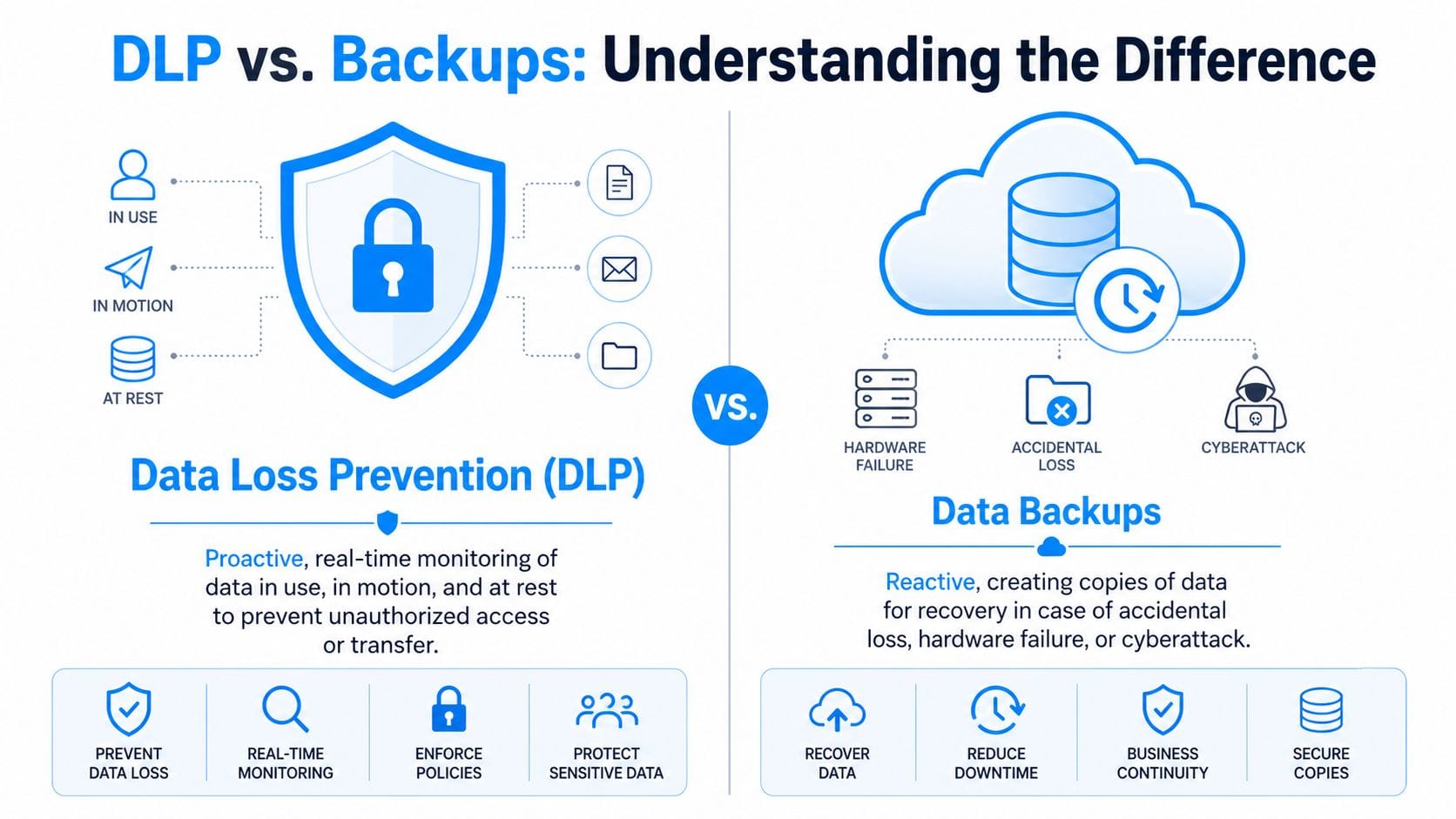
DLP prevents. Backup restores.
That distinction matters because businesses often buy one and assume they've covered both problems.
A backup can restore a deleted contract. It can't stop an employee from emailing that contract to the wrong person. A DLP rule can block that email or force encryption. It can't rebuild a server after a hardware failure. You need both because they solve different business risks.
For Canadian SMBs, this confusion is especially costly. A local perspective from Ottawa-Gatineau notes that 68% of Canadian data loss incidents stem from human error or device failure rather than malicious exfiltration, and that many businesses still blur the line between prevention and recovery in their planning, as outlined in this Ottawa IT guidance on safeguarding data and data loss prevention.
Use the right tool for the right threat
This quick comparison keeps the distinction clear:
| Business problem | DLP | Sauvegarde |
|---|---|---|
| Employee emails client list to personal account | Yes | No |
| User shares confidential folder externally by mistake | Yes | No |
| Laptop fails and files are gone | No | Yes |
| Server data needs restoration after corruption | No | Yes |
| Need audit trail for sensitive data handling | Yes | Limited |
| Need point-in-time recovery | No | Yes |
If you only have backup, you're prepared for loss after the fact. You're not controlling how data leaves your business in the first place.
What DLP looks like in practice
In a Microsoft 365 environment, DLP might detect personal information in an email and block external delivery. In a file-sharing system, it might stop staff from uploading sensitive client documents into an unapproved cloud app. On a laptop, it might prevent copying restricted files to a USB key.
Backup handles a different set of failures. Think online backup, versioning, immutable copies, and restore testing. If you run a clinic, law office, accounting firm, or any team that lives in documents and email, you don't get to choose between DLP and backup. You need a prevention plan and a recovery plan.
The Four Core Types of DLP Controls Explained
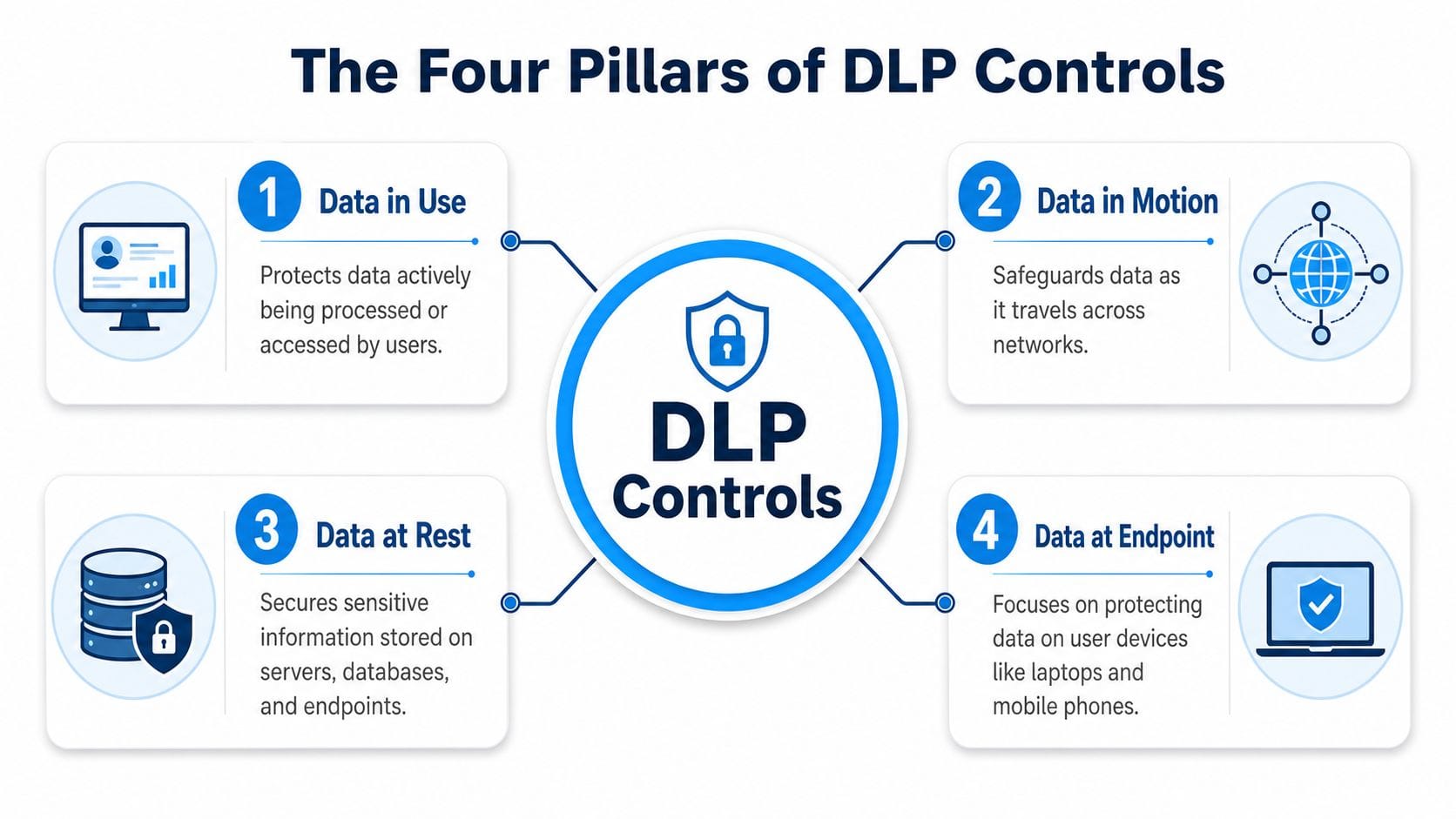
A proper DLP setup uses several controls to cover the places your data is exposed. That matters because sensitive information leaves a business in different ways. An employee can copy a file to a USB key, share the wrong OneDrive folder, upload a document to an unapproved app, or send client data by email. One control will not catch all of that.
For Ottawa SMBs dealing with PIPEDA and, in some cases, Bill 25, the practical goal is simple. Stop sensitive data from leaving the business in ways that create legal, financial, and reputational damage. Backup helps you recover after loss. DLP controls what users, systems, and apps are allowed to do before the loss happens.
Start with the controls that match real risk
Many SMBs should start with endpoint and cloud DLP, because that is where day-to-day work happens. Staff work from laptops, share files in Microsoft 365, and send information from outside the office. If you want a plain-English view of how DLP fits into a broader protection stack, our guide to security solutions for Canadian businesses gives the bigger picture.
Canadian incident reporting also points to user-driven mistakes as a major source of security problems. The Datarisk report on Canadian business cybersecurity incidents found that human error plays a significant role, which is exactly why device-level and user-level controls deserve priority.
Where each control fits
Network DLP
Network DLP monitors data as it moves through managed traffic paths. It gives you visibility into outbound transfers, web uploads, and connections leaving core systems.
Use it when your team works mainly through office networks, a central firewall, or known business applications. It helps you spot policy violations and stop suspicious transfers before they leave your environment.
Best fit:
- Central visibility: You want to monitor traffic flowing through shared network infrastructure.
- Policy enforcement: You need rules for approved destinations and blocked services.
- Office-based operations: Staff and systems still route a large share of work through company-controlled networks.
Endpoint DLP
Endpoint DLP runs on the device. It controls actions such as copying to USB, printing, screen capture, clipboard use, and uploads from laptops and desktops.
This is usually the first place we focus for hybrid teams. If your staff work from home, travel, or use cloud apps all day, the device is where risky behaviour happens. Endpoint DLP gives you control even when users are not connected to the office network.
Consultant's view: If your team handles client records on laptops, endpoint DLP should be near the top of the list. It closes off the easiest paths for accidental leaks and deliberate theft.
Cloud DLP
Cloud DLP protects data stored in platforms such as Microsoft 365, SharePoint, OneDrive, Teams, and Google Workspace. It scans files, applies policies, and limits oversharing inside the apps your team already uses.
This control matters because many businesses are no longer losing data through a server room mistake. They are losing it through bad sharing settings, public links, excessive permissions, and files left in the wrong SaaS app. For Canadian SMBs, cloud DLP also supports compliance by helping you identify where personal information lives and who can access it.
Email DLP
Email DLP focuses on the most common way sensitive information leaves a business. One message sent to the wrong recipient can create a reportable privacy incident.
Email DLP scans message content and attachments before delivery. It can warn users, require encryption, block external sends, or stop messages that contain regulated information such as employee records, financial data, or client identifiers.
A practical DLP program usually combines all four:
| DLP control | What it protects | Example |
|---|---|---|
| Network | Data in motion on managed traffic paths | Blocking upload of sensitive files to unauthorised destinations |
| Endpoint | Data in use on user devices | Stopping USB copy or screenshot of restricted records |
| Cloud | Data stored and shared in SaaS platforms | Preventing oversharing in OneDrive or SharePoint |
| Courriel | Data leaving by message | Blocking external send of confidential attachments |
Choose controls based on how your team works. If you are trying to prevent malicious theft and reduce accidental disclosure under PIPEDA or Bill 25, endpoint, cloud, and email DLP usually deliver the fastest business value.
Building Your DLP Policy and Classifying Data
Your office manager emails a file to the wrong contact. Your sales rep syncs a proposal to a personal app. Your bookkeeper keeps a payroll export on a laptop with no controls. None of that looks like a hacker problem at first. It is still a data protection problem, and your policy needs to separate two risks clearly. DLP is for stopping sensitive information from leaving the business in the wrong way. Backup is for restoring data after deletion, corruption, ransomware, or device failure. You need both, especially if you handle personal information under PIPEDA or Bill 25.
DLP tools fail when the policy is vague. If you have not defined what matters, where it belongs, and who can use it, the software will either create noise or miss the records that would cause legal and business pain.
For many SMBs, a complicated governance program is unnecessary to get started. You need a short policy, clear labels, and rules your staff can follow during a normal workday.
Start with the data that can hurt you
Focus first on information that would trigger a privacy incident, client fallout, operational disruption, or a compliance review if it were exposed.
For many Ottawa SMBs, that means:
- Client and customer records: Contact details, contracts, payment information, service history, and identity-related records
- Financial documents: Payroll files, tax records, budgets, forecasts, banking documents, and audit material
- HR information: Employee records, compensation details, disciplinary notes, benefit data, and medical accommodation information
- Operational files: Pricing models, proposals, vendor agreements, internal procedures, and project documents
- Regulated information: Patient information, legal files, and other records tied to sector-specific obligations
Then decide three things for each category. Who needs access. Where the data is allowed to live. What users are allowed to do with it.
That is the practical line between DLP and backup. If payroll data is copied to personal email, DLP should stop it. If payroll data is deleted or encrypted by ransomware, backup should restore it. If you do not define the class first, neither control works properly. That is why we often pair policy work with online disaster recovery solutions for Ottawa businesses.
Use labels people will actually apply
Skip legal language and academic taxonomy. Staff need labels they can recognize in seconds.
A simple traffic light model works well:
| Classification | Meaning | Typical rule |
|---|---|---|
| Green. Public | Safe to share outside the company | Website content, public brochures |
| Yellow. Confidential | Internal use, limited external sharing with approval | Quotes, internal reports, routine customer files |
| Red. Restricted | High sensitivity, tightly controlled | Payroll, patient records, legal files, banking data |
Now write your policy to match the label.
- Red data stays in approved systems only. Block personal email, consumer cloud storage, and unauthorised USB copying.
- Yellow data can be shared for business use. Limit sharing to approved tools such as Microsoft 365 with proper permissions, expiry settings, and audit trails.
- Green data gets basic handling rules. Do not waste time applying strict DLP controls to marketing brochures or public web copy.
For Canadian SMBs, this matters because privacy obligations focus on personal information and access discipline. A label is not just an admin shortcut. It tells your team what needs stronger controls, what needs retention, and what could become a reportable incident if it leaves the business.
Good DLP policy starts with business impact. Classify the information first, then apply the controls.
Keep version one short. If the policy reads like it was written for a courtroom, your staff will ignore it and your administrators will stop maintaining it.
An SMB-Friendly DLP Implementation Checklist
Your office manager emails a customer spreadsheet to a personal Gmail account to finish work at home. Your backup system will not stop that file from leaving the business. DLP will. That is the implementation priority for Ottawa SMBs handling employee, customer, or financial data under PIPEDA and, in some cases, Bill 25.
A practical rollout plan
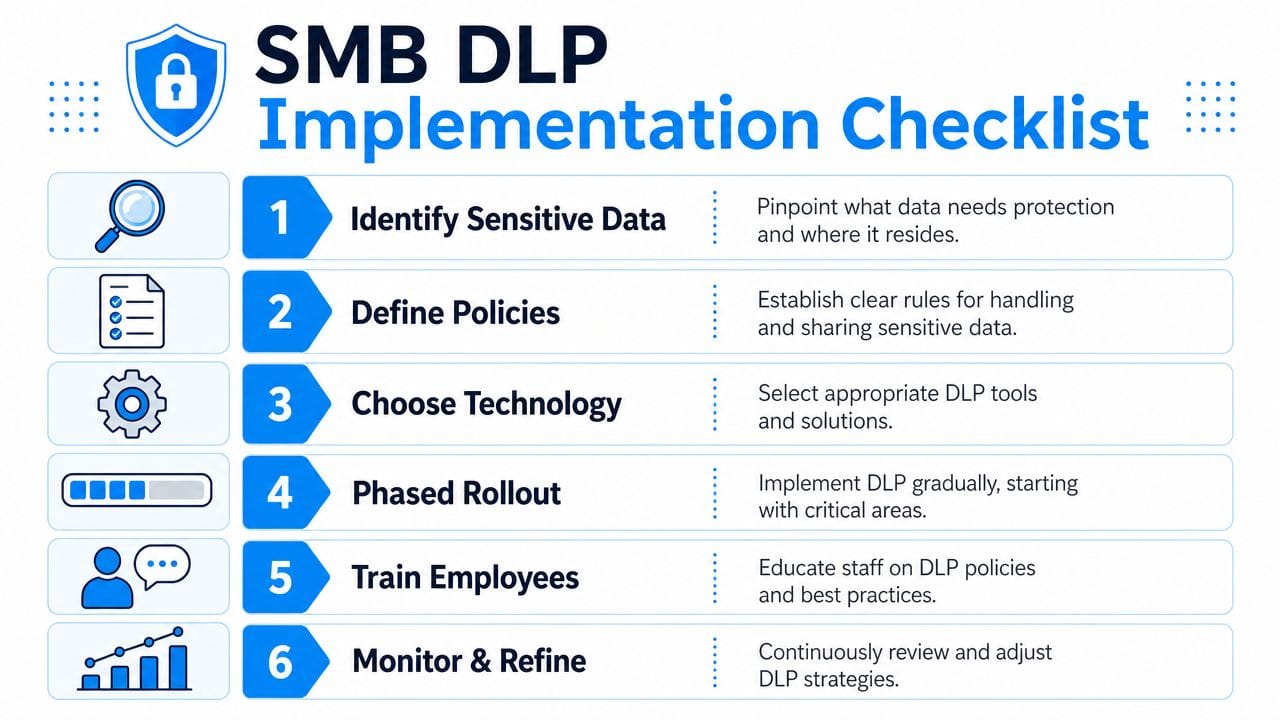
Keep the first phase tight. The goal is to stop the most likely data leaks without slowing down normal work.
Start with the data that would hurt the business if it left. Focus on personal information, payroll files, banking details, client records, legal documents, and any file set that could trigger a privacy incident, contract dispute, or reputational damage.
Check where that data travels. Review email, Microsoft 365, Teams, SharePoint, laptops, USB use, cloud storage, and line-of-business apps. If you do not map the flow, you will end up blocking the wrong behaviour and missing the true risk.
Put in a small set of high-value rules first. Block personal email forwarding for restricted data. Restrict USB copying for sensitive folders. Tighten external sharing defaults in Microsoft 365. Alert on unusual downloads or bulk exports.
Run in monitoring mode before broad enforcement. Watch the alerts, identify false positives, and learn which teams need exceptions. This is how you avoid breaking payroll, sales, or client delivery on day one.
Apply controls that match the risk. Use blocking, warnings, encryption, and access limits where they fit. A workable DLP program follows a simple path. Find sensitive data, control how it moves, and review activity continuously.
Treat backup and DLP as separate protections. DLP helps stop intentional or careless data exfiltration. Backup helps you recover from deletion, corruption, ransomware, or system failure. You need both, along with tested online disaster recovery solutions for business continuity.
What to avoid during rollout
Many SMB projects fail due to common, non-technical reasons.
Avoid these traps:
- Starting with every system at once: Begin with email, cloud storage, and the users who handle finance, HR, leadership, or customer records.
- Writing too many rules too early: A short list of trusted policies gets better results than a bloated rule set nobody understands.
- Ignoring exception handling: Staff will have valid business cases. Give managers and IT a clear approval path instead of forcing people to find workarounds.
- Rolling out controls without explanation: Tell people what is changing, which data is affected, and what approved sharing methods they should use instead.
- Confusing prevention with recovery: DLP is for stopping data from leaving. Backup is for getting data back.
One rollout rule to follow: start with visibility, move to user warnings, then enforce the block.
You do not need a perfect policy pack and fifty rules. You need ownership, a short list of enforceable controls, and a rollout plan that reflects how your team works.
Compliance and ROI for Canadian Businesses
An employee emails a client list to a personal account so they can finish work at home. Your backup system still has every file. You can recover deleted data just fine. But backup does nothing to stop that list from leaving your business in the first place.
That distinction matters for compliance. DLP is about controlling how personal and confidential information is used, shared, and moved. Backup is about recovery after deletion, corruption, ransomware, or system failure. If you handle customer, employee, financial, or health-related data, you need both.
For Canadian SMBs, the compliance test is straightforward. Can you show that sensitive information is identified, access is limited, sharing is controlled, and exceptions are documented? Under PIPEDA, that supports the requirement to protect personal information with security safeguards appropriate to the sensitivity of the data. For Quebec-connected businesses, Bill 25 raises expectations further around governance, incident handling, and accountability.
You do not need a legal memo to make the right operational decisions. You need policies your staff can follow, technical controls that enforce those policies, and logs that prove you were paying attention.
Compliance is a practical business issue
Too many DLP articles aimed at SMBs blur two separate problems. One is malicious or careless data theft. The other is accidental data loss that calls for backup and recovery. Regulators care about both, but they are not the same control set, and treating backup as a substitute for DLP leaves a compliance gap.
That gap gets expensive fast. If a staff member uploads personal information to an unsanctioned cloud app, a successful restore does not undo the exposure. If someone forwards payroll data outside the company, recovering the original file does not contain the breach. DLP addresses outbound risk. Backup addresses recovery. You need each tool to do its own job.
Canadian businesses also face client pressure that rarely shows up in vendor brochures. More procurement forms now ask how you restrict data sharing, how you monitor for unauthorized transfers, and how you protect personal information in Microsoft 365, endpoints, and cloud storage. If you cannot answer clearly, you lose deals or spend days scrambling to respond.
ROI comes from fewer incidents, faster audits, and less wasted time
It's common for business owners to view DLP as an overhead cost rather than an investment. That view is shortsighted.
The return usually shows up in three places. First, you reduce the number of preventable incidents, especially the everyday ones caused by auto-forwarding, misaddressed email, personal cloud storage, USB copies, and oversharing in collaboration tools. Second, you cut the time needed to respond to customer security questionnaires, audits, and breach reviews because your rules and logs already exist. Third, you protect management time. A single data handling incident can pull your owner, office manager, controller, and IT lead into days of cleanup.
IBM's long-running breach cost research continues to show that data incidents are expensive, and response costs go well beyond the technical fix, as summarized in this data breach cost summary referencing IBM's annual report. For an Ottawa SMB, the more useful point is simpler. You do not need a headline breach to suffer real damage. One exposed spreadsheet, one payroll file sent to the wrong recipient, or one salesperson syncing client records to a personal app can create legal work, client notifications, and lost trust.
Here is the practical ROI case:
- DLP reduces preventable data exposure before it becomes a reportable problem
- Audit trails and policy enforcement make compliance reviews faster and less painful
- Clear controls lower the chance that staff use personal apps and risky workarounds
- Better data handling strengthens client confidence during renewals and procurement checks
If you want this to pay off, treat DLP as an operating control, not a one-time software purchase. That usually means assigning ownership internally or getting help from a team that already manages policy, monitoring, and response through managed IT services for Ottawa businesses.
The business case is simple. Backup helps you recover after something goes wrong. DLP helps stop the wrong thing from happening in the first place. For Canadian compliance, that difference matters. For your bottom line, it matters even more.
How Managed DLP Services Simplify Protection
Most SMBs don't fail at DLP because they don't care. They fail because nobody has the time to classify data, tune rules, investigate alerts, maintain exceptions, and keep watching after hours.

Why most SMBs struggle to run DLP alone
DLP isn't a buy-once tool. It's an operating discipline.
Policies need adjustment. Alerts need human review. Users need training. Cloud platforms change. Staff roles change. New apps appear. If your office manager, controller, or one overextended internal IT person owns all of that off the side of their desk, the programme won't stay sharp.
That's why many Ottawa businesses move this work into a managed model instead of trying to build a mini security department internally. A provider can handle assessment, policy design, deployment, monitoring, and response while your team stays focused on running the business.
If you want a clear example of that operating model, look at what managed IT services for Ottawa businesses are meant to provide: ongoing oversight, not just a one-time setup.
What a managed approach changes
A managed DLP service should bring structure to the whole lifecycle:
- Assessment and scoping: Identify sensitive data, priority systems, and obvious leak paths.
- Policy creation: Turn business rules into enforceable controls.
- Deployment and tuning: Start with high-risk areas and refine based on actual user behaviour.
- Ongoing monitoring: Review alerts, investigate incidents, and adjust policies as the business changes.
- Support for recovery planning: Make sure DLP controls sit alongside tested backup and restore practices.
A quick overview helps make that more concrete.
You don't need more dashboards. You need fewer blind spots and faster decisions when something looks wrong.
If your business needs practical help separating data loss prevention from backup, tightening compliance around PIPEDA and Bill 25, and putting real controls around Microsoft 365, endpoints, and shared data, talk to IT Experts Canada. We help Ottawa-Gatineau SMBs build protection that's usable, monitored, and aligned with how their teams work.
0 Comments