

Your office opens at 8:30. By 8:42, staff can't log in, the shared drive won't open, and your phone starts ringing with the same message from every desk: “The system's down.” If you run a clinic, law office, accounting firm, or multi-location business in Ottawa–Gatineau, that kind of morning doesn't feel like an IT problem. It feels like lost revenue, delayed service, and a day that's suddenly off the rails.
That's why managed IT services matter. They turn technology support from a reactive scramble into an organised service with monitoring, maintenance, security, backups, and support built in. For many small and mid-sized businesses, the value isn't only fixing issues faster. It's having fewer surprises, clearer monthly costs, and coverage that your internal admin or junior IT person can't provide alone.
Table of Contents
- Introduction and Key Benefits
- Understanding Managed IT Services
- Core Service Packages Explained
- Real-world Use Cases
- Pricing Models and Calculating ROI
- Buyer Checklist and Evaluation Questions
- Ottawa–Gatineau Differentiators and IT Experts Canada Capabilities
- Conclusion and Next Steps
Introduction and Key Benefits
A lot of owners wait until they've had one bad outage, one failed backup restore, or one security scare before they look seriously at managed IT services. That's understandable. Technology often fades into the background when everything works.
But when it breaks, it breaks in ways that touch every part of the business. A missed patient file access, a remote employee who can't connect, or an email outage before a client deadline can stall the whole day. Managed IT services are designed to reduce that risk by putting routine care around the systems you depend on.
The business case is getting stronger across Canada. The broader Canada IT Services market reached USD 60.08 billion in 2025 and is projected to grow to USD 128.46 billion by 2030 at a 16.23% CAGR, according to Mordor Intelligence's Canada IT Services market analysis. That growth reflects how many organisations now prefer ongoing outsourced support over unpredictable break-fix spending.
Why SMBs switch: They want steady support costs, fewer interruptions, and access to skills they can't justify hiring in-house full time.
For Ottawa–Gatineau businesses, the question usually isn't whether technology needs attention. It's whether you want to buy that attention only after something goes wrong, or as an ongoing service that keeps problems smaller and rarer.
Understanding Managed IT Services
Managed IT services are easiest to understand if you compare them to building maintenance. Most businesses don't wait for the furnace to fail, the elevator to stop, and the pipes to leak before calling anyone. They pay specialists to inspect, maintain, and repair important systems before those systems disrupt the building.
Your IT environment works the same way.

The building maintenance analogy
Think of each technology component as part of a property:
- Endpoints are the doors and workspaces your staff use every day. Laptops, desktops, and mobile devices need regular upkeep.
- Servers are the utility room. If they fail, core business functions stop.
- Networks are the hallways and wiring. If traffic can't move, people can't work.
- Patching and updates are preventive inspections. They close gaps before they become failures.
- Routine administration is the day-to-day care that keeps the place functional.
That's the shift from break-fix to managed service. Instead of waiting for a ticket after a failure, the provider watches, updates, and maintains the environment under a service agreement.
What businesses are really buying
At a practical level, managed IT services usually mean someone is responsible for the recurring work that easily gets delayed in a busy office. That includes monitoring alerts, applying patches, reviewing vulnerabilities, checking backups, supporting users, and documenting the environment.
For SMB leaders, the hidden benefit is decision clarity. You know who handles after-hours alerts. You know what's included. You know when an issue becomes the provider's responsibility under an SLA.
That model also matches what the Canadian market values most. In 2024, the Managed IT Infrastructure & Data Center segment accounted for 32.5% of Canada's managed services market share, according to Credence Research's Canada managed services market report. Infrastructure remains the core of the service because stable endpoints, servers, and networks still sit underneath everything else.
If your team relies on Microsoft 365, cloud apps, VoIP, or remote access, you still need someone watching the infrastructure those tools depend on.
Core Service Packages Explained
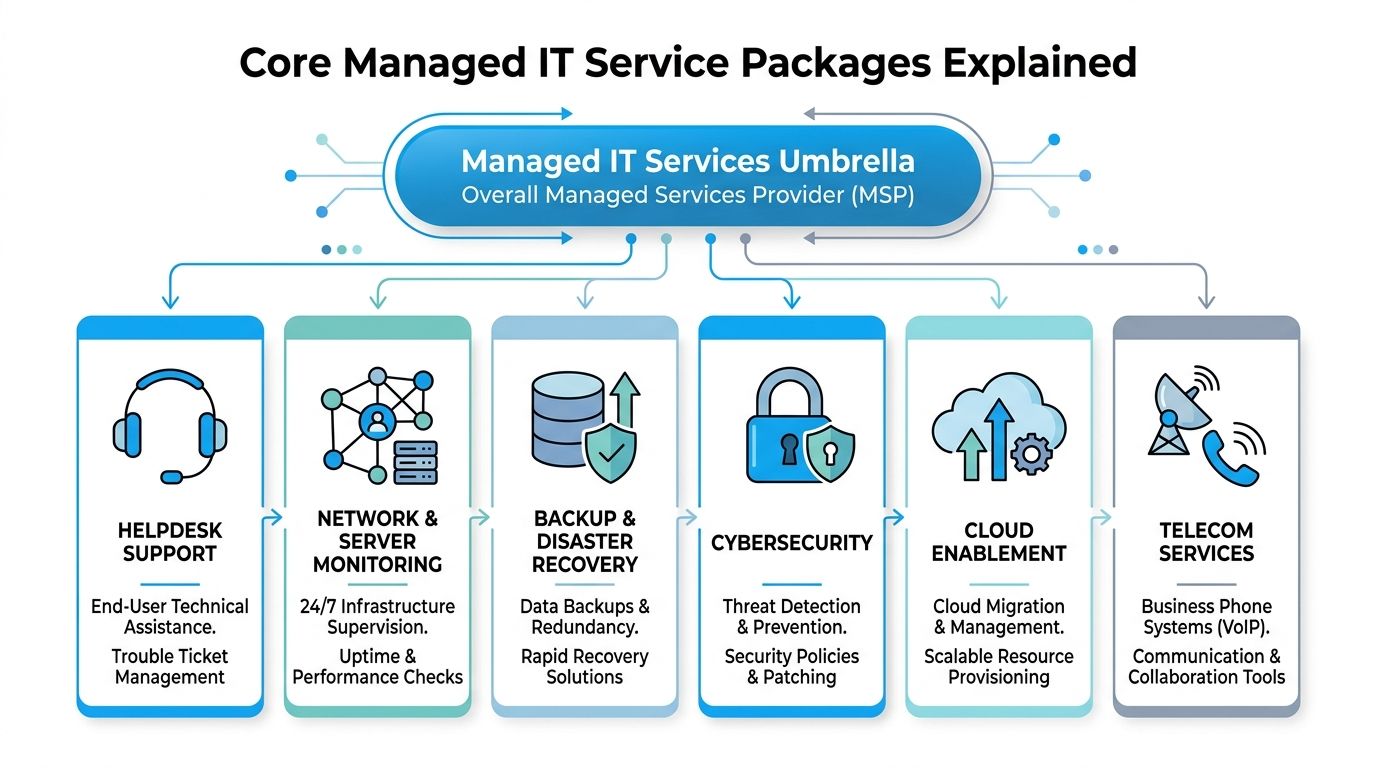
Most managed IT services are sold as bundles. That sounds simple until you start comparing proposals and realise that one provider's “fully managed” plan may only include a narrow slice of what you expected.
What a helpdesk actually does
A helpdesk is the front door. Staff contact it when they can't print, can't access email, forget a password, or need help with software and device issues.
A good helpdesk package usually includes user support by phone, email, and remote session. A key consideration is scope. Does it only cover basic troubleshooting, or does it also include account setup, software assistance, and coordination with vendors such as Microsoft, internet providers, or line-of-business software suppliers?
The systems that keep the business running
This next group prevents the bigger operational failures.
- Network and server monitoring: This watches infrastructure health, availability, and unusual behaviour so small issues can be addressed before staff notice them.
- Backup and disaster recovery: This protects business data and creates a path to restore operations after deletion, hardware failure, ransomware, or another disruption.
- Cloud enablement: This covers migrations and ongoing management for platforms such as Microsoft 365 and Google Workspace, along with cloud desktops and hosted email.
If you've ever discovered a failed backup only after needing it, you already know why these services matter. They aren't glamorous. They're foundational.
Security cloud and communications
Cybersecurity now sits at the centre of many managed service agreements. That's not just because attacks are more common. It's because clients, insurers, and regulated sectors expect stronger controls than basic antivirus.
Canada's MSP market reflects that change. Cybersecurity is the fastest-growing MSP segment in Canada, expanding at 18% annually through 2026, according to DeskDay's managed service provider trends overview. In practical terms, that often means layered endpoint protection, firewall management, web filtering, vulnerability review, and continuous monitoring. Businesses comparing providers can also review examples of managed security solutions for Ottawa businesses to see how those layers are commonly packaged.
Telecom services are often overlooked, but they belong in the conversation. Many SMBs want one partner to coordinate internet connectivity, business phone systems, and vendor relationships because communication outages can hurt just as much as server outages.
Here's a simple way to match packages to pain points:
| Business problem | Service package that usually addresses it |
|---|---|
| Staff lose time on everyday tech issues | Helpdesk support |
| Systems fail without warning | Network and server monitoring |
| Files disappear or systems can't be restored | Backup and disaster recovery |
| Malware, phishing, or compliance pressure | Cybersecurity services |
| Email or collaboration platforms need modernising | Cloud enablement |
| Phones and internet are unreliable or fragmented | Telecom services |
Real-world Use Cases
Generic guides often stop at definitions. Local buying decisions usually start with a more specific question: “What would this look like in my business, with my staff, and my hours?”
Healthcare clinic with a daytime admin
A clinic may have one capable in-house administrator who handles printers, user accounts, and basic software tasks during office hours. That person keeps things moving, but they can't also provide overnight monitoring, backup oversight, cybersecurity support, and compliance-focused escalation.
In that setup, a managed provider typically covers the gaps with 24/7 monitoring, automated patching, vulnerability scanning, and backup management under SLAs, as described in Ottawa managed IT service practices published by Bedrock IT. If an after-hours issue affects access to systems the next morning, someone is already working on it before the first appointment.
Professional services firm with hybrid staff
A legal or accounting firm often has a different challenge. Staff work from home, in the office, and on the road. They need reliable remote access, secure file handling, and support that doesn't end when the office manager leaves for the day.
In practice, that usually means combining helpdesk support, endpoint security, identity controls, and cloud management. If the firm also wants a more formal continuity plan, reviewing online disaster recovery solutions for business continuity helps frame what recovery support should include before a disruption happens.
A hybrid workforce doesn't only need access. It needs support for the moments when access fails outside normal office hours.
Retail operation with multiple locations
Retail and service businesses often struggle with a different kind of risk. One failing switch, unstable internet line, or neglected patch at a single location can disrupt payments, reporting, or staff coordination.
For those businesses, managed IT often acts like central operations control. The provider watches locations remotely, standardises updates, and reduces the chance that one neglected site becomes the source of a larger problem. The owner gets fewer surprise calls. The manager at each location gets one clear escalation path.
Pricing Models and Calculating ROI
Pricing is where many SMBs get stuck. They understand the need for support, but they don't want to sign a monthly agreement that feels vague. The solution is to separate pricing structure from business value.

Three common pricing models
In Ottawa–Gatineau, most proposals land in one of three models.
| Model | Best fit | Watch for |
|---|---|---|
| Per-user | Office-based teams where each employee uses several tools and devices | Clarify which support tasks are included per user |
| Per-device | Environments with shared workstations, kiosks, servers, or many fixed assets | User support may be billed separately |
| Hybrid | Businesses with a mix of users, shared devices, cloud services, and project needs | Complexity can hide extra charges if scope isn't clear |
Per-user pricing is often easier for professional services firms because it aligns with headcount. Per-device pricing can work well in clinics, retail, or operations with shared terminals. Hybrid pricing fits businesses that need ongoing support plus a more customised arrangement for infrastructure, cloud, or compliance work.
If you want a concrete reference point for how providers explain these structures, managed IT pricing guidance for Canadian SMBs shows the kinds of cost drivers buyers should expect to discuss.
Where ROI usually hides
The biggest ROI mistake is only comparing the monthly fee to what you spent last month on IT. That's too narrow.
A better approach is to ask what unmanaged technology is costing you now:
- Downtime cost: What happens when staff can't work, serve clients, or access systems?
- Internal distraction: Who is getting pulled away from operations to chase recurring IT issues?
- Delayed maintenance: Which updates, backup checks, or security tasks keep slipping?
- Risk exposure: What would a failed restore, security incident, or compliance issue cost in disruption and reputation?
Many businesses also overlook co-managed ROI. If you already have a junior internal IT person or office administrator, managed services can prevent the need to add a second full-time role just to cover after-hours support, security specialisation, or cloud administration.
Practical rule: ROI often comes from replacing chaos, not replacing a person.
You don't need a complicated spreadsheet to estimate value. Start with a basic before-and-after comparison.
- List recurring IT interruptions that slow the business.
- Note which ones happen because no one owns monitoring, patching, backup review, or after-hours response.
- Compare that operational drag with a fixed monthly support model.
- Add the value of stronger continuity and clearer accountability.
That's the hidden return generic guides often miss. The benefit isn't only lower repair bills. It's fewer leadership hours spent managing preventable disruption.
Buyer Checklist and Evaluation Questions
A polished proposal can still leave major gaps. The safest way to compare providers is to read past the headline package name and inspect the operating details.

What to check in the proposal
Use this checklist when reviewing a managed IT offer:
- SLA clarity: Look for defined response targets, escalation paths, and what counts as a critical issue.
- Support coverage: Confirm whether support is remote only, onsite when needed, and available after hours for serious incidents.
- Bilingual capability: In Ottawa–Gatineau, English and French support can matter for both staff experience and day-to-day efficiency.
- Security scope: Check whether the agreement includes endpoint protection, firewall management, vulnerability review, and incident support.
- Backup responsibility: Don't assume backups are monitored or tested unless the proposal says so clearly.
- Cloud support: If you use Microsoft 365 or Google Workspace, confirm whether administration and user support are included.
- Cost drivers: Ask what triggers added fees. Common examples include projects, new-site setup, major migrations, vendor coordination, and after-hours work outside agreed scope.
Questions worth asking before you sign
Ask these directly in meetings:
“If our internal admin is away and something fails after hours, who responds and what happens next?”
That single question reveals whether the provider supports co-managed environments or only sells a generic package.
Other useful questions include:
- Who owns documentation? You want network, device, and vendor knowledge documented and accessible.
- How do you handle regulated environments? This matters for healthcare, professional services, and government-adjacent firms.
- What isn't included? This is often more revealing than the included-services list.
- How do you support growth? New staff, new locations, and cloud changes should not require reinventing the relationship.
- What does onboarding look like? Good providers assess the environment before promising outcomes.
A strong proposal feels specific. A weak one sounds broad but avoids operational detail.
Ottawa–Gatineau Differentiators and IT Experts Canada Capabilities
Local context matters more than many buying guides admit. Ottawa–Gatineau businesses often need bilingual support, occasional onsite help, and a provider that understands the expectations around healthcare data, professional confidentiality, and government-adjacent security practices.
That need is becoming more visible as security requirements tighten. The federal National Cyber Security Strategy 2024–2029 includes CAD $1.2 billion in new federal security spending, according to analysis of Gatineau federal IT and security demand. For businesses that support federal contractors or work near that ecosystem, layered protection and continuous monitoring are becoming normal operating expectations rather than optional extras.
Co-managed support is where the local gap often shows up most clearly. NFD's managed IT services guide for Canada notes that Co-Managed IT fills gaps like after-hours coverage, cybersecurity expertise, and compliance support for Ottawa's regulated SMBs. That's especially useful for businesses with one internal generalist who knows the office well but can't also cover every specialised need.
A regional provider can also draw from a substantial Canadian talent base. The Canadian ICT sector includes over 48,700 companies, with more than 45,000 in software and computer services, and supported 812,636 workers in 2023, representing 4.0% of total national employment, according to Innovation, Science and Economic Development Canada's ICT Sector Profile 2023. In practical terms, that supports bilingual service delivery and ongoing technical depth closer to home.
Among local options, IT Experts Canada offers managed services, cloud support, cybersecurity, telecom services, 24/7 assistance, and a complimentary initial analysis for Ottawa–Gatineau SMBs.
Conclusion and Next Steps
Managed IT services are easiest to value when you stop viewing them as outsourced tech repair and start viewing them as operational support for the whole business. The right arrangement stabilises daily work, reduces avoidable disruption, clarifies responsibility, and gives you a more predictable way to handle support, security, backup, and cloud management.
For Ottawa–Gatineau SMBs, the most overlooked opportunity is often co-managed IT. If you already have an internal admin or junior IT person, you may not need to replace them. You may only need a partner that fills the gaps they can't reasonably cover, especially after hours and in regulated environments.
A good next step is simple. Review your current weak spots: after-hours coverage, backup oversight, cybersecurity depth, cloud administration, and support response. Those are usually the areas where the business case becomes obvious.
If you want a clearer view of where your environment stands, contact IT Experts Canada for a complimentary infrastructure analysis. A practical review can identify support gaps, clarify which services you need, and help you compare managed and co-managed options before committing to a long-term plan.
0 Comments