
Canadian businesses spent $1.2 billion on cybersecurity in 2023, up from $881 million in 2021. That jump is the clearest signal that endpoint protection is no longer a nice-to-have for Ottawa–Gatineau firms, it’s a basic operating requirement. When laptops, desktops, mobile phones, and servers are the first place attackers try to land, weak endpoint controls turn every phishing email and stolen credential into a network problem.
For small and mid-sized organisations, the issue isn’t whether endpoint protection solutions exist. It’s whether the platform gets deployed across every device, gets monitored, and gets tuned by someone who has the time to do it properly. That’s where most SMBs stumble, because buying a tool is easy, running it well is the hard part.
Table of Contents
- Why Endpoint Protection Matters More Than Ever for Canadian Businesses
- Understanding the Endpoint Protection Technology Stack
- The Hidden Gap That Undermines Most Endpoint Deployments
- Selection Criteria for Small and Mid-Sized Canadian Teams
- When Managed Endpoint Protection Outperforms In-House Deployment
- Pricing Models and Cost Considerations for Canadian Organizations
- Your Endpoint Protection Deployment Checklist
Why Endpoint Protection Matters More Than Ever for Canadian Businesses
Canadian organisations are spending more because the threat is present, not theoretical. Statistics Canada found that 16% of Canadian businesses reported at least one cybersecurity incident in 2023, with ransomware among the most commonly reported attack types, and that same survey showed spending moving from $881 million in 2021 to $1.2 billion in 2023 Communications Square summary of Statistics Canada’s survey. That’s not budget fluff. That’s a response to the reality that attackers keep hitting the place where the work happens, the endpoint.
Endpoints are where the breach usually starts
A modern endpoint protection strategy has to cover laptops, desktops, mobile devices, servers, and cloud-connected workloads. In practice, that means protecting the devices employees use to open email, authenticate into business apps, sync files, and reach internal systems. The old model, antivirus on a few PCs, doesn’t fit hybrid work, mobile access, or remote users spread across Ottawa, Gatineau, and everywhere in between.
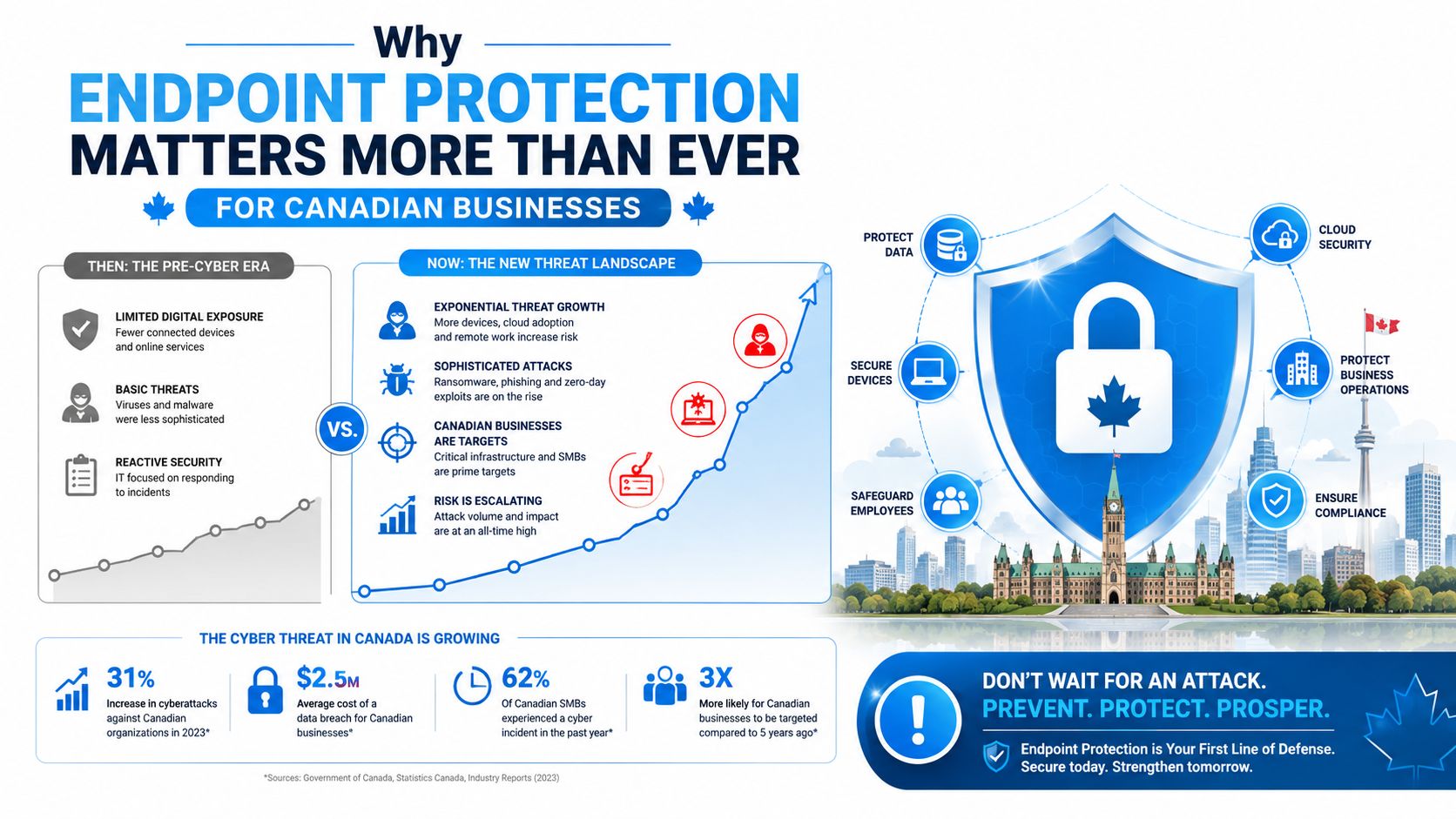
What matters operationally is simple. If a compromised device can reach email, file shares, line-of-business apps, or identity systems, then endpoint protection becomes a front-line control, not an optional add-on. The Ottawa–Gatineau market is full of firms that run lean, which makes that front line even more important because there’s rarely a deep security bench behind it.
Practical rule: if you can’t answer which devices are protected right now, you don’t have endpoint security, you have endpoint hope.
For Canadian SMBs, the right mindset is to treat endpoint protection as part of basic business continuity. You’re not just stopping malware. You’re reducing the odds that one infected laptop turns into a wider outage, a ransomware event, or a compliance headache that pulls staff away from actual customer work.
Understanding the Endpoint Protection Technology Stack
The acronyms get thrown around as if they’re interchangeable, but they’re not. EPP means Endpoint Protection Platform, and Cisco describes it as an integrated security solution that combines personal firewall, port and device control, et anti-malware capabilities Cisco. In plain terms, EPP is the prevention layer. It’s designed to stop known bad activity before it executes.
EDR takes a different job. Fortinet describes endpoint protection platforms as using behaviour-based prevention, machine learning, behavioural analysis, exploit prevention, device control, et quarantine or isolation workflows to block both file-based and fileless attacks Fortinet. That’s the key shift for SMBs, because fileless attacks don’t always look malicious to signature-based tools. EDR-style telemetry helps identify suspicious process chains, unusual PowerShell activity, registry changes, and odd network behaviour.
The practical difference between layers
For small teams, the useful way to think about the stack is progression, not rivalry.
| Technology | Detection Method | Response Capability | Staffing Needed |
|---|---|---|---|
| Antivirus | Known signatures and file matching | Limited, mostly block or quarantine | Low |
| EPP | Signatures, device controls, firewall policies, prevention rules | Basic containment and policy enforcement | Low to moderate |
| EDR | Behavioural telemetry, process monitoring, event correlation | Isolation, process termination, investigation support | Moderate to high |
| XDR | Correlated signals across endpoints, email, identity, cloud, and network | Broader automated investigation and response | Moderate to high |
| MDR | EDR or XDR operated by a service team | Managed monitoring, triage, and response actions | Lower internal staffing burden |
The point isn’t to buy the longest acronym. It’s to match capability to the people who will use it. A platform with deep telemetry is useful only if someone reviews alerts, tunes policies, and acts on what the console shows. That’s why many Ottawa–Gatineau firms are better off with a managed model rather than trying to force enterprise tooling into a small IT team.
If you’re comparing options, a local MSP like IT Experts Canada’s security solutions can be part of that mix, especially when your team needs a single control plane rather than a stack of disconnected point products.
Bottom line: prevention matters, but response is what keeps a small incident from becoming a business interruption.
The Hidden Gap That Undermines Most Endpoint Deployments
The mistake I see most often is simple. A business buys a good endpoint tool, deploys it on the obvious machines, and assumes the job is done. It isn’t. Public guidance on endpoint security failures points to incomplete coverage and shadow IT as core reasons protections fail, not weak tooling, which means a significant problem is often visibility, not product quality Medium article on endpoint security failures.
Shadow IT breaks the cleanest security design
Hybrid work makes this worse. Staff use personal laptops, temporary devices, home printers, borrowed tablets, and unmanaged phones. A clinic, accounting firm, or franchise operation may think it has standardised protection, but one unsanctioned device can still access email, cloud storage, or admin portals. That gap matters more than a glossy feature list because an endpoint protection solution can only defend what it can see.
The better question is not which platform is best. It’s how you discover every endpoint you own or touch, then keep monitoring it after the first rollout. That includes contractors, remote staff, branch offices, and the devices people use when they’re off the corporate network.
Governance matters more than the logo on the console
Canadian organisations keep expanding cloud and remote work, so endpoint governance has to keep pace. If device inventory is stale, policies drift, or exceptions pile up, the tool gradually becomes a false sense of security. That’s especially risky for Ottawa–Gatineau firms where the IT function is often shared between infrastructure, help desk, and admin duties.
The operational fix is boring, but it works. Keep inventory current, tie onboarding to endpoint enrollment, review exceptions routinely, and make sure security ownership is explicit. Endpoint protection fails when everyone assumes someone else is watching the consoles.
No dashboard replaces knowing which devices are outside normal control.
The market hype tends to overpromise. The platform doesn’t clean up shadow IT by itself. Someone has to find the device, decide whether it belongs, and enforce the policy.
Selection Criteria for Small and Mid-Sized Canadian Teams
Small teams need to evaluate endpoint protection solutions by workload, not by feature count. Trellix’s product documentation reflects the right architecture for lean environments, a single-agent, centrally managed control plane that covers on-prem, cloud, and disconnected devices while enforcing vulnerability remediation and device controls Trellix. That matters because a bloated stack creates agent sprawl, policy drift, and more help desk tickets than most SMBs can absorb.
What to insist on during evaluation
Start with behaviour-based prevention, not signature bragging. A 2021 endpoint security effectiveness report found that 56% of respondents believed their endpoint security tools miss between 1% and 10% of malware Endpoint Security Effectiveness report. That doesn’t mean the tools are useless. It means you should assume detection gaps exist and choose a platform that can isolate suspicious devices quickly when behaviour turns abnormal.
Then look at response speed. Microsoft’s Cloud Security Benchmark v2 recommends automated response actions appropriate for workload type, including process termination for non-critical virtual machines and alert-only handling for production systems that need manual review. It also emphasises timely protection updates through automated signature updates, software version management, and update-compliance monitoring Microsoft. That’s the right mindset for Canadian SMBs, because the tool has to fit the business, not the other way around.
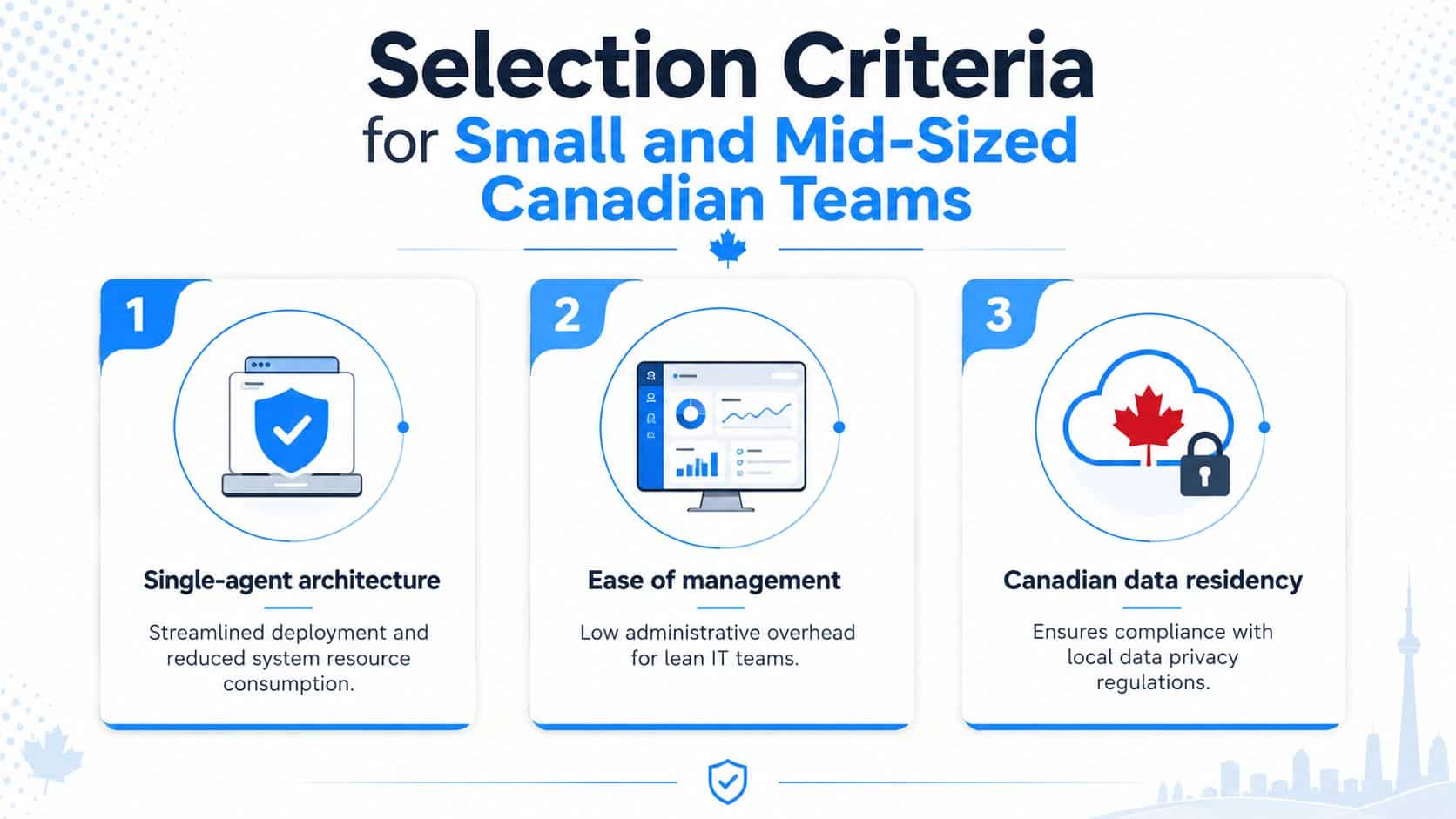
A decent buying checklist for Ottawa–Gatineau teams looks like this:
- Single-agent architecture: fewer moving parts, less system overhead, and cleaner rollout across offices and remote users.
- Ease of management: one console that a small IT team can use daily without needing a dedicated analyst.
- Canadian data residency: important for organisations that need stronger local privacy alignment and easier compliance conversations.
That last item is often overlooked. The best tool for a five-person IT team is usually the one that fits the team’s operating reality, not the one with the longest advanced-threat brochure. If your team can’t maintain it, tune it, and audit it, it’s too complex.
When Managed Endpoint Protection Outperforms In-House Deployment
The question is who’s going to watch the alerts at 2 a.m., tune the policies, and investigate the weird process tree on a Tuesday afternoon. For most SMBs, the answer is nobody, at least not consistently. WatchGuard’s guidance on modern EDR notes that many enterprise-style solutions assume dedicated analysts, 24/7 SOC coverage, advanced threat hunting, and significant operational budgets, which smaller IT teams usually don’t have WatchGuard.
Self-managed tools create hidden labour
A self-managed endpoint stack looks efficient until you count the work. Someone has to adjust policies, review alerts, validate device health, watch patch compliance, and audit exceptions. If that person also supports users, phone systems, cloud mail, and backups, endpoint monitoring becomes reactive instead of continuous.
Managed detection and response changes that equation. The service provider handles triage, monitoring, and routine response actions, while your internal team keeps control over business decisions. That model is often a better fit for Ottawa–Gatineau firms with regulated data, branch locations, or lean IT coverage because it removes the need to build a private security operations centre just to stay protected.
Managed service makes sense when capacity is the constraint
This is the point where MSP-delivered security usually wins. You’re not buying less protection. You’re buying protection that gets maintained. The operational gain is consistency, because the team running the tool does this work every day instead of only when an incident lands in the inbox.
The trade-off is control versus capacity. In-house teams keep more direct ownership, but they also carry the burden of 24/7 coverage, false-positive tuning, and response discipline. Managed endpoint protection is the better choice when you need reliable monitoring without turning your internal team into part-time security analysts.
If you want a local partner for that model, IT Experts Canada’s managed IT services are structured around ongoing support and monitoring rather than one-off fixes, which is exactly what endpoint protection demands after deployment.
Pricing Models and Cost Considerations for Canadian Organizations
Endpoint protection pricing is usually straightforward on paper and messy in practice. Most buyers run into per-user or per-device pricing, then discover that advanced capabilities, multi-site management, or compliance reporting push the quote higher. The right way to judge value is to ask what’s included in the operational layer, not just the licence.
What drives the price up
Per-device pricing can make sense for organisations with shared workstations or many fixed assets. Per-user pricing usually works better when staff move between laptops, mobile devices, and home offices. Bundled managed service models often make budgeting simpler because endpoint protection, monitoring, patching, and response sit in one monthly relationship instead of separate line items.
That predictability matters in healthcare, legal, accounting, and franchise environments where surprise IT costs are hard to absorb. It also matters because the comparison isn’t endpoint licence versus endpoint licence. It’s licence plus labour versus a managed service that includes the labour.
A few cost drivers deserve close scrutiny:
- Advanced EDR capability: deeper telemetry, isolation, and investigation features cost more because they require more engineering and support.
- Compliance reporting: if the vendor produces audit-ready evidence, expect that to show up in the price.
- Multi-site coverage: branch offices and roaming endpoints need stronger central management, which adds complexity.
- Vulnerability remediation: built-in patch prioritisation and remediation workflows are worth paying for if they remove separate tooling.
The IT Experts Canada pricing guidance is useful because it frames common Canadian models in practical terms. That’s the right lens for Ottawa–Gatineau buyers, since the cheapest quote often leaves out the work that keeps endpoints secure.
Don’t ask only, “What does it cost?” Ask, “What work disappears from my team if I buy this?” If the answer is only antivirus and a dashboard, the quote is probably too thin.
Your Endpoint Protection Deployment Checklist
Start with the device inventory. If you don’t have a list of every laptop, phone, server, and remote device, you’re already exposed. Discovery should include shadow IT, because unmanaged endpoints are where coverage can easily break down.
Put the controls in the right order
- Device inventory. Identify every endpoint that touches company data, including remote and mobile devices. If a device can reach business email or cloud apps, it belongs in scope.
- Policy definition. Set separate rules for admins, standard users, shared devices, and high-risk roles. One policy for everyone usually becomes nobody’s policy.
- Regular audits. Review logs, incidents, and policy exceptions on a schedule that your team can sustain. If the review process is too heavy, it won’t happen.
Then connect endpoint protection to backup and disaster recovery. If ransomware gets through, recovery speed matters just as much as detection. Endpoint controls and restore testing should work together, not as separate projects run by different people.
Know when to bring in help
If your team can’t keep inventory current, tune alerts, or validate response actions, partner with an MSP before the gap widens. A local provider can assess your current posture, identify unmanaged devices, and map the platform to your actual staffing model instead of an idealised one. That’s the difference between buying software and running security.
Rule of thumb: if the deployment depends on heroic effort, it’s already underdesigned.
For Ottawa–Gatineau organisations, the smartest next move is a clear-eyed review of what’s protected, what isn’t, and who owns the console. When the answer is vague, the risk is already higher than the dashboard suggests.
IT Experts Canada helps Ottawa–Gatineau organisations secure endpoints, monitor threats, and keep patching and response under control without adding more burden to an already lean team. If you’re comparing endpoint protection solutions or trying to fix coverage gaps, visit IT Experts Canada and ask for a practical review of your current setup.
0 Comments