
You’re probably dealing with one of these problems right now. Staff are complaining that Microsoft 365 is slow, a line-of-business app only works if one ageing server behaves itself, and every security headline makes you wonder whether your company is next. Then the invoice arrives for an emergency fix, and your IT budget is blown again.
That’s the trap a lot of Ottawa businesses fall into. They think they have an IT problem. They have a growth problem. When the owner, office manager, or operations lead spends time chasing outages, approving rushed hardware purchases, or worrying about backups, the business stops moving forward.
Managed IT cloud services fix that when they’re set up properly. Not as a pile of disconnected tools, but as an operating model that gives you stable costs, better uptime, stronger security, and fewer distractions. If you run a small or mid-sized business in Ottawa or Gatineau, especially in legal, healthcare, finance, or government-adjacent work, you also need to think beyond generic cloud sales pitches. You need straight answers about hidden hybrid-cloud fees and who controls your data encryption keys.
Table of Contents
- Stop Managing Servers and Start Growing Your Business
- What Exactly Are Managed IT Cloud Services
- The Business Benefits and Tangible ROI
- Core Components of a Managed Cloud Solution
- Understanding Pricing Models and Service Levels
- How to Choose a Provider in Ottawa–Gatineau
- Foire aux questions
- Will moving to managed cloud mean losing control of our systems
- Is managed cloud only for larger companies
- Will migration interrupt our business
- Is cloud really secure enough for legal, healthcare, or finance work
- What’s the biggest mistake SMBs make when choosing a provider
- Should we keep some systems on-premises
Stop Managing Servers and Start Growing Your Business
An Ottawa firm with fifteen to fifty staff often starts the same way. One server in the office. One outside technician who “knows the setup.” A few cloud subscriptions layered on over time. Then the cracks show. Remote access is awkward, backups are uncertain, patching happens late, and nobody can tell you with confidence what happens if a key system fails at 10:30 on a Tuesday.
That failure is expensive. In the Ottawa–Gatineau region, unplanned network downtime costs small and mid-sized businesses an average of $5,600 per hour in lost productivity, revenue, and customer service failures, which is why continuous monitoring and rapid response matter so much for local firms, according to Ottawa downtime cost findings from IT Experts Canada.
The biggest mistake I see is treating each incident as a one-off. A firewall problem gets patched. A mailbox issue gets fixed. A backup warning gets ignored because business is busy. That approach feels cheaper until it isn’t. You end up paying for interruptions, stress, and lost focus.
Practical rule: If your team only hears from IT when something breaks, you don’t have an IT strategy. You have a repair service.
Managed IT cloud services shift the model. Instead of babysitting servers and hoping the right person picks up the phone, you move core systems into a managed environment where someone is watching performance, security, backups, and user issues all the time. Staff get dependable tools. Leadership gets fewer surprises. Budgeting gets easier.
For Ottawa businesses, that shift matters even more when clients expect reliability. Government contractors, clinics, law firms, and finance teams can’t afford vague answers about resilience or data handling. They need systems that support work, not systems that become the work.
What Exactly Are Managed IT Cloud Services
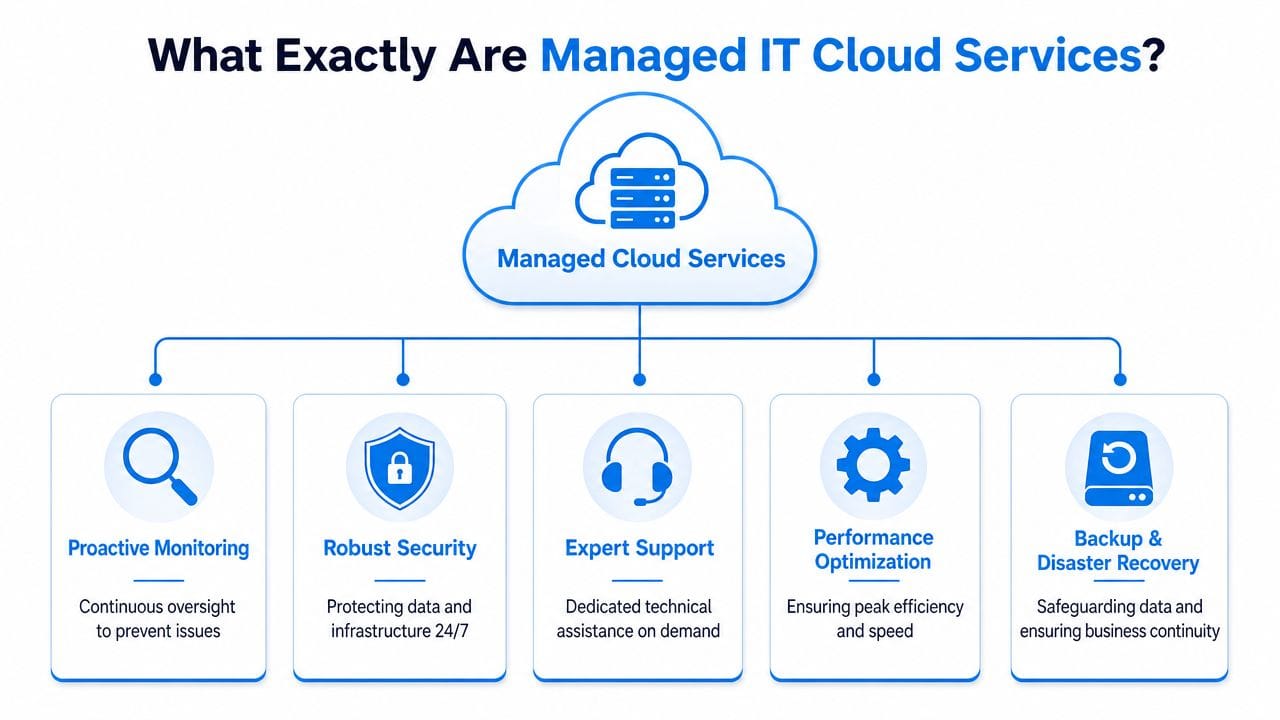
Think of your IT environment like a commercial building. Renting office space is only the start. Someone still has to manage security, maintenance, access control, inspections, and emergencies. Cloud services are the building. Managed IT cloud services are the property management team that keeps the place safe, working, and organised.
That distinction matters because many providers sell “cloud” as if buying licences solves the problem. It doesn’t. Microsoft 365, Google Workspace, cloud desktops, hosted backups, and online file storage are useful tools. On their own, they don’t monitor threats, enforce standards, handle patching, or recover your business when something goes wrong.
Cloud tools are only half the answer
The cloud side usually includes things like:
- Microsoft 365 or Google Workspace: Email, file sharing, collaboration, and identity.
- Cloud desktops: A full work environment that staff can access securely from the office, home, or the road.
- Online backup and disaster recovery: Copies of critical data and systems stored so they can be restored quickly.
- Cloud networking and hosted infrastructure: Services that replace or reduce your dependence on office-based hardware.
These services give you flexibility. They don’t automatically give you control.
The managed layer is where the value sits
The managed side is the operational discipline wrapped around those tools. That includes user administration, patching, monitoring, security policy enforcement, device protection, backup verification, vendor coordination, and helpdesk support. It’s the difference between owning software and having an environment that’s maintained.
A lot of business owners assume this is optional. I don’t agree. The Canadian market itself shows where buyers are placing their money and attention. The Canada cloud managed services market is projected to reach USD 14,340.1 million by 2030, et security services were the largest revenue-generating segment in 2024, according to Grand View Research’s Canada cloud managed services outlook. That tells you something simple: businesses are not just buying cloud capacity. They’re paying for secure operation.
Buying cloud software without management is like buying a fleet vehicle without maintenance, insurance, or keys control. You own the asset, but you haven’t managed the risk.
For an Ottawa SMB, the practical definition is straightforward. Managed IT cloud services mean you outsource day-to-day cloud operations to specialists so your systems stay available, secure, and aligned with how your business works.
The Business Benefits and Tangible ROI
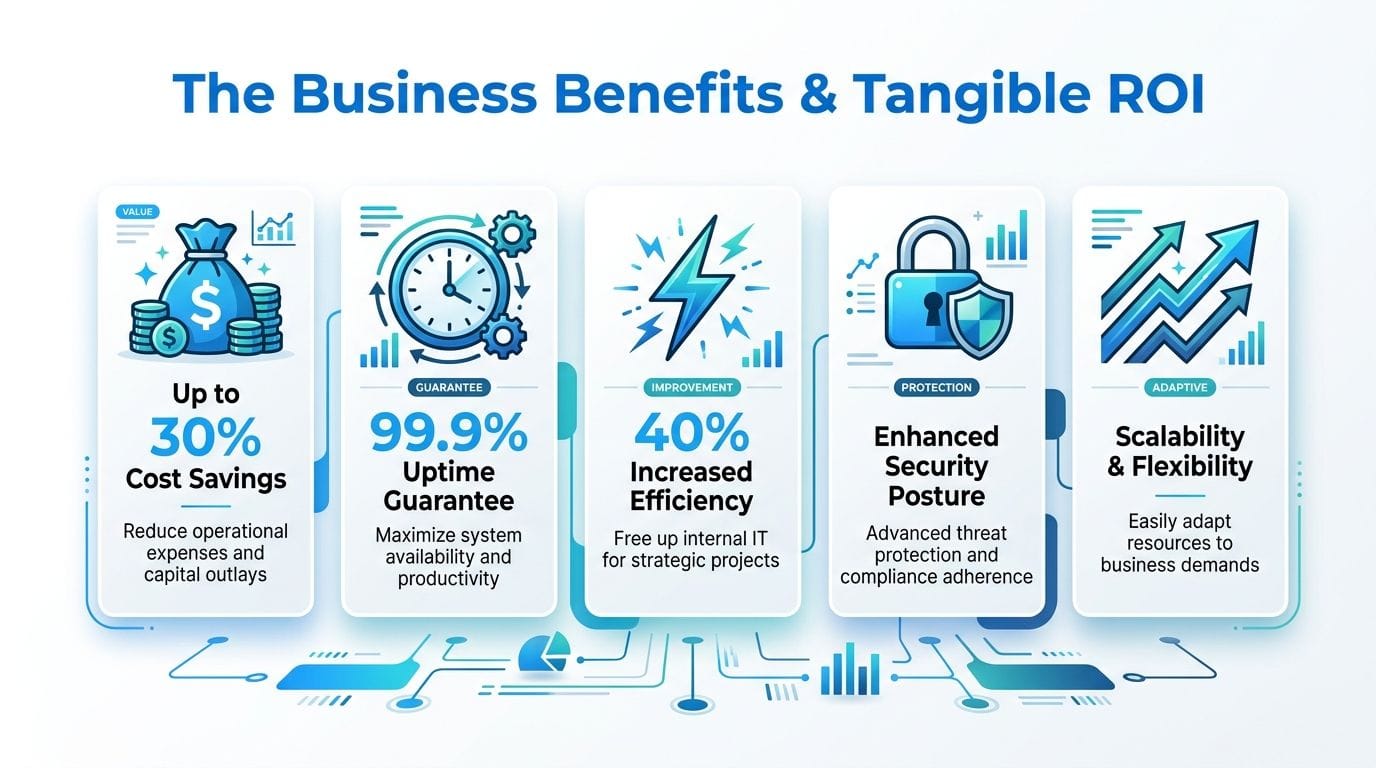
The return on managed IT cloud services isn’t abstract. It shows up in fewer disruptions, more predictable spending, and less executive time wasted on technical noise. If your current setup depends on a mix of old hardware, ad hoc support, and disconnected subscriptions, the gains are usually obvious within the first budget cycle.
Here’s the visual version of that business case.
Security becomes practical, not performative
Most SMBs don’t need more security jargon. They need controls that reduce actual risk. That means endpoint protection, firewall management, web filtering, access controls, patching, and someone reviewing alerts instead of letting them pile up.
That isn’t overkill. It’s basic protection. 60% of Ontario-based small businesses reported at least one security breach in the past year, and layered controls from managed IT providers can reduce incident likelihood by up to 45% in regulated sectors, according to Clutch’s Ottawa IT services market summary.
A security stack only has value if someone owns it. Managed service gives that ownership a name.
For a quick overview of how providers frame cloud support and oversight, this video gives useful context.
Budgeting gets cleaner
Break-fix IT creates fake savings. You avoid a monthly commitment, then absorb random labour, rush procurement, user downtime, and preventable cleanup. Managed service turns that chaos into a defined operating expense.
You’ll still need to make decisions about licences, projects, and hardware lifecycle. But your baseline support, monitoring, and routine maintenance stop bouncing around month to month. For owners and controllers, that’s often the first real win.
Staff stay productive
When email works, files sync properly, devices stay patched, and remote access is stable, your team gets more done without talking about IT. That’s the point. Good managed cloud service fades into the background.
Consider where most productivity losses come from:
| Business problem | What managed cloud changes |
|---|---|
| Staff wait for someone to fix access issues | User support and account administration happen faster |
| Devices drift out of date | Patching and monitoring stay on schedule |
| Shared files become messy or inaccessible | Cloud collaboration tools are structured and governed |
| Remote work feels unreliable | Cloud desktops and managed access improve consistency |
Owners should spend their time on margins, clients, and hiring decisions. They shouldn’t spend it figuring out why someone can’t open a shared spreadsheet.
Core Components of a Managed Cloud Solution
A proper managed cloud setup is a stack of services that work together. If a provider only talks about “moving you to the cloud,” keep pressing. You need to know what they’ll manage, how they’ll protect it, and what happens when users need help or systems fail.

Productivity tools that stay secure
Most SMBs already use Microsoft 365 or Google Workspace. The problem usually isn’t the platform. It’s the lack of governance around it. Shared mailboxes get messy. Permissions drift. Departed staff still have access to files they shouldn’t. Multi-factor authentication is inconsistent. Nobody reviews conditional access, forwarding rules, or storage sprawl.
Managed cloud services bring discipline to those tools. That means onboarding and offboarding users properly, locking down access, applying standard security policies, and keeping collaboration usable instead of chaotic. A law office, for example, needs different sharing rules than a multi-location retail business. Good management respects that.
If you’re comparing options, review the scope of cloud solutions available through IT Experts Canada and compare that against other providers’ support for Microsoft 365, Google Workspace, hosted email, and cloud desktops. The important question isn’t the product list. It’s whether the provider manages the operational details that create risk.
Cloud desktops and continuity planning
Cloud desktops are valuable when your team needs a consistent work environment across devices or locations. They’re common in firms that handle sensitive data, support hybrid work, or need tighter control over where business information lives.
They also pair well with disaster recovery. For SMBs, modern Disaster Recovery as a Service can achieve 99.99% data availability with restore times under 15 minutes, a capability that helps meet the service expectations common among Ottawa-area government contractors and financial institutions, according to Pathcom’s managed IT services overview for Ottawa businesses.
That matters because continuity isn’t just about backups existing. It’s about whether you can restore operations fast enough to avoid real damage.
A solid continuity layer should include:
- Automated backups: Backups should run on schedule without staff remembering to do anything.
- Restore testing: A backup you’ve never tested is a hope, not a plan.
- Defined recovery order: Critical systems must come back first, not whenever someone gets to them.
- Documented responsibilities: Staff need to know who approves failover, who communicates with clients, and who verifies recovery.
Monitoring that prevents fires
Reactive support is expensive because the business pays twice. First in disruption. Then in repair. Proactive monitoring changes that by identifying warning signs early, such as storage issues, failed backups, suspicious logins, failing hardware, or unusual network behaviour.
Managed service transitions from a support plan to operational insurance. You want alerting tied to action, not just dashboards for show. If a server is running out of capacity, someone should deal with it before users feel it. If patches fail on key devices, someone should re-run and verify them. If endpoint protection throws a critical event, someone should investigate.
The right provider doesn’t just answer the phone. They reduce the number of times you need to call.
Understanding Pricing Models and Service Levels
Pricing in managed cloud is usually presented as simple. It rarely is. The quote may look tidy, but the actual cost depends on what’s included, what’s excluded, and how much complexity your environment already carries.
How providers usually price managed cloud
Most Ottawa-area providers use one of three models:
- Per-user pricing: Good for office-heavy businesses where each employee uses a standard bundle of support, security, and cloud tools.
- Per-device pricing: Useful when workstations, shared kiosks, servers, and specialty devices vary a lot.
- Tiered plans: These bundle service levels. One tier may cover support and patching, another may add security management, backup, and strategic advice.
None of these models is wrong. What matters is whether the quote matches your reality. A simple professional services firm with cloud-first systems can often price cleanly. A business with on-prem servers, Microsoft 365, line-of-business applications, multiple sites, and compliance demands cannot.
Where quotes go wrong
This is the hidden-fee problem that too many providers skate past. 82% of Canadian SMBs cite cost predictability as a primary selection criterion, yet the actual cost of managing multi-cloud complexity can exceed initial quotes by 30–45% because of unquoted integration and monitoring fees, according to Research and Markets reporting on the Canada managed service market.
If you run Azure plus an office server, or Microsoft 365 plus a legacy application in a colocation environment, you’re in hybrid territory. That setup can work well. It just isn’t cheap to orchestrate if the provider hasn’t scoped it properly.
Common quote gaps include:
- Integration work: Connecting cloud apps, identity, backups, and older systems takes time.
- Monitoring outside the base plan: Some proposals monitor endpoints but not servers, network gear, or cloud workloads.
- After-hours response: Critical incidents at night or on weekends may trigger separate charges.
- Compliance administration: Reporting, policy enforcement, and audit support are often treated as extras.
For a grounded view of what cost drivers usually look like, compare your assumptions against managed IT pricing guidance from IT Experts Canada.
What to demand in the SLA
The Service Level Agreement, or SLA, matters more than the front-page price. If the SLA is weak, the quote is weak.
Ask for a table that spells out:
| SLA item | What you want to see |
|---|---|
| Response times | Different targets for critical, major, and minor issues |
| Coverage hours | Clear statement of business-hours and after-hours support |
| Included systems | Exact list of devices, servers, cloud platforms, and vendors |
| Backup responsibility | Who monitors jobs, who tests restores, who signs off |
| Escalation path | What happens if the first line can’t resolve the issue |
If the provider won’t define these items clearly, move on.
How to Choose a Provider in Ottawa–Gatineau
Choosing a provider locally isn’t just about convenience. It’s about fit. Ottawa–Gatineau has a specific mix of business needs: bilingual operations, regulated data, public-sector clients, and a lot of firms sitting in that awkward middle ground between basic office IT and formal enterprise governance.

Ask local questions, not generic ones
A polished proposal means very little if the provider doesn’t understand your operating environment. For Ottawa businesses, I’d put these criteria near the top:
- Local presence: If something physical fails at your office, can they attend onsite without treating it like an exception?
- Bilingual support: If part of your team works in French, support should too.
- Industry familiarity: Clinics, legal practices, and government-adjacent firms have different risk profiles from a standard office.
- Operational maturity: You want clear ticketing, reporting, escalation, and account management. Not a “call this mobile number if it’s urgent” setup.
If you’re evaluating firms, managed IT services in Ottawa from IT Experts Canada are one local example of the kind of service scope to compare against. Use that as a benchmark alongside other providers. Look at support channels, monitoring, cloud coverage, security layers, and whether the offering is built for SMB operations rather than improvised around them.
Your data sovereignty checklist
This is the issue most providers under-explain. They’ll tell you data is encrypted. Fine. Ask the next question. Who controls the keys?
The Government of Canada advises organisations engaging MSPs to “contractually retain legal ownership of tenant data” and “consider full data encryption… while maintaining control of encryption keys”, as outlined in Government of Canada guidance on contracting managed service providers. For Ottawa firms working under PIPEDA obligations or serving government clients, that’s not a technical footnote. It’s a contract issue.
Ask every provider these questions before signing:
- Where is our data stored: Not “in the cloud.” Which jurisdiction?
- Who legally owns the tenant data: The contract should answer this plainly.
- Who technically controls encryption keys: Your provider, the platform vendor, or your organisation?
- What happens if we leave: Can you export data cleanly, and in what format?
- How are privileged accounts controlled: Who can access your systems, and how is that logged?
If a provider can explain encryption but can’t explain key ownership, they’re not ready for regulated work.
The right MSP should answer these questions without getting defensive. If they hand-wave around sovereignty, assume the contract will be weak too.
Foire aux questions
Will moving to managed cloud mean losing control of our systems
No. You’re handing off operations, not ownership. You still decide which platforms you use, who has approval authority, what security rules matter, and how much risk you’re willing to accept. A good provider handles execution and gives you better visibility than you probably have now.
Is managed cloud only for larger companies
Not at all. It’s often more useful for smaller businesses because they can’t justify hiring specialists for every IT function. A managed provider gives you access to support, security, monitoring, backup management, and cloud administration without building a full in-house team.
Will migration interrupt our business
It can if it’s rushed. It usually doesn’t if it’s planned properly. Good migrations happen in phases, with user prep, data review, cutover timing, fallback planning, and post-migration support. If a provider talks about a “smooth migration” without discussing these details, be careful.
Is cloud really secure enough for legal, healthcare, or finance work
It can be, but only if the environment is configured and managed properly. Security comes from layered controls, access discipline, monitoring, backup readiness, and data governance. The platform alone doesn’t make you compliant or protected.
What’s the biggest mistake SMBs make when choosing a provider
They buy on monthly price alone. That usually leads to weak SLAs, missing services, and surprise fees later. The better move is to evaluate scope, response commitments, security responsibilities, backup accountability, and data sovereignty terms before comparing price.
Should we keep some systems on-premises
Sometimes yes. Some firms have legacy applications, specialised equipment, or contractual requirements that make a hybrid model sensible. The key is making sure the provider prices and manages that complexity transparently instead of pretending it behaves like a simple cloud-only setup.
If you want a practical review of your current setup, IT Experts Canada works with Ottawa–Gatineau businesses that need managed support, cloud services, cybersecurity, backup, and day-to-day operational stability. A useful first step is a straight assessment of what you already have, where the risks sit, and whether your current IT model is helping the business or holding it back.
0 Comments