

Business VoIP in Canada is mainstream now, and realistic per-user costs usually sit in the $25 to $60 range per line each month. The handset is not the decision, network design and ongoing management are, and that’s what determines whether the system saves money or turns into a support headache.
If you’re running an Ottawa–Gatineau SMB, you probably already know the pain. The old phone system works until it doesn’t, the bill arrives with ugly surprises, and the one call that mattered most lands in voicemail because nobody was at the desk when the clock hit 4:55 on a Friday.
The shift away from legacy phone lines is no longer theoretical. Canada’s telecom market has already moved hard toward IP-based voice, with the CRTC reporting 31.9 million retail fixed local access lines in 2008 and continuing to regulate VoIP within the modern telecom framework by 2023, while Internet access at home reached 92.2% of Canadian households in 2022, rising to 96.0% in the highest income quintile and 81.8% in the lowest quintile CRTC VoIP and telecom shift overview, Statistics Canada Internet access figures. For business buyers, that means voice is now part of the same broadband and managed IT conversation as everything else.
Table of Contents
- When the Phone Bill Becomes the Problem
- Features That Move the Needle for Small and Mid-Sized Businesses
- On-Premise, Hosted Cloud, or Managed VoIP
- The Deployment Path From Discovery to Cutover
- Understanding the Full Cost of VoIP Phones Services
- Security, Reliability, and 911 Considerations
- Choosing a VoIP Provider and the Case for a Managed Partner
- Next Steps and Common Buyer Questions
When the Phone Bill Becomes the Problem
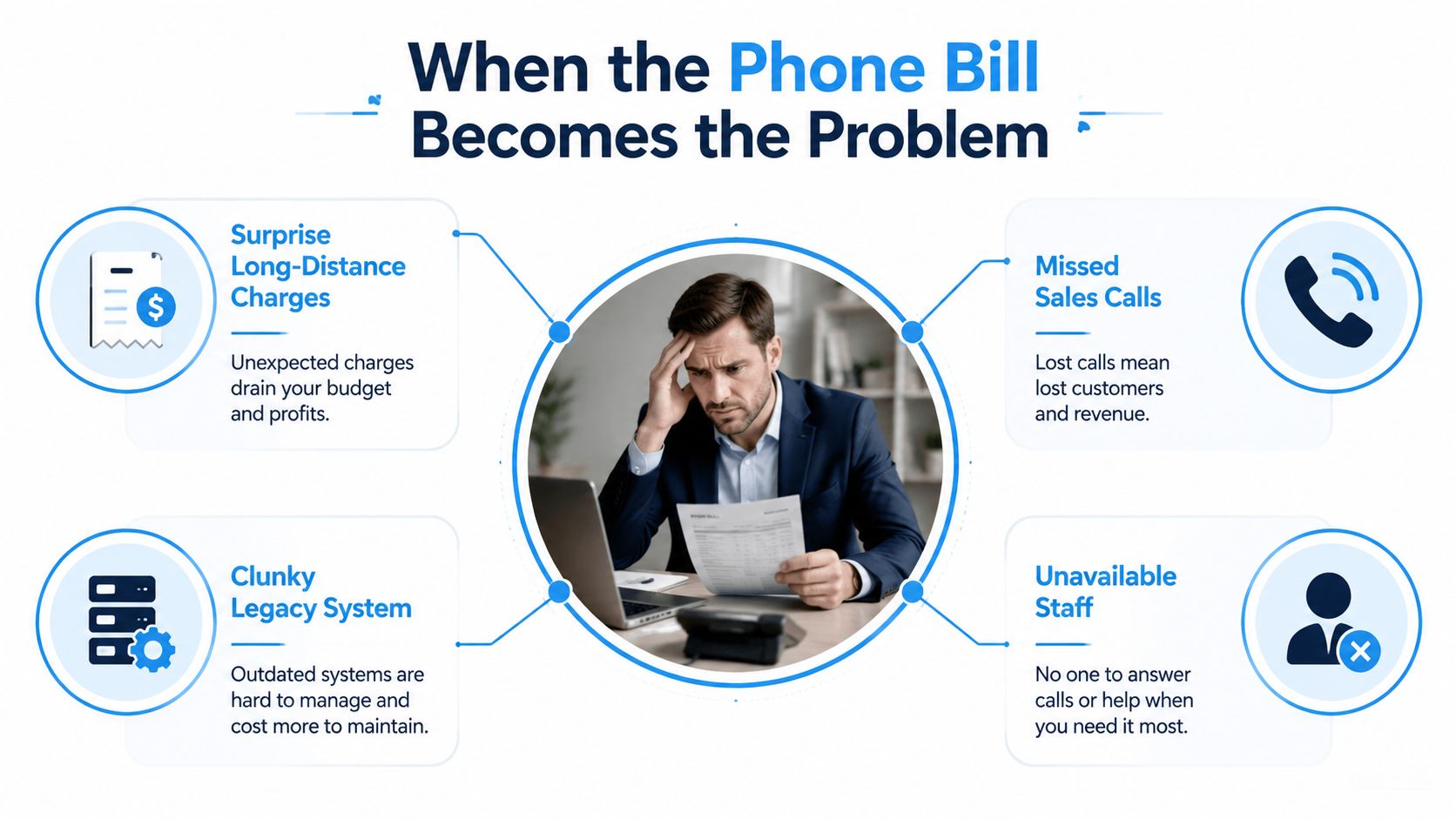
A lot of Ottawa–Gatineau owners only start shopping for VoIP phones services after a bad month. The system limps along for years, then one long-distance invoice lands on the desk, a second-line hunt turns into a game of voicemail ping-pong, and a sales lead gives up before anyone picks up. That’s when the old setup stops looking familiar and starts looking expensive.
VoIP, in plain English, is phone service that rides over the internet instead of a copper phone line. Think of a letter that gets broken into small, address-labelled packets, sent over the network, then reassembled at the other end so the person on the line hears a normal conversation. The call feels ordinary, but the plumbing underneath is digital.
The parts that actually matter
The two main delivery models are easy to separate. A hosted cloud PBX means the provider runs the phone system brain in their data centre, while an on-premise IP-PBX keeps that brain on a server inside your office. The supporting cast is the same either way, SIP trunks for outside lines, desk phones or headsets for endpoints, softphones on laptops and mobiles, and the broadband connection that carries the traffic.
Practical rule: if a provider spends more time selling handsets than talking about your internet circuit, call quality, failover, and support model, you’re not getting the whole story.
That matters because the telecom market has already moved into this structure. The OECD has described VoIP as a market shift that lowers barriers to entry and pushes bundling and interconnection to the front of the conversation OECD VoIP market structure paper. For SMBs, the practical result is simple, you’re no longer buying a standalone phone line, you’re buying a communications service that depends on the rest of your IT stack.
Who should care
This guide is for owners, operations leads, office managers, and IT-minded decision makers who need a phone system that doesn’t collapse the moment the day gets busy. If your team answers from desks, mobiles, and home offices, and if missed calls turn into missed revenue, you need something more deliberate than a bargain-rate line bundle.
The best buying question isn’t “does VoIP work?” It’s “what happens when we rely on it every day?” That’s the lens that keeps you from choosing a platform that looks cheap on paper and turns costly in real life.
Features That Move the Needle for Small and Mid-Sized Businesses
The right features change behaviour. The wrong ones just pad the demo.
Start with the call path
Intelligent call routing sends callers to the right person faster, which cuts transfers and shortens the time between enquiry and answer. Auto-attendant menus replace a live receptionist for the first layer of triage, so callers can reach sales, service, billing, or a specific site without a human manually shuffling every call. Those two features alone usually matter more than any flashy dashboard.
Mobile softphones matter because they keep the business identity attached to the call even when staff are away from the desk. A call made from a laptop or phone can still present as a company call, which is a cleaner model than handing customers a personal mobile number and hoping they remember who they reached. For hybrid teams, that flexibility is one of the few features that changes day-to-day operations.
A good VoIP system should make it harder for customers to hit a dead end. If callers keep bouncing between people, the system is helping the phone tree, not the business.
Use features to remove tool sprawl
Audio and video conferencing can also replace a separate meeting subscription in smaller offices, especially when the team already lives inside the phone platform. That isn’t glamorous, but it trims one more login, one more invoice, and one more place where meeting links get lost.
Basic analytics are the quiet win. You don’t need a giant reporting suite to get value from call volume, missed calls, et response times. Those numbers help you decide whether you need better routing, more coverage at lunch, or a stronger overflow plan during peak periods.
A useful way to score features is by outcome, not novelty. If a feature doesn’t help answer calls faster, reduce missed leads, simplify remote work, or shrink software sprawl, it probably belongs on the nice-to-have list. That mindset keeps the buying process honest and stops teams from paying for tools they’ll never use.
On-Premise, Hosted Cloud, or Managed VoIP
The deployment choice is where a lot of SMBs make the wrong trade. They pick the cheapest initial model, then discover they’ve bought an operating model they can’t realistically support.
Compare control against burden
An on-premise IP-PBX gives you the most control. You own the box, you decide how it’s configured, and you can align it tightly to internal policy, but you also own upgrades, fault-finding, and the expertise needed to keep it healthy. That works for organisations with real telecom and infrastructure skills already in-house.
A hosted cloud PBX moves the platform brain to the provider. Upfront cost is lower, rollout is faster, and it suits a single site with solid internet and an IT team that can handle endpoint setup and basic troubleshooting. The trade-off is that you depend more heavily on the provider’s platform and your own network quality.
A managed VoIP model adds a local partner who handles design, provisioning, monitoring, and support on top of the hosted platform. That’s the fit for multi-site clinics, professional services firms, and any SMB that doesn’t want phone issues competing with core work.
Deployment model comparison for SMBs
| Model | Upfront Cost | IT Burden | Best Fit |
|---|---|---|---|
| On-Premise IP-PBX | Higher | Highest | Businesses with in-house telecom expertise and strict control needs |
| Hosted Cloud PBX | Lower | Moderate | Single-site SMBs with stable internet and internal support |
| Managed VoIP | Moderate | Lowest | Multi-site offices, clinics, and firms that want one support path |
The decision rule is blunt. Pick hosted if you want the cheapest path and you already have solid internet and IT support. Pick managed if you want predictable outcomes and would rather call one number than chase a ticket queue.
The Deployment Path From Discovery to Cutover
Most VoIP failures happen before the first call is placed. They start with poor discovery, sloppy network assumptions, and a rushed cutover.
Stage one to three
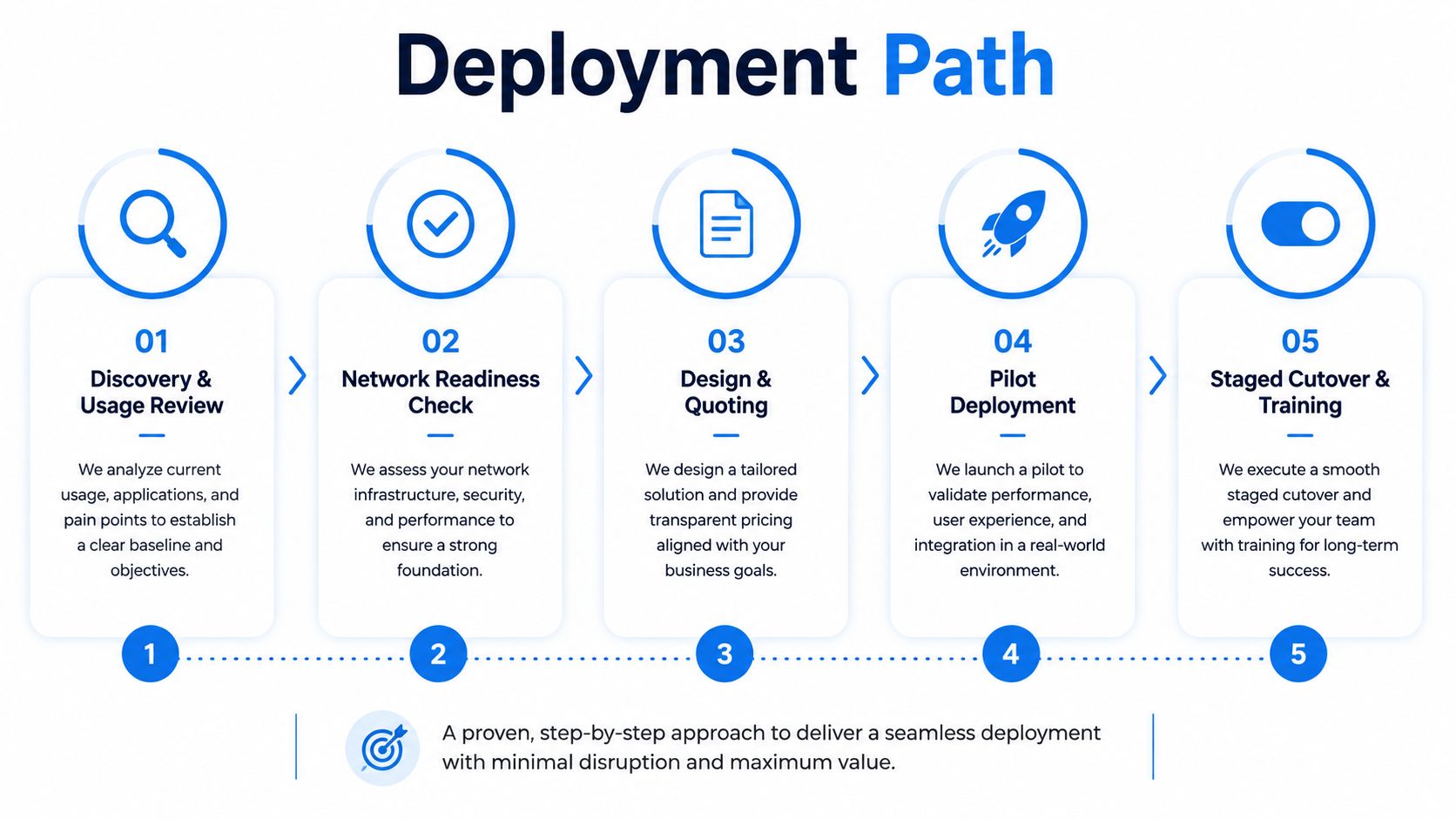
The rollout should begin with discovery and usage review. Count users, call patterns, peak times, and where the business answers. Then do a network readiness check, because that’s where day-one problems are born.
For voice, the network matters more than the phone. A practical operating rule is roughly 85 to 100 Kbps of upload and download bandwidth per VoIP device, with latency and jitter kept below about 70 ms to avoid audible degradation VoIP bandwidth and latency rule. That means you size the internet plan for concurrent calls plus overhead, not for the minimum speed on the contract. It also means voice traffic needs QoS priority so backups, VPN sessions, and cloud app bursts don’t crowd it out.
The third stage is design and quoting. That’s where you decide which users need desk phones, which can run on softphones, how failover should work, and whether the office Wi-Fi can support the endpoints you plan to use. If the building has weak wireless coverage, don’t pretend a voice rollout will magically fix it.
Stage four and five
A pilot deployment is essential. Put a small group on the new system, validate audio quality, test transfers, and see what breaks before the whole office moves. Then do a staged cutover and training process so people learn the system in pieces instead of under pressure.
Never flip an entire office in one weekend unless you enjoy diagnosing every problem at once.
If you want a broader infrastructure lens on the network side, the team at IT infrastructure and telecom planning should be thinking about the same readiness issues before phones change over. The point is not to rush live. The point is to make the first week boring.
Understanding the Full Cost of VoIP Phones Services
The sticker price is not the total price. That is where many buyers get it wrong.
What the monthly fee leaves out
Published pricing often sits in a band of $15 to $60 per line per month, with standard business VoIP often around $25 per user per month VoIP pricing overview. That is a useful starting point, but it is not the full budget. Stop there, and you miss the rest of the stack that keeps the service usable.
The extra costs are usually predictable. Better internet for redundancy or call quality, a managed firewall to keep SIP traffic clean, UPS-backed network gear to ride through short outages, replacement cycles for phones and headsets, and labour for provisioning, moves, adds, changes, and end-user support all show up sooner or later. The system price is only one line in the spreadsheet.
If you roll out phones across more than one site, the hidden bill gets bigger fast. Phones need stable connectivity, proper network setup, and someone who can deal with the tickets that follow a cutover. That is where a live view of the network helps, which is why tools such as network monitoring for business phones matter when you are trying to keep call quality steady and downtime short.
Think in total cost of ownership
The right question is total cost of ownership, not monthly subscription. A business that picks a cheaper plan but then pays for extra support calls, a second internet path, or more staff time every time a desk moves has not saved money. It has just shifted the cost into operations.
That is why managed services make sense for some offices and not others. If your internal team already handles telecom cleanly, a hosted platform can stay lean. If your business needs predictable service and does not want to build telecom expertise around a phone system, the management layer is worth the money because it cuts down on vendor sprawl and day-to-day firefighting.
The hard truth is simple. VoIP can be economical, but it is not automatically cheap. Finance has to match operations, or the savings disappear into support effort, network fixes, and missed work when the phones stop behaving.
Security, Reliability, and 911 Considerations
The cheap-on-paper argument falls apart fast if the system isn’t secure or reachable during an outage.
Three controls that actually matter
CISA’s VoIP guidance is clear on the basics. Keep anti-virus and anti-spyware tools current, patch the software on every device that touches voice, and use encryption for software VoIP installations when appropriate CISA VoIP security guidance. Those aren’t theoretical controls. They reduce the attack surface on endpoints that carry business conversations.
Voice should also be isolated from the rest of the office network. A separate VLAN and strict firewall rules make it harder for random traffic to interfere with call quality or expose voice systems to unnecessary risk. If your provider can’t explain how they separate voice traffic, security is already an afterthought.
Practical rule: a phone system is only as trustworthy as the weakest laptop, switch, or firewall it depends on.
Outages and emergency calling
The bigger question is what happens when the internet drops, the power flickers, or someone dials 911. The FCC warns that some VoIP services do not work during power outages, may not offer backup power, and may not connect directly to emergency services through 9-1-1 FCC VoIP overview. That matters in Ontario and Quebec as much as anywhere else, because a reachable office is part of basic continuity.
The reliability checklist is simple. Put a UPS on the modem, router, and switches. Register the correct E911 address. Build a failover path, whether that’s a mobile softphone or a secondary internet route. Keep a printed emergency procedure in the office so staff know what to do when the system is down.
If you want a live view of how the network is behaving before users complain, systems and network monitoring should already be on the table. Voice is unforgiving. If the path is weak, people hear it immediately.
Choosing a VoIP Provider and the Case for a Managed Partner
A provider shortlist gets messy fast if you only compare feature lists.
What to verify before you sign
Start with platform reliability and service levels. Press the provider on what happens during an outage, how they handle failover, and whether their service holds up when the office is under load. Then ask about security and compliance, especially if you run a clinic or a professional services firm. Add Canadian data residency and regulatory familiarity, because Ottawa–Gatineau businesses still deal with local telecom realities that generic sales pitches ignore.
Next, check integration. If the phone system does not fit cleanly with Microsoft 365 or Google Workspace, your staff will waste time on workarounds and duplicate admin. Ask what migration support looks like, what training your team gets, and who owns the system after cutover. If that answer is vague, the support burden will drift back to your own staff.
Why a local managed partner earns its keep
A local managed services partner like IT Experts Canada, which offers managed IT services, fits businesses that want onsite visits, 24/7 assistance, proactive monitoring, and one team that can handle VoIP alongside broader IT, cloud, and cybersecurity work. For Ottawa–Gatineau SMBs, that matters because phone problems rarely show up alone. They arrive with network noise, firewall questions, user setup, and the occasional outage.
That is the difference between buying a platform and buying a working phone environment. One vendor can provision the service. A managed partner can watch it, tune it, and respond when the office needs help instead of sending your team to a portal login while calls are dropping.
Next Steps and Common Buyer Questions
Start this week with a clear checklist. Confirm your current telecom spend and the pain points attached to it, audit internet and Wi-Fi readiness, shortlist two or three providers including one managed option, and book a complimentary analysis so someone can challenge your assumptions before you sign.
Four questions buyers ask all the time
How long does a typical migration take? It depends on the size of the office and how much cleanup the old setup needs, but the variable is readiness, not the calendar. A clean network and a small pilot speed things up.
Can VoIP work for clinics handling regulated health data? Yes, but only if the provider treats security, access control, and support discipline as core requirements rather than extras. That’s where provider selection matters most.
How do we handle 911 and emergency calling? Make sure the provider supports correct emergency address handling and test the process before go-live. Don’t assume the default settings are enough.
What ROI timeline is realistic? Treat it as a business case, not a promise. The return depends on your current telecom waste, support burden, and whether the new setup reduces disruption.
Canada has already made voice over IP part of mainstream business infrastructure. The decision now isn’t whether to move, it’s how to move without making the team less reachable, less secure, or more expensive to support.
If you want a straightforward assessment of your current phone setup, IT Experts Canada can review the network, support model, and migration risks around VoIP phones services for your office. Visit IT Experts Canada to start a conversation about a managed rollout that keeps calling reliable, secure, and budget-aware.
0 Comments