

Your old setup usually fails at the worst possible time, first thing Monday morning, when someone can’t open the shared drive, the mail server is lagging, or a password reset turns into a half-day interruption. For an Ottawa or Gatineau business owner, that’s the point where Office 365 in business stops being a software discussion and becomes an operations decision. You’re not buying Word and Outlook anymore, you’re deciding how your email, files, identities, and collaboration will be run every day.
That shift matters because Microsoft 365 has become a default business platform, not a niche add-on. One 2025 industry analysis estimated that over 3.7 million companies globally use Microsoft 365, and Microsoft’s tenant-level tooling is built to measure adoption and service usage inside an organisation’s environment, which is exactly why the platform has become so embedded in day-to-day business life Microsoft 365 global adoption analysis. When a platform is that widespread, the question isn’t whether it’s familiar. It’s whether your business is configured to get value from it without creating a mess in security, licensing, and support.
Table of Contents
- The Monday Morning Your Old Setup Stops Working
- What Microsoft 365 Actually Is
- The Features That Actually Change Daily Operations
- Licensing, Plans, and What Actually Drives the Bill
- Security and Compliance in a Canadian Context
- Planning a Migration That Does Not Disrupt the Business
- Common Use Cases Across Ottawa–Gatineau SMBs
- When a Managed IT Provider Becomes Worth the Cost
The Monday Morning Your Old Setup Stops Working
A typical Ottawa-area SMB runs on a handful of fragile dependencies. There’s the file server in the back office, the mail platform that someone inherited years ago, the local VPN that only one person understands, and the spreadsheet of shared passwords nobody wants to admit exists. Then one morning a drive mapping fails, a laptop refuses to sync, and staff spend half the day asking who has the latest version of a document.
That’s the moment Microsoft 365 starts to look less like a subscription and more like a relief valve. It collapses email, file sharing, collaboration, and identity into one environment, so the business is no longer stitching together separate systems and hoping they all stay aligned. For a small or mid-sized company, that consolidation changes the support model as much as the software itself.
From separate tools to one operating layer
When businesses move off old-school local infrastructure, they usually stop managing a “mail system” and a “file system” separately. Microsoft 365 brings those pieces together under one tenant, with shared administration, user provisioning, and policy controls. That gives owners a cleaner line of sight into who has access, where documents live, and what happens when someone joins or leaves.
Practical rule: if your current setup needs a hero to keep it alive, you don’t have a system, you have a dependency.
The important trade-off is that the business also becomes more dependent on getting the cloud configuration right. A broken local server only hurts one site. A bad Microsoft 365 rollout can affect every user at once, which is why migration and governance matter more than the licence itself.
Why the support model changes
Many owners underestimate the shift. Microsoft 365 is not just software you install and forget, it’s an environment that has to be managed continuously. Users need identity controls, devices need policy enforcement, and files need a structure that people follow.
If you’re already thinking in terms of cloud operations rather than office software, the internal architecture becomes much easier to understand. A good overview of cloud solution planning can help frame that shift in practical terms, especially for businesses comparing local hosting with a managed cloud approach, which is why many firms start with a structured cloud discussion like this Microsoft 365 cloud solutions overview. The key point is simple, the old model centred on hardware, while the new model centres on identity, access, and collaboration.
What Microsoft 365 Actually Is
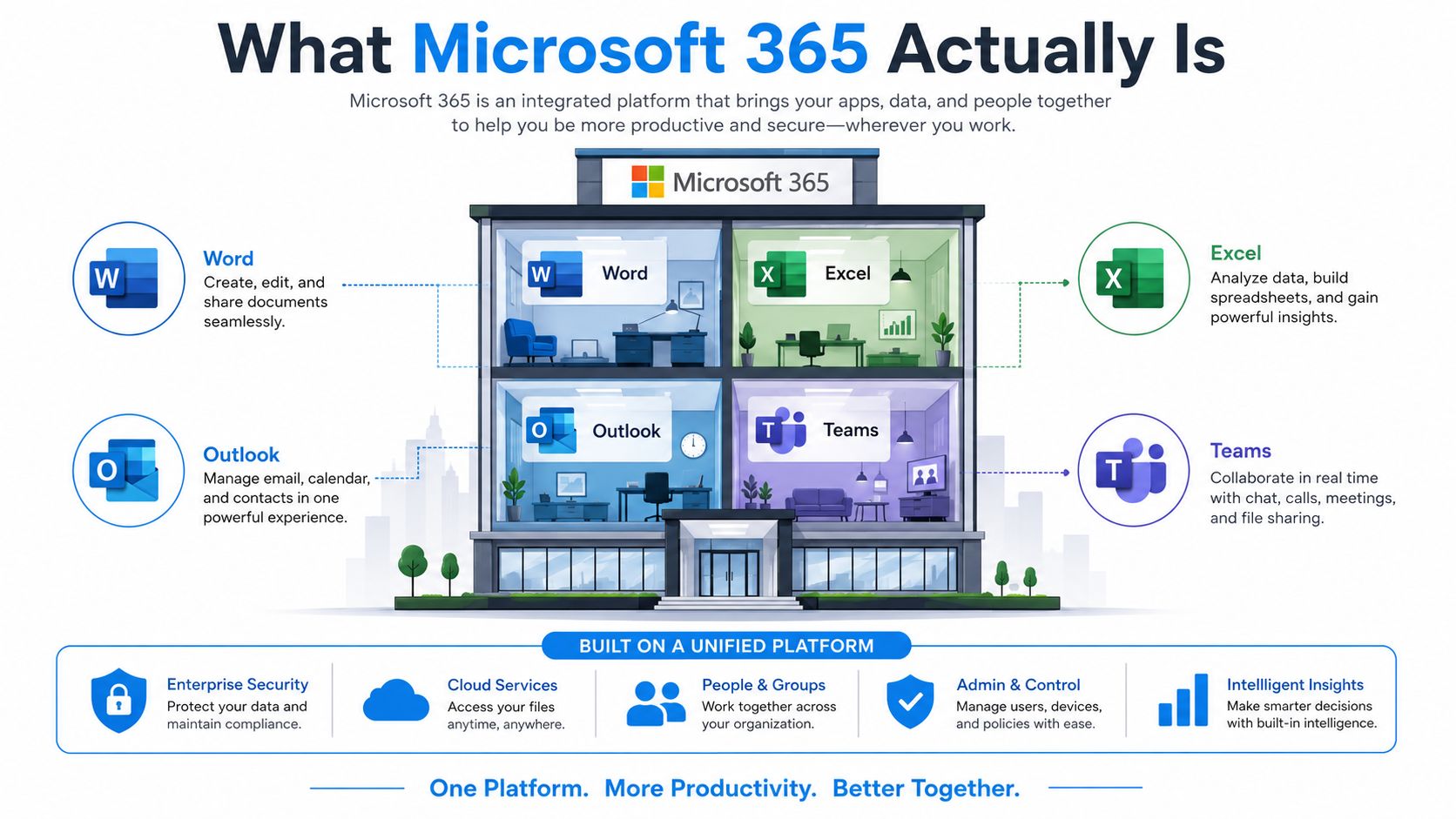
A Microsoft 365 rollout changes more than the apps on a screen. Word, Excel, Outlook, and Teams are the parts users notice first. The underlying shift sits in Exchange Online, SharePoint, OneDrive, and identity controls that decide where data lives and who can reach it. That is the layer business owners feel after migration, even if they never open the admin centre.
Apps on the surface, platform underneath
Microsoft 365 functions like a building. The offices inside are the everyday apps your team sees. The lobby, locks, security desk, and building management are the cloud services underneath. If you focus only on the office furniture, you miss how the whole place is run.
Microsoft’s own service description says Microsoft 365 Apps for enterprise is licensed per user and can be installed on up to five PCs or Macs, five tablets, and five mobile devices, with higher-tier security and device-management services such as Microsoft Intune and Microsoft Defender for Endpoint included at higher tiers Microsoft service description. That detail matters because the licence follows the person, not the device. For a business with hybrid work, that is easier to manage than trying to licence every endpoint one by one.
Subscription means ongoing management
The subscription model is not a billing gimmick. It is how Microsoft keeps the platform current. Updates, feature changes, and security controls arrive continuously instead of through a one-time installation. That works well if your business wants standardisation, but it also means someone has to watch what changed and decide whether it affects users or compliance.
Microsoft 365 also changes how you handle data placement. Files no longer sit on a single office box. They live in cloud storage and collaboration services that people can reach from different devices and locations. That gives staff flexibility, but it also means your policies have to be written for people, not just equipment.
A structured cloud discussion can help owners compare this model with local hosting and judge the operational trade-offs more clearly, especially for firms that want a practical view before they migrate, like this Microsoft 365 cloud solutions overview.
Why it matters for a sceptical owner
If you are skeptical of vendor marketing, keep the distinction clear. Microsoft 365 has value when it cuts admin work, standardises access, and keeps people productive without leaning on local infrastructure. If you do not operationalise it, you are just renting a suite of apps and leaving the platform around them underused.
The Features That Actually Change Daily Operations
Most businesses buy Microsoft 365 for email and end up using only a slice of what they pay for. That’s the wrong way to judge it. The value comes from the features that change how people work every day, not the ones that look good in a product sheet.
The core tools that earn their keep
Outlook and Exchange Online still matter because business email is the front door for customers, vendors, and internal approvals. If mail is unreliable, trust drops fast. Moving that function into Microsoft 365 usually makes support easier because the mail platform sits in the same tenant as the rest of the collaboration stack.
OneDrive and SharePoint matter because they replace the chaotic shared-drive pattern that causes version confusion. OneDrive is for individual working files, SharePoint is for shared team content, and both are far easier to govern than a folder tree with no ownership. If your staff keep emailing attachments back and forth, you’re wasting time and creating risk.
Teams changes meeting culture, but only if you standardise on it. Used properly, it gives staff one place for chat, calls, and meetings instead of a patchwork of consumer tools. Used badly, it becomes another notification stream nobody reads.
A suite only creates value when the business agrees on a default way of working.
The overlooked tools that replace smaller subscriptions
The underrated part of Office 365 in business is the long tail of tools that replace separate SaaS products. Planner handles simple task tracking, Bookings helps with appointment scheduling, Forms reduces ad hoc data collection, and Loop can improve lightweight collaboration when teams need shared working spaces. Microsoft’s business plans bundle collaboration, storage, webinars, and tools like Loop, Bookings, Planner, and Forms, but most companies never push beyond the familiar apps Microsoft 365 business plans and pricing.
That’s the operational trap. If your team only uses email and document editing, you’re leaving money on the table. If you try to force every tool into the business without a workflow reason, you’ll just confuse users. The middle ground is the right one, pick a few workflows and standardise them.
What to operationalise first
Start with three things. First, mail and calendar. Second, file sharing and document version control. Third, meeting and collaboration habits. Everything else can wait until someone can explain how it improves a real process.
The practical test is blunt. If a feature doesn’t replace a manual step, reduce a support ticket, or remove a separate subscription, it’s probably not your priority yet.
Licensing, Plans, and What Actually Drives the Bill
Microsoft licensing looks confusing because Microsoft wants it to look broad. For most SMBs, the decision isn’t between every possible tier. It’s between the licence that covers your current habits and the one that covers the security and management you need.
The bill is driven by control, not just apps
Business Basic makes sense when the team mainly needs cloud email, meetings, and file access. Business Standard adds the desktop apps many staff expect. Business Premium becomes relevant when you need stronger security and device management. If you move into enterprise tiers such as E3 or E5, you’re usually paying for more advanced compliance, security, and administrative control, not just more familiar apps.
The biggest cost drivers are straightforward. User count matters, security requirements matter, and add-ons matter. Teams Phone, Visio, and Project can all change the monthly number quickly, especially once you have multiple user groups with different needs. If your reseller gives you a single “best” package without mapping it to actual roles, be wary.
Nonprofits need to check licence continuity now
There’s one licensing shift that many Canadian organisations still underplay. Microsoft-related reseller coverage states that free grant-based licences for Office 365 E1 and Microsoft 365 Business Premium were retired starting July 1, 2025, while eligible nonprofits can still access up to 300 free Microsoft 365 Business Basic licences and discounted paid plans nonprofit licensing changes. That is not a minor pricing tweak. It changes budget planning, renewal timing, and migration priorities.
If you support a nonprofit, don’t ask only which plan has the best features. Ask whether the current licence is going away, how many users need paid coverage, and whether the organisation can absorb the switch without losing access. That’s the core financial question.
Best practice: licence the business for how it works today, then stress-test what happens when a grant, discount, or entitlement changes.
Questions to ask before you buy
- How many users need desktop apps? Some staff can work fine in browser-based tools, others can’t.
- Who needs advanced security? Don’t overbuy protection for low-risk roles, but don’t leave regulated roles exposed either.
- What add-ons are essential? Voice, document management, or project tools may shift the plan more than the core suite does.
The honest answer is that many businesses overpay because they buy too much in one shot, then underpay later in security and support because they skipped the planning stage. That’s a bad trade.
Security and Compliance in a Canadian Context
Microsoft 365 security is not a checkbox you tick during purchase. It’s a configuration discipline. If you leave the tenant in a default or half-managed state, you get cloud convenience without the controls that protect business data.
The controls that actually matter
For an SMB, the practical baseline starts with multi-factor authentication, then conditional access, then the email and document controls that reduce everyday exposure. Higher Microsoft 365 tiers also support stronger security and compliance capabilities, including advanced security, data storage, collaboration controls, and add-ons such as Microsoft Purview, Defender Suite, et Entra identity controls, which support features like eDiscovery, archiving, and legal hold in regulated environments Microsoft 365 enterprise overview.
That matters because a lot of small businesses think “we’re in the cloud” equals “we’re covered.” It doesn’t. If your staff handle sensitive customer, employee, or patient information, the tenant has to be configured to match the sensitivity of that data.
Canadian law makes that non-optional. PIPEDA applies to private-sector organisations engaged in commercial activity across Canada, and it requires safeguards appropriate to the sensitivity of the personal information being handled PIPEDA overview. If your Microsoft 365 environment stores client or employee records, access control and retention discipline are part of the compliance posture, not just IT preferences.
Québec changes the risk calculation
For Québec-based or Québec-serving organisations, Law 25 raises the stakes further. It expands consent, governance, and breach-related obligations, and penalties can reach up to $10 million CAD or 2% of worldwide turnover, with higher penalties up to $25 million CAD or 4% of worldwide turnover for the most serious offences Québec Law 25 reference?redirectedfrom=MSDN). That makes identity protection, audit logging, and data-loss controls concrete business decisions, not optional hardening tasks.
If you want a security stance that survives scrutiny, treat Microsoft 365 as part of your compliance system, not just your productivity stack. The difference is in the configuration work, the monitoring, and the documentation.
For a deeper security discussion, a focused review of managed security solutions is the right place to start if you’re comparing what Microsoft provides natively versus what your business needs layered around it.
Don’t confuse usage with protection
A company can use Microsoft 365 and still be poorly protected. That’s the hard truth. The core question is whether someone has turned the tenant into a managed control environment with clear access, retention, and monitoring rules.
Planning a Migration That Does Not Disrupt the Business
A Microsoft 365 migration should be treated like a phased decision tree, not a single cutover event. The business has to know what exists today, what must move, what can wait, and what should be retired instead of copied over.
Discovery comes before the calendar
The first mistake is picking a migration weekend before you understand the environment. You need to know how many mailboxes exist, where the shared files live, which devices are in circulation, and what old applications still point to the existing server. If you skip that step, you will discover dependencies at the worst possible moment.
A staggered approach is usually safer than a big-bang cutover. It gives the business time to test email flow, file access, and user permissions without breaking everyone on the same day. That extra bit of caution matters more when leadership expects zero downtime and the staff are already busy.
Canadian connectivity is part of the budget
Cloud migration looks clean on paper until you factor in internet quality and recurring connectivity cost. Statistics Canada reported that in 2024 the average monthly cost of Internet access for Canadian businesses was $84.33 for businesses with one to four employees, $148.39 for five to 19 employees, et $427.54 for 100 or more employees Statistics Canada internet access costs. Those are real inputs to total cost of ownership because Microsoft 365 depends on stable connectivity for email, sync, meetings, and cloud storage.
Migration rule: if your internet link is weak, your cloud project becomes everyone’s problem.
What a sane rollout looks like
A practical rollout usually includes three decisions in advance.
- Pilot first: Test with a small group that represents how the business works.
- Cut over in stages: Move mail, files, and device management in a controlled order.
- Train after behaviour changes: Show people how they’ll work tomorrow, not how the product brochure looks.
That sequence reduces surprises. It also makes support easier because the help desk or MSP can isolate issues before they affect every user.
The businesses that struggle most are the ones that treat migration as a one-time technical event. It isn’t. It’s an operational transition that changes how people authenticate, share, and store work every day.
Common Use Cases Across Ottawa–Gatineau SMBs
A dental clinic, a law firm, a retail chain, and a remote startup all buy Microsoft 365 for different reasons. The common thread is that each one is replacing a different kind of mess.
Four businesses, four different priorities
A dental clinic usually cares most about protected patient data, predictable access, and keeping staff from storing records in the wrong place. Microsoft 365 becomes useful when identity controls and document governance are tight enough to support regulated workflows.
A small law firm is usually thinking about retention, matter-based file structure, and legal hold. The apps matter, but the governance layer matters more because the firm needs to manage evidence, correspondence, and case materials without relying on local folder habits.
A two-location retail chain tends to care about standardised email, shared calendars, and consistent access to operational documents across locations. The challenge is less about fancy features and more about making sure the same rules apply in both places.
A remote-first startup usually wants identity and device management from day one. It does not have the luxury of cleaning up local servers later, so the Microsoft 365 tenant becomes the company’s operating environment from the start.
What each one should ask before choosing a plan
The right tier depends on whether the business needs stronger security, better compliance, or just cleaner collaboration. A clinic and a law firm may need the same apps as everyone else, but the controls are not the same. A retail chain may not need the highest tier, but it may need simpler administration across multiple sites.
The best Microsoft 365 setup is the one that matches the business’s risk, not the one with the longest feature list.
If you’re comparing your own operation to those examples, ask three questions. What data do we protect. Who needs access to it. What happens when a device, user, or location changes. Those answers tell you more than a price sheet ever will.
When a Managed IT Provider Becomes Worth the Cost
Microsoft 365 is not a set-and-forget product. Licences drift, identities get messy, security defaults change, and somebody still has to decide who gets access to what. Once that starts happening across multiple users, the cost of internal babysitting goes up fast.
That’s the point where a managed provider becomes worth it, especially if you need migrations, day-to-day administration, security monitoring, backup, and fast incident response. For Ottawa–Gatineau SMBs, managed IT services are worth considering when the business owner or office manager is carrying too much of the burden themselves. If they’re the person approving licences, chasing password resets, and worrying about data recovery, the software has already become an operational problem.
The cleanest rule is simple. If the time spent keeping Microsoft 365 healthy is starting to pull attention away from revenue work, outsource the administration before the environment slips. That is when the platform starts paying for itself instead of consuming management time.
If you want a blunt assessment of your current Microsoft 365 setup, IT Experts Canada can help you work through licences, migration risks, and security gaps without the sales fluff. Visit IT Experts Canada to talk through your current environment and get practical guidance on making Office 365 in business work day to day.
0 Comments