

Only 54% of organizations have an established, company-wide disaster recovery plan according to this disaster recovery statistics summary. That means many Ottawa–Gatineau businesses are still one serious outage away from a full operational standstill.
For an SMB, disaster recovery services aren't an abstract IT topic. They affect whether staff can log in on Monday morning after a weekend server failure, whether a clinic can reach patient files after a ransomware event, and whether a retail location can process sales during a power disruption. In this region, that risk feels more immediate because local businesses already live with winter storms, grid issues, hardware failure, internet outages, and the practical mess of operating across Ontario and Québec.
A lot of owners still think backup equals recovery. It doesn't. A backup is one component. Recovery is the full process of restoring systems, access, data, and day-to-day business operations in the right order and within a realistic timeframe.
Table of Contents
- The Real Cost of a Business Interruption
- What Are Disaster Recovery Services Really?
- The Two Numbers That Define Your Recovery Plan
- Choosing Your Recovery Model
- Implementing Your Disaster Recovery Plan
- Testing Maintenance and Financial Realities
- Choosing a Recovery Partner in Ottawa–Gatineau
The Real Cost of a Business Interruption
A business interruption rarely starts with drama. Usually it starts with something ordinary. A file server stops responding. Microsoft 365 access gets interrupted by an identity issue. A power event damages a network appliance. Staff arrive, open laptops, and discover they can't work.
For a professional services firm in Ottawa, that can mean missed client deadlines, no access to billing records, and a receptionist fielding calls with no system visibility. For a retailer in Gatineau, it can mean payment issues, inventory confusion, and a team writing things down on paper while customers lose patience. The technology problem turns into an operations problem almost immediately.
The hard part is that downtime doesn't stay in the server room.
Practical rule: If an outage stops revenue, client service, or internal communication, it's a business continuity issue first and an IT issue second.
The organizations that struggle most are usually the ones that treated disaster recovery as something to revisit later. They may have a USB drive backup, an external hard drive, or a cloud sync folder. But they often don't have a documented recovery sequence, decision-maker list, fallback communications plan, or clear restoration priorities.
That's why disaster recovery services should be viewed the same way you view insurance, lease protection, or legal support. You hope you won't need them under pressure, but when the bad day arrives, the absence of preparation becomes expensive very quickly.
A simple first step is to get an outside view of your current environment through a free IT infrastructure analysis. Most owners already know their systems feel fragile. What they usually don't know is exactly which failure would hurt them first, and which fix would reduce the most risk.
Where small businesses feel the pain first
- Revenue interruption: Sales stop when point-of-sale systems, booking tools, or payment workflows fail.
- Client trust: Customers don't separate “temporary outage” from “poorly managed business.”
- Staff paralysis: Employees can't work when files, email, line-of-business apps, or printers are unavailable.
- Recovery confusion: Without a plan, people make reactive choices that slow recovery instead of speeding it up.
What Are Disaster Recovery Services Really?
Disaster recovery services are the organised systems, processes, and people that help a business restore technology after a disruptive event. Think of them as a digital emergency response capability. Not just a storage location for copies of files, but a coordinated way to protect, restore, and restart the parts of the business that matter most.
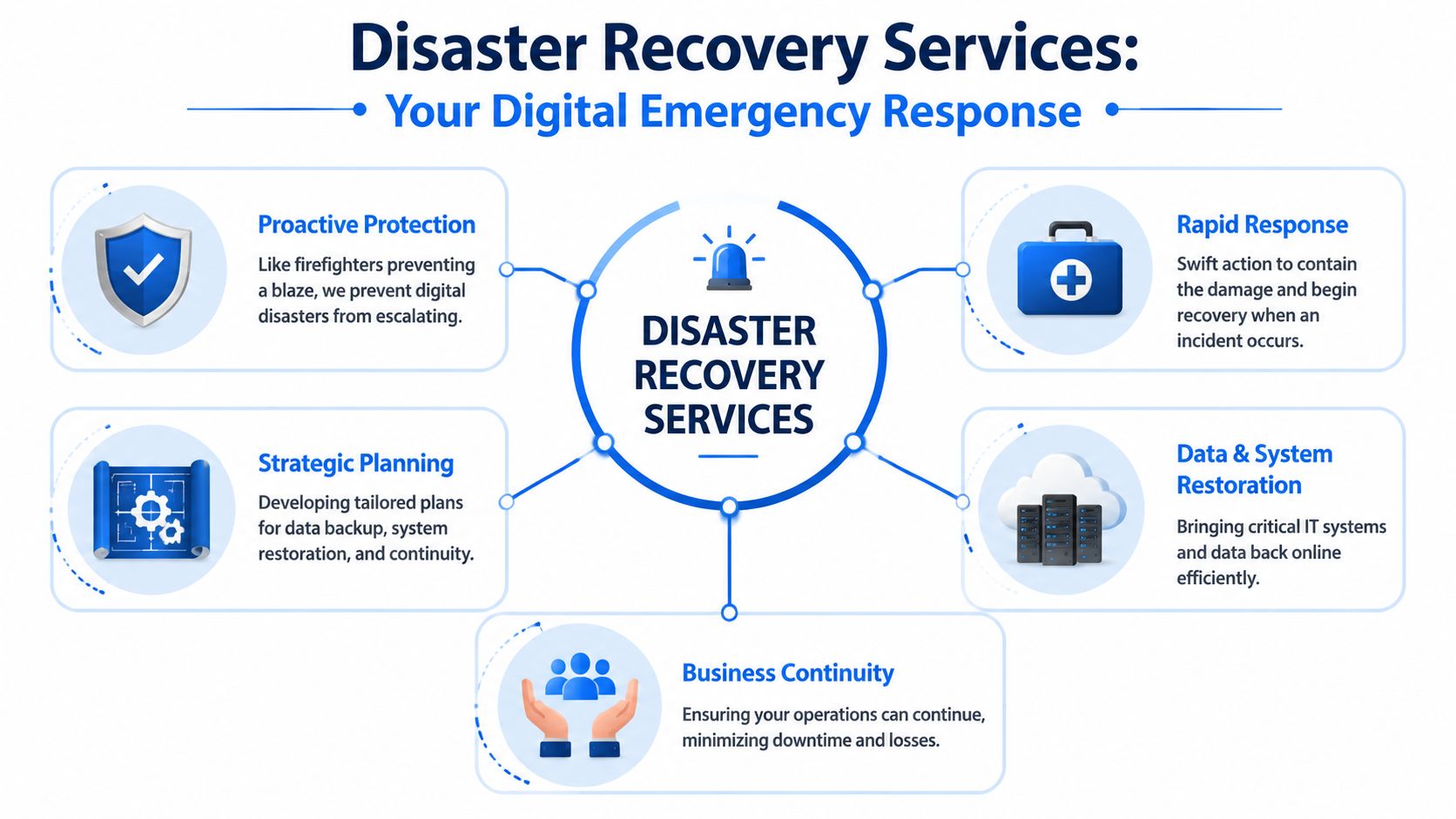
Most SMB owners first encounter the topic through backups. That makes sense because backup is tangible. You can see it on a dashboard. You can point to a retention policy. But recovery services go further than storing data. They deal with restoration order, application dependencies, administrator access, device readiness, remote work fallback, and the steps required to bring users back online without creating more damage.
A practical example helps. If your accounting database is backed up but the application server, user permissions, and network access aren't restored properly, the backup alone doesn't get your finance team working again. Recovery depends on the full chain.
More than backup
Good disaster recovery services usually include a mix of these activities:
- Protection planning: Deciding what needs to be backed up, how often, and where copies are stored.
- Recovery design: Mapping which systems come back first and which can wait.
- Incident response: Containing the outage so a hardware fault, malware event, or configuration mistake doesn't spread.
- Restore execution: Recovering data, applications, devices, and access for staff.
- Validation: Confirming that restored systems work for real users.
If you're reviewing your current setup, it helps to compare it against a dedicated business backup approach rather than assuming your existing tools already cover recovery end to end.
Disaster recovery versus business continuity
These terms overlap, but they're not the same.
Disaster recovery is about getting systems back after something serious goes wrong. It's reactive by design. A server fails, a fire affects your office, a ransomware incident locks files, or a severe outage takes key systems offline. Recovery services focus on restoration.
Business continuity is broader. It covers how the business keeps functioning while recovery is underway. That can include remote access, alternate workflows, phone routing, temporary devices, manual procedures, and communication plans for staff and clients.
Disaster recovery brings technology back. Business continuity keeps the business moving while that happens.
Many failed recovery efforts come from mixing those two ideas together and planning neither properly. Owners buy backup software and think continuity is handled. It isn't. Staff still need a way to answer customers, access core information, and operate through the disruption.
The Two Numbers That Define Your Recovery Plan
Every serious recovery plan depends on two decisions. Not product names. Not vendor promises. Two numbers.
According to Google Cloud's disaster recovery guidance, RTO measures “how long after a disaster before I'm up and running,” while RPO measures “how much data can I afford to lose.” Those two metrics shape the architecture and cost of any recovery solution.
If you don't define them, you end up buying recovery tools blindly. If you define them accurately, you can match the solution to the business.
RTO asks how fast
Recovery Time Objective is the maximum acceptable downtime for a system or process.
For an Ottawa law office, the document management system may need a short RTO because lawyers and assistants can't bill, review files, or prepare submissions without it. For a small marketing agency, a non-critical archive server may tolerate a slower recovery because active work happens in Microsoft 365 and Adobe cloud tools.
That distinction matters because faster recovery usually costs more. To shorten RTO, businesses often need better automation, standby systems, better documentation, and tighter monitoring. Slow recovery can be cheaper, but only if the business can absorb the interruption.
Ask these questions:
- What must be restored first: Email, accounting, file access, phones, booking software, or line-of-business applications?
- What can wait until tomorrow: Older archives, secondary reporting tools, or local test systems?
- What causes immediate client impact: Anything that blocks service delivery or payment collection belongs near the top.
RPO asks how much you can lose
Recovery Point Objective deals with data loss tolerance. This is the answer to a harder question. If systems fail, how much recent work can you afford to re-create?
A bookkeeping firm may need a very low RPO because every recent transaction matters. A construction business may be able to tolerate losing a limited amount of recently changed non-critical data if field teams can reconstruct it from email, paper notes, or supplier records. A dental clinic may have almost no tolerance for missing appointment or chart information. Different environments justify different targets.
Owners often answer emotionally instead of operationally. They say, “We can't lose anything.” In practice, that might be true for a few systems and unrealistic for others.
The best plan isn't the one with the most aggressive targets. It's the one the business can support, fund, and actually maintain.
The trade-off most businesses need to face
Lower RTO and lower RPO usually mean more complexity. You may need:
- More frequent backups or replication
- Cloud failover options
- Better identity and access controls
- Documented recovery runbooks
- Regular testing with real users
The mistake is applying the same target to everything. That wastes money on low-priority systems and still leaves critical ones underprotected. Smart recovery planning sorts systems into tiers, then assigns recovery expectations based on business impact, not guesswork.
Choosing Your Recovery Model
Once you know how quickly systems need to return and how much data loss is acceptable, you can choose a recovery model that fits. There isn't one universal answer. The right model depends on budget, internal IT capability, system complexity, and whether your business runs mostly on-premise, mostly in the cloud, or somewhere in between.
For SMBs, four models come up most often.
Four common models
Traditional on-premise recovery keeps recovery infrastructure within your own environment or a secondary company-controlled location. That can work for businesses with legacy servers, specialised applications, or strict control requirements. The downside is obvious during a serious local event. If your primary location is affected by power, hardware damage, or building access issues, the recovery environment may be too close to the same problem.
Cloud-based recovery shifts protected workloads, backup repositories, or failover capability into cloud infrastructure. For many SMBs, this improves flexibility and reduces the burden of owning spare hardware. It can also simplify remote access during an incident. But cloud recovery still needs careful planning. If systems are designed only within one region or without proper redundancy, you can still create a single point of failure.
Hybrid recovery combines local and cloud resources. This is often the most practical model for businesses that want fast local restores for common issues but also want offsite resilience for bigger disruptions. A hybrid setup might restore a deleted file locally in minutes while preserving the option to recover larger workloads from cloud infrastructure after a site-wide event.
Disaster-Recovery-as-a-Service (DRaaS) packages much of the recovery design, replication, orchestration, and failover support into a managed service. For SMBs without deep internal IT benches, DRaaS can be the cleanest path because it reduces management overhead and gives the business access to tested recovery workflows rather than improvised ones.
A closer look at online disaster recovery solutions usually helps owners understand where their current environment sits on that spectrum.
Disaster Recovery Model Comparison
| Model | Initial Cost | Management Effort | Recovery Speed (RTO) | Best For |
|---|---|---|---|---|
| On-premise | Higher for hardware and setup | High | Can be fast for local issues | Businesses with legacy systems and in-house IT control |
| Cloud-based | Often more flexible to start | Moderate | Strong when designed well | SMBs shifting workloads to cloud platforms |
| Hybrid | Moderate to higher | Moderate to high | Balanced | Firms that want local restore speed plus offsite resilience |
| DRaaS | Service-based ongoing cost | Lower for the client | Often strong because workflows are managed | SMBs that need expert support without building everything internally |
What works and what doesn't
What works is choosing the model that matches your operations.
A small accounting practice with limited IT staff usually benefits from a managed or hybrid approach because recovery needs to be dependable without requiring the office manager to coordinate failover steps. A manufacturer with specialised local software may need local recovery elements even if cloud protection is part of the design. A multi-location business may prioritise centralised cloud recovery because staff can work from alternate sites.
What doesn't work is buying a premium architecture for every workload, or going cheap on the systems that run the business. Another common mistake is assuming that because an application is “in the cloud,” recovery planning is complete. It isn't. Access control, data exportability, local internet dependency, and restoration workflows still matter.
Implementing Your Disaster Recovery Plan
The planning stage matters, but implementation is where most businesses discover whether they're building a document or a usable operating system for crisis conditions.
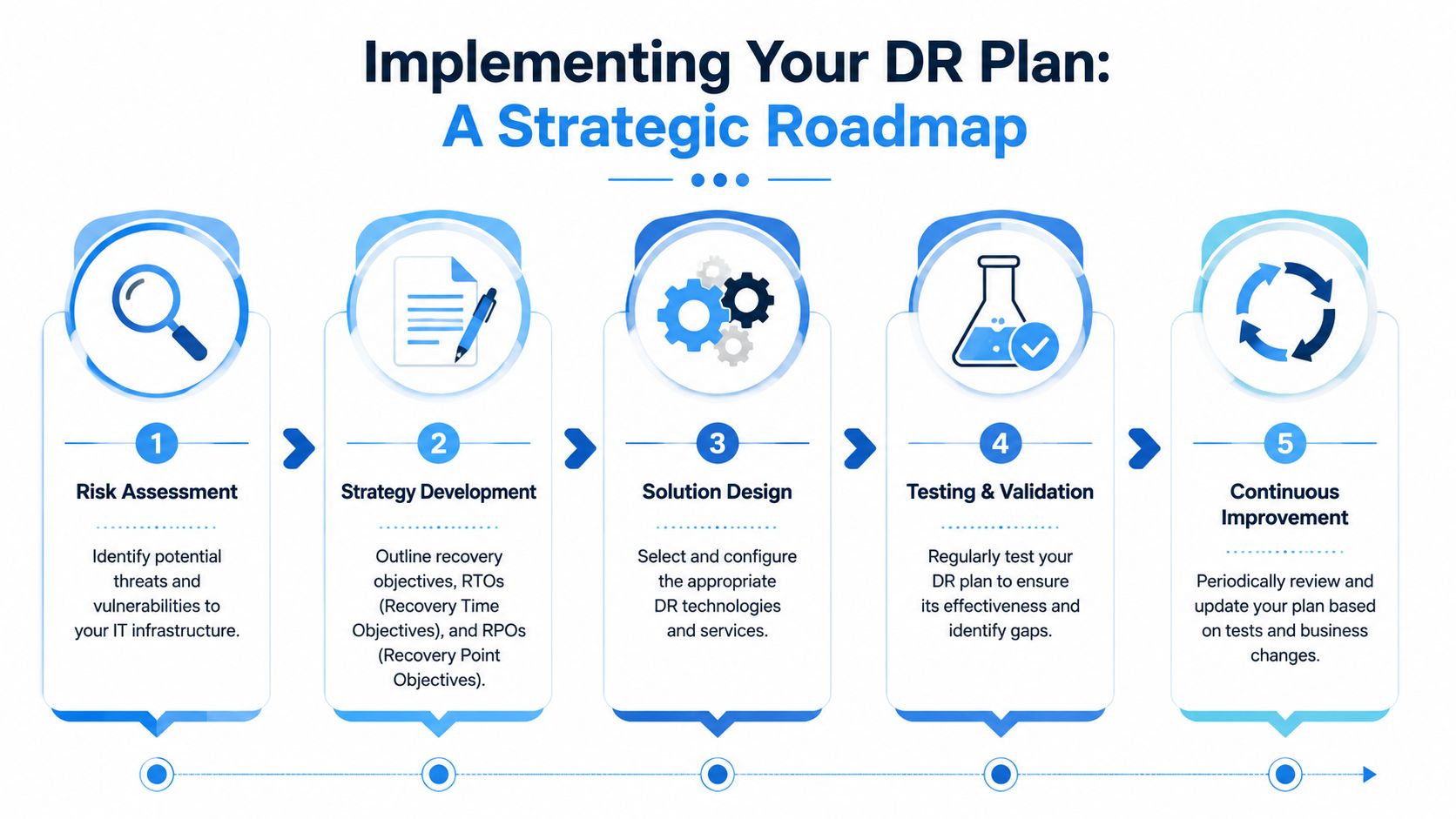
A good rollout starts with a business-led review, not a shopping list of tools. Which services generate revenue. Which systems keep staff productive. Which vendors hold critical data. Which devices, credentials, and internet paths are required for people to work from somewhere else if the office is unavailable.
Start with business impact, not hardware
Most solid implementations begin with a business impact analysis. That sounds formal, but for an SMB it usually comes down to a practical ranking exercise.
List your core functions first. Then map the systems, accounts, devices, and people each one depends on. In many companies, that reveals a few surprises. The payroll system may rely on one staff member's local spreadsheet process. The CRM may depend on a single admin account nobody else has documented. The phone system may fail over poorly because nobody tested call routing from outside the office.
A useful implementation sequence often looks like this:
- Identify critical functions: Revenue, client communication, billing, scheduling, and regulated records usually sit at the top.
- Map dependencies: Servers, cloud apps, user accounts, internet, phones, printers, third-party platforms, and key staff roles.
- Set restoration order: Bring back what the business needs first, not what's simplest for IT to restore.
- Document fallback procedures: Manual invoicing, alternate communications, temporary remote access, paper processes where needed.
The technical plan should reflect the business, not the other way around.
To see how recovery planning fits into actual incident response, this short video gives a useful operational overview.
Build, assign, test, improve
After priorities are clear, the plan needs named ownership. Someone authorises major decisions. Someone handles vendors. Someone communicates with staff. Someone verifies restored applications with actual users. When those roles aren't assigned in advance, everyone waits for someone else to act.
The written plan should include:
- Contact paths: Internal leaders, external IT support, telecom providers, internet providers, software vendors.
- System priorities: What gets restored first, second, and later.
- Access details: Where recovery credentials are stored and who can use them.
- Decision triggers: When to declare a major incident, when to switch to alternate workflows, when to communicate with clients.
A recovery plan fails most often at the handoff points. No one knows who approves, who restores, who validates, or who informs customers.
For many SMBs, an outside managed services team makes implementation more realistic because the technical lift is heavy. Backup policies, cloud configuration, failover sequencing, restore testing, endpoint readiness, security hardening, and documentation all take time and discipline. Owners should still own the business decisions, but they shouldn't have to build every technical layer themselves.
Testing Maintenance and Financial Realities
A recovery plan starts to drift out of date the moment the business changes. New laptops get deployed. A cloud app adds a new login step. A manager leaves. An office move changes internet providers. In Ottawa and Gatineau, a winter outage does not wait for your documentation to catch up.
Testing keeps the plan tied to reality.
As noted earlier, regular disaster recovery testing is still uncommon. That gap shows up during real incidents. The backup exists, but no one has confirmed the restore order. Remote access works for IT, but not for accounting staff at 7:30 on payroll morning. A vendor contact number is saved in the old portal. Those are the failures that slow recovery, not the ones owners usually budget for.
Testing shows whether recovery works for the business
A successful backup job is not the same as a successful recovery.
The useful question is simple: can your staff do their jobs after systems are restored? For an Ottawa law office, that may mean access to document management, email, and scanned client files. For a manufacturer in Gatineau, it may mean order entry, inventory, and the shop-floor system. For a medical or professional services firm, it may mean line-of-business software, secure file access, and phones.
The best test format depends on the risk you are checking:
- Tabletop exercises: Leadership walks through a realistic scenario such as an ice storm, prolonged power outage, or ransomware event, and confirms who makes decisions, who contacts vendors, and who updates clients.
- Restore tests: IT confirms that backups can be recovered cleanly, permissions still work, and the restored system behaves as expected.
- User validation: Staff sign in and complete real tasks, so the business confirms more than server uptime.
- Change-based retesting: After a cloud migration, software replacement, office move, or major infrastructure change, the affected recovery steps get tested again.
For many SMBs, one annual test is not enough if systems are changing every quarter. A lighter test schedule tied to major changes is usually more practical and more useful.
Maintenance is operating discipline
Disaster recovery plans fail subtly before they fail publicly. Password vault access changes. Vendor support contacts become outdated. A backup exclusion gets added during troubleshooting and never removed. If no one owns plan maintenance, the document stays polished while the recovery process weakens.
A maintained plan should be reviewed after:
- changes to core software
- moves to Microsoft 365, Azure, or other cloud platforms
- office relocations or new locations
- internet, telecom, or hardware provider changes
- staffing changes in leadership, finance, operations, or IT
- security changes such as MFA rollout or identity platform updates
This is where a local managed IT partner earns their keep. At IT Experts Canada, we see the same pattern across Ottawa-Gatineau SMBs. The technical pieces can be configured correctly, then drift out of sync as the business grows. Review cycles, test calendars, and change-driven updates prevent that drift.
Cost decisions are really recovery decisions
Owners often compare disaster recovery options by monthly software cost. That misses the essential trade-off.
The actual cost includes backup storage, retention, replication, recovery infrastructure, security controls, documentation, vendor coordination, and staff time for testing. Lower-cost plans usually push risk somewhere else. Recovery takes longer. More steps are manual. Fewer systems are covered. Validation is skipped. Those savings disappear quickly during a real outage.
A practical budget discussion starts with three questions:
- How long can the business operate without this system?
- How much data can we afford to lose?
- What manual workaround is realistic for 4 hours, 24 hours, or 3 days?
Those answers shape the spend. A bookkeeping platform may need faster recovery than the archive server. A construction firm may accept some delay on historical files but not on quoting, scheduling, or mobile access for field staff. The right design is rarely the most expensive one. It is the one that matches the business impact.
Canadian public policy is moving in the same direction. Public Safety Canada's Disaster Financial Assistance Arrangements ties disaster funding to recovery and mitigation, not just rebuilding after the fact. The lesson for SMB owners is straightforward. Spending on resilience before an event is often cheaper than paying for downtime, rushed decisions, and avoidable rework afterward.
Testing protects the money already spent on backup and recovery. It exposes bad assumptions before an ice storm, power failure, or cyberattack turns them into lost revenue.
Choosing a Recovery Partner in Ottawa–Gatineau
Local context matters more than many providers admit. A generic national provider may understand backup platforms, but still miss what makes this region different. Ottawa–Gatineau businesses operate across provincial lines, depend on mixed infrastructure footprints, and deal with severe weather that can interrupt power, connectivity, travel, and building access all at once.
That local exposure isn't theoretical. In the Ottawa–Gatineau region, 56% of residents have personally experienced a major emergency or disaster within their community, according to Statistics Canada's reporting on emergency experience. For business owners, that should settle the debate about whether planning can wait.
What local businesses should look for
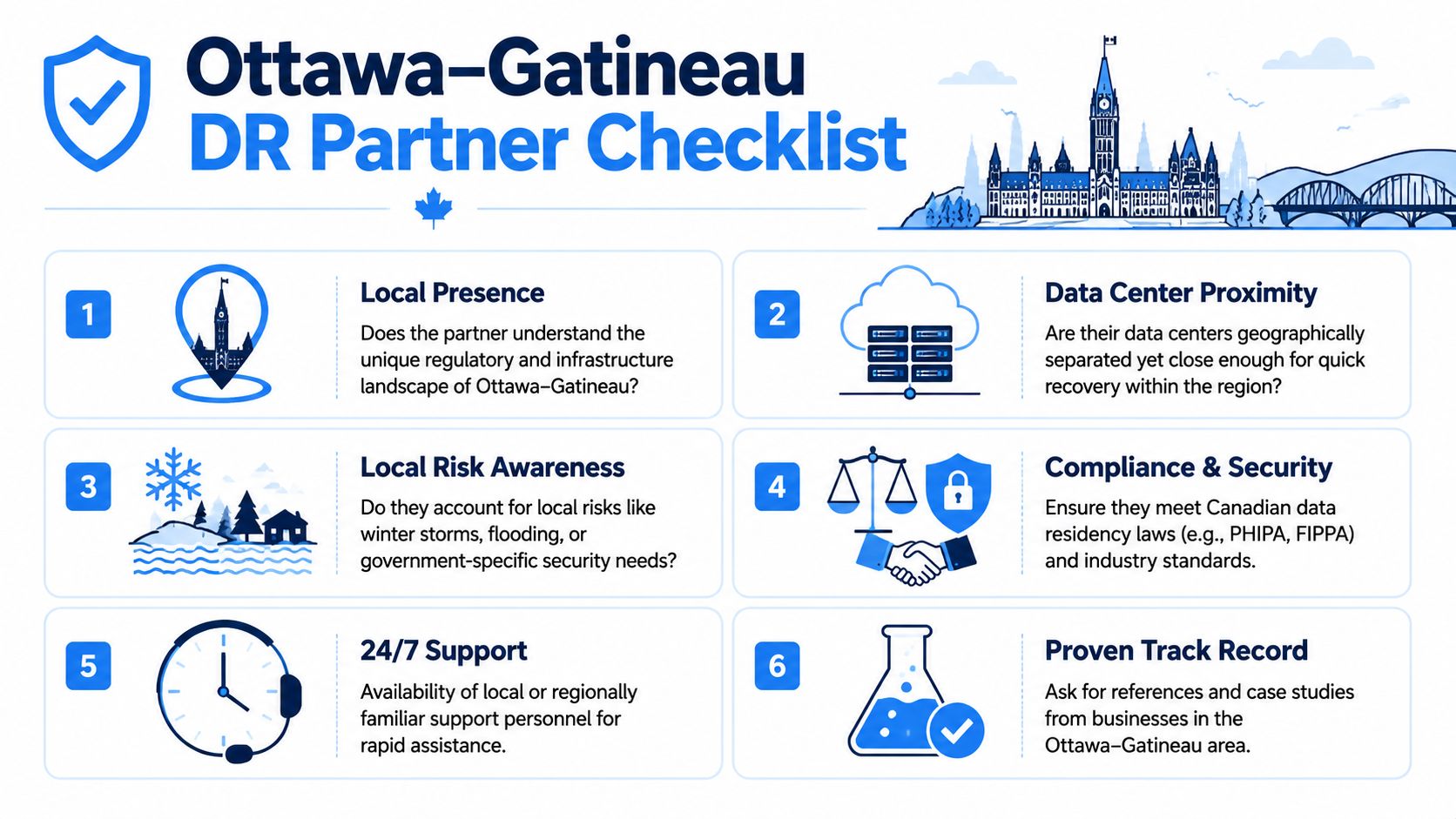
Use a shortlist that goes beyond “they sell backup.”
- Local presence: The provider should understand the operating realities of Ottawa and Gatineau, including regional outages, bilingual environments, and cross-provincial service expectations.
- Canadian data handling: If your business deals with regulated or sensitive information, ask where data is stored and how access is controlled.
- Support availability: Major incidents don't respect office hours. You need to know who answers after hours and how escalation works.
- Recovery testing discipline: Ask how often plans are tested, how results are documented, and how remediation is handled.
- Cloud and on-premise capability: Many SMBs run hybrid environments. Your provider should be comfortable with both.
- Communication maturity: During an outage, you need concise updates, defined contacts, and practical next steps.
A provider should also be able to explain trade-offs in plain language. If every answer sounds like marketing copy or tool jargon, that's a warning sign.
Why local context matters
An Ottawa accounting firm, a Gatineau clinic, and a multi-site retailer may all need disaster recovery services, but their priorities differ. One may care most about client file access. Another may care about line-of-business application availability and privacy obligations. Another may need phone routing and payment continuity during a local outage.
The right recovery partner understands those differences and builds around them. They don't push the same template into every business. They ask how your staff work during a storm, what happens if the office is inaccessible, which systems can be recreated, and which ones can't.
For businesses in this region, the strongest partners usually bring a combination of local familiarity, remote management capability, cloud knowledge, and always-available support. That mix matters because recovery rarely happens under ideal conditions. Roads may be difficult. Staff may be remote. Building access may be limited. Internet service may be unstable in one area but available in another.
When a provider can connect technical recovery with how Ottawa–Gatineau businesses operate, the plan becomes usable. That's the difference between a shelf document and real resilience.
If your business needs a practical review of its backup posture, recovery priorities, and continuity gaps, IT Experts Canada can help you assess where you're exposed and what a realistic disaster recovery plan should look like for your Ottawa–Gatineau operations.
0 Comments