
You're probably reading this after one of those days. A staff member can't access Microsoft 365. The office printer has vanished from the network again. Your line-of-business app runs slowly every Monday morning. Or maybe nothing is broken right now, which almost feels worse, because you know the next issue is coming and you have no idea when.
That's the reality for many small businesses in Ottawa-Gatineau. Technology often gets treated like plumbing. You only think about it when something leaks. But unlike a sink, business technology touches everything at once: customer service, billing, scheduling, files, phones, security, and remote work. When one part fails, the whole day gets dragged off course.
For a local business owner, the question usually isn't whether you need IT support. It's whether you want to keep paying for chaos, or move to a model that keeps problems from interrupting the work in the first place.
Table of Contents
- Is Your Technology Helping or Hindering Your Business
- What Are IT Managed Services for Small Business
- Core Offerings in a Managed IT Services Plan
- The Business Benefits of Switching to an MSP
- Understanding Managed IT Services Pricing
- How to Choose the Right Managed IT Partner in Ottawa-Gatineau
- Take the Next Step Towards Proactive IT Management
Is Your Technology Helping or Hindering Your Business
A common small business pattern looks like this. The office network slows down, someone calls an IT technician, the immediate issue gets patched, and everybody moves on. Two weeks later, email delivery breaks, then a laptop fails, then a staff member clicks a phishing link, and now the business owner is back on the phone explaining a different emergency.
That's the break-fix cycle. It feels practical because you only pay when something goes wrong. In reality, it often creates the most expensive kind of IT environment: one that waits for disruption before taking action.
In Ottawa-Gatineau, this hits especially hard for lean teams. A law office, clinic, retail operation, contractor, or professional services firm usually doesn't have spare internal capacity. The office manager becomes the unofficial IT contact. The owner approves purchases without a long-term plan. Staff create workarounds just to get through the day. None of that is unusual. It's just fragile.
Practical rule: If your team only talks about IT when users are already blocked, your business is running reactively.
The damage isn't only technical. It shows up in missed calls, delayed invoices, frustrated staff, and customer confidence that slips away. One recurring Wi-Fi issue can waste more management time than the hardware itself is worth. One poorly managed Microsoft 365 setup can create endless password resets, file confusion, and permission problems.
Managed services change that relationship. Instead of calling for help after the fire starts, you put someone in charge of smoke alarms, wiring checks, locked doors, and evacuation plans. That's a simpler way to understand it managed services for small business. You're not buying random repairs. You're putting structure around the systems your company already depends on.
For most owners, the main relief isn't the technology. It's knowing somebody is watching the environment, keeping it organised, and dealing with issues before they become your problem.
What Are IT Managed Services for Small Business
The easiest way to understand IT managed services for small business is to think of them as an on-demand IT department for a fixed monthly service relationship. Instead of hiring a full internal team, or relying on whoever can show up after something breaks, you work with a provider that monitors, maintains, supports, and improves your systems continuously.
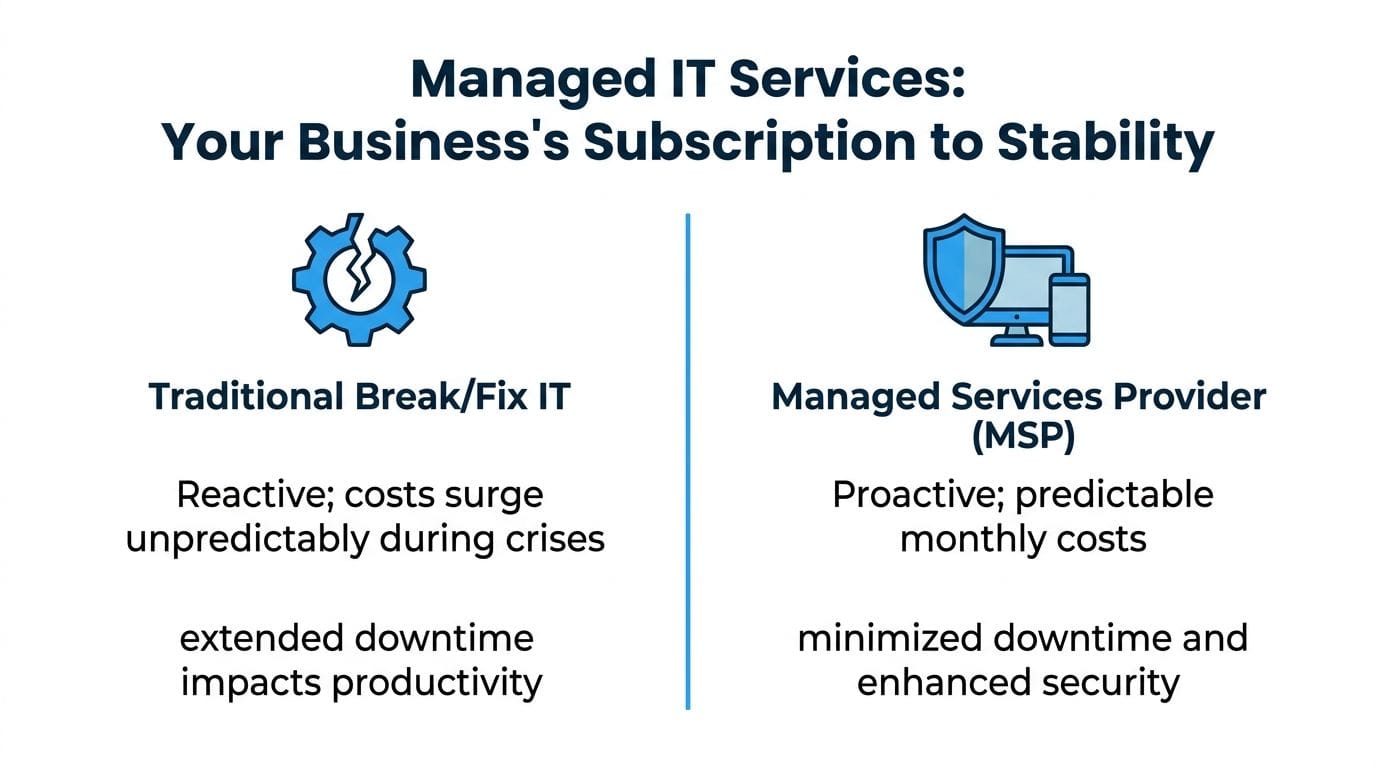
That monthly relationship usually includes a mix of help desk support, device management, patching, cybersecurity tools, backup oversight, cloud administration, and planning. Some providers also handle phones, internet coordination, and vendor management, which matters more than people expect when an outage involves more than one supplier.
Managed services versus break-fix
Break-fix IT is exactly what it sounds like. Something breaks, you call someone, they try to fix it, and you get an invoice after the damage is already done.
Managed services work differently:
- They monitor continuously. Servers, workstations, network devices, and security alerts are watched in the background.
- They maintain routinely. Updates, patches, antivirus, policy changes, and account reviews happen on a schedule.
- They support users directly. Staff can call or email when they need help instead of improvising risky workarounds.
- They plan ahead. Hardware lifecycle, cloud changes, licensing, and security improvements get handled before they become urgent.
That last point is where the value really sits. Good providers don't just keep things running. They reduce the number of bad surprises.
What a good MSP relationship looks like
A managed services provider, or MSP, should feel less like a repair shop and more like an operations partner. Their job isn't to prove how fast they can react to disasters. Their job is to lower the odds of those disasters happening in the first place.
Managed IT works best when the provider's success is tied to your stability, not to the volume of emergencies.
For a small business, that can mean practical improvements such as standardising laptops, tightening Microsoft 365 permissions, replacing weak backup routines, and documenting who has access to what. None of that sounds dramatic. That's the point. The best IT environments are often the least dramatic ones.
In the Ottawa-Gatineau market, there's another layer. Businesses often need support that works in both English and French, onsite help when remote tools aren't enough, and guidance that reflects local operating realities. A generic remote-only provider can look fine on paper. It often feels different when your receptionist needs help now, your copier vendor is blaming the network, and your staff need clear support in the language they work in every day.
Core Offerings in a Managed IT Services Plan
A proper managed services plan should cover the systems that keep your business operating, not just the devices that happen to be on your desk. If a provider only talks about antivirus and password resets, the plan is too thin.

Help desk support that people will actually use
Small businesses need responsive help desk support by phone, email, and remote access. This sounds basic, but the difference between a strong help desk and a weak one is huge. Good support solves the issue and leaves the user more confident. Poor support turns every ticket into a delay, a handoff, or a lesson in jargon nobody asked for.
A useful help desk handles things like:
- Login and access issues. Microsoft 365 sign-ins, shared mailbox access, file permissions, and password resets.
- Device problems. Slow laptops, printer failures, webcam issues, docking station problems, and mobile device setup.
- Application support. Outlook sync errors, Teams call quality, Google Workspace access, and common business software hiccups.
For owners, the business value is simple. Your staff stop wasting productive time trying to be their own technician.
Monitoring that catches trouble early
Proactive monitoring is the quiet backbone of managed IT. It watches servers, workstations, firewalls, switches, backups, and key service alerts so support teams can act before users start reporting symptoms.
This isn't glamorous work. It's the digital equivalent of hearing a strange noise in a delivery van and fixing the belt before the vehicle dies on the highway.
Good monitoring should catch patterns like repeated login failures, storage issues, failing hardware, service interruptions, and devices that have stopped checking in. If nobody is watching those signals, the first alert often comes from your staff, and by then the problem has already interrupted business.
Layered cybersecurity that fits a small business
Cybersecurity shouldn't be sold as one tool. It needs layers. A small business rarely fails because one product was missing. It fails because the overall setup had gaps.
A practical small business security stack often includes:
- Endpoint protection. Security software on laptops and desktops to detect malware and suspicious behaviour.
- Email filtering and web protection. Controls that reduce phishing, malicious links, and risky downloads.
- Multi-factor authentication. Extra verification for Microsoft 365, Google Workspace, and remote access tools.
- Patch management. Regular operating system and software updates so known weaknesses don't stay open.
- User guidance. Staff need simple coaching on what suspicious emails, fake invoices, and account prompts look like.
Security is less like a vault and more like a commercial building. You want locks, cameras, alarms, lighting, and people paying attention.
In the Ottawa-Gatineau area, this matters for firms handling client files, payment information, health records, or legal documents. Even when a business doesn't face a formal compliance audit, it still needs to prove to clients that data is treated seriously.
Cloud management without the usual confusion
Most small businesses already use cloud platforms. The issue isn't whether they're in the cloud. It's whether those services are configured well and managed consistently.
Microsoft 365 and Google Workspace are the usual anchors. Then come shared files, Teams or Meet, hosted email, OneDrive or Google Drive, cloud backups, and cloud desktops for specific roles. Without oversight, these environments get messy fast. Former staff keep access. Shared folders become permission puzzles. Email security settings are left at defaults. Nobody knows which data is backed up and which isn't.
A managed provider should help with:
- Account setup and offboarding
- Licence management
- Security settings and access policies
- File sharing structure
- Migration support
- Day-to-day administration
That's where cloud services stop being a collection of subscriptions and start functioning like a coherent system.
Backup and recovery that work under pressure
Most businesses think they have backups because a backup product exists somewhere in the environment. That's not the same as a working recovery process.
A real backup and disaster recovery service includes backup status monitoring, recovery planning, and periodic verification that important data can be restored. When a ransomware event, hardware failure, or accidental deletion happens, nobody wants a theory. They want a clean copy and a clear process.
Look for plain answers to these questions:
- What is being backed up
- Where those backups are stored
- Who checks them
- How recovery works
- Which systems get restored first
If a provider can't answer those clearly, the backup plan probably looks better in a proposal than it will during an emergency.
Telecom and connectivity under one roof
Telecom often gets treated separately from IT, but for small businesses they're tightly connected. Business phones, internet service, Wi-Fi performance, voicemail, and remote work quality all affect operations and customer experience.
When one partner can manage or coordinate voice and data services alongside the rest of your environment, troubleshooting gets much easier. If calls are choppy, is it the phone system, the firewall, the ISP, the office network, or the user's setup? Businesses lose time when five vendors point fingers at each other.
A stronger model is one where someone owns the full picture and can work across internet connectivity, business phone options, network health, and user support without sending you into the middle of a technical blame game.
The Business Benefits of Switching to an MSP
The biggest reason to switch to a managed services provider isn't that the technology becomes more advanced. It's that the business becomes easier to run.

Predictable spending beats surprise invoices
Reactive IT creates financial whiplash. One month is quiet. The next month includes emergency labour, replacement hardware, rushed security work, and staff downtime that never appears cleanly on an invoice but still costs you.
Managed services shift that into a more predictable operating expense. You know what support, monitoring, maintenance, and routine administration are likely to cost. That makes budgeting easier, especially for small firms that can't absorb repeated unplanned IT events.
The cost of downtime is where this becomes obvious. Studies show that small businesses can lose up to $1,000 per minute of IT downtime, making proactive management far more cost-effective than reactive repairs. For many, a single major incident can cost more than a full year of managed services, according to Gartner newsroom reporting on IT downtime impacts.
That doesn't mean every business needs the same service level. It means uncertainty is expensive, and many owners underestimate how expensive it is until systems stop moving.
Better security without building an internal team
Most small businesses need stronger security than they currently have, but they don't need to hire a full in-house security department to get it. An MSP gives access to tools, processes, and daily oversight that would be difficult to organise alone.
That often includes managed endpoint protection, patching, account controls, security monitoring, backup oversight, and help with cloud security settings. Just as important, someone is responsible for keeping those layers aligned. A good setup doesn't happen because a few products got purchased. It happens because someone manages them continuously.
If your cybersecurity plan depends on staff “being careful,” you don't have a plan yet.
This is especially relevant for professional firms and clinics in Ottawa-Gatineau, where trust, confidentiality, and uninterrupted access to records matter every day.
Less downtime means better work gets done
Stable IT doesn't draw applause. It creates room for everything else.
When users can open files, join calls, access email, print documents, and work remotely without friction, the business feels calmer. Staff stop building side habits around broken tools. Managers stop acting as dispatchers for technical issues. Owners stop having to decide whether a random Tuesday outage is serious enough to derail the afternoon.
For a closer look at how proactive support changes day-to-day operations, this short video gives useful context:
The most valuable outcome isn't only fewer incidents. It's smoother work. That's what businesses buy when they invest in managed IT.
Understanding Managed IT Services Pricing
Managed IT pricing often looks confusing until you know what's being measured. Most proposals are built around a few standard models, then adjusted based on your environment, risk level, and support expectations.
The common pricing models
Some providers charge by user, some by device, and some package services into tiers. None of these is automatically better. The right fit depends on how your business operates.
| Pricing Model | How It Works | Best For |
|---|---|---|
| Per-user | A monthly fee covers each employee and usually includes support across that user's common devices and cloud tools | Offices where staff use multiple devices and need broad day-to-day support |
| Per-device | Each workstation, server, firewall, or other managed asset is billed separately | Environments where device count matters more than employee count |
| Tiered package | Service bundles are grouped by support depth, security coverage, and included features | Businesses that want clear service levels and room to scale up later |
Per-user pricing is often easier to budget when people use laptops, phones, Microsoft 365, and remote access tools interchangeably. Per-device pricing can make sense in operational environments with shared workstations, specialised equipment, or a small headcount but a larger infrastructure footprint. Tiered packages work well when a business wants a baseline option now and a stronger security or compliance package later.
What changes the final monthly cost
The proposal amount usually depends less on the pricing label and more on the environment behind it.
Common cost drivers include:
- Business size and support volume. More users generally mean more tickets, more devices, and more onboarding or offboarding activity.
- Infrastructure complexity. An office with on-premises servers, line-of-business apps, and multiple locations needs more oversight than a cloud-first team with standard laptops.
- Security and compliance expectations. A dental clinic, healthcare practice, or legal office may need tighter controls, more documentation, and more formal processes.
- Service scope. Some plans include only monitoring and remote support. Others include onsite visits, vendor coordination, cybersecurity tools, cloud administration, telecom support, and strategic planning.
Ask what is included, not just what it costs. Cheap plans often exclude the work that becomes urgent later.
A strong pricing conversation should leave you with answers, not marketing language. If a proposal is vague about onsite support, after-hours response, Microsoft 365 administration, backup oversight, or project work, those grey areas will usually become billable later.
For small businesses, the smartest way to compare providers isn't to hunt for the lowest monthly figure. It's to compare how much operational responsibility each one is taking off your plate.
How to Choose the Right Managed IT Partner in Ottawa-Gatineau
Selecting an MSP is less like buying software and more like choosing an operations partner. You're trusting this team with your files, your staff experience, your daily uptime, and, in many cases, your client confidentiality. That decision deserves more than a quick quote comparison.

What local businesses should check first
Start with the basics that affect service quality in real life, not just in sales meetings.
- Clear SLAs. Ask what response times are promised, what counts as urgent, and how issues are escalated.
- Remote and onsite support. Some problems can be fixed remotely. Some can't. You want both options available.
- Documented onboarding. A good provider should explain how they'll assess your environment, standardise systems, and take over support without disrupting operations.
- Security maturity. Ask how they handle patching, endpoint protection, account security, backup oversight, and user access reviews.
- Vendor coordination. Your MSP should be willing to deal with internet providers, copier vendors, software support teams, and telecom carriers when problems cross boundaries.
If the answers are fuzzy, expect the service to be fuzzy too.
Why bilingual and regional support matter
Ottawa-Gatineau has its own operating reality. Many businesses serve clients and employ staff across both Ontario and Québec. That means support needs to work in English and French, and sometimes the problem itself isn't only technical. It's communication.
A bilingual support relationship helps when onboarding staff, handling urgent user issues, writing documentation, and working with front-line teams who don't want to explain a technical problem twice. Local presence matters for similar reasons. A provider that knows the region can usually respond better to onsite needs, multi-office logistics, and the practical expectations of businesses operating in the National Capital Region.
This also shows up in compliance conversations. Local firms in healthcare, legal, accounting, and consulting often need guidance that reflects the way regulated information is handled in their day-to-day operations, not just generic security advice copied from a template.
A practical shortlist test
When you narrow your list, run each provider through a simple scenario.
Tell them this: your office has intermittent internet issues, one staff member can't send encrypted email, a new hire starts Monday, your backup reports are unclear, and your business phone quality drops during afternoon calls. Then ask how they would handle it.
A strong partner will talk through triage, ownership, communication, and next steps. A weak one will jump straight into tools, or promise that everything is “fully covered” without explaining who does what.
Here's the standard I'd use for a local small business:
- They speak plainly. You should understand their answer without needing translation.
- They show process. Good providers explain how incidents are prioritised, tracked, and resolved.
- They think beyond one ticket. They don't just fix the symptom. They look for the root cause.
- They fit your region. They can support English and French users and show they understand local business realities.
The wrong MSP often looks acceptable until the first stressful week. The right one feels organised before that week ever happens.
Take the Next Step Towards Proactive IT Management
If your business is still handling technology one emergency at a time, you're paying for IT in the most disruptive way possible. The better model is calmer. Systems are monitored, staff know where to get help, security is treated as an ongoing discipline, and budgeting stops depending on luck.
For small businesses in Ottawa-Gatineau, the local angle matters. You need support that can be remote when speed matters, onsite when the situation requires it, and bilingual when your team works across both English and French. You also need guidance that reflects the compliance and operational expectations common in this region.
The next practical move is simple. Get a clear view of your current environment. Identify where the risks are, where the recurring friction sits, and which responsibilities nobody owns today. Once that's visible, managed services become much easier to evaluate.
If you want a local, bilingual assessment of your current setup, IT Experts Canada can help you review your support gaps, security posture, cloud environment, and recovery readiness, then recommend a managed services plan that fits how your business operates in Ottawa-Gatineau.
0 Comments