
It's Monday morning in Ottawa. Your receptionist can't open the shared drive. A staff member clicked a strange email attachment and now everyone's asking if they should shut their computers off. Your point-of-sale terminal is lagging, your Microsoft 365 sign-ins are failing for one user, and the person you usually call for IT help isn't picking up.
That's not an IT problem. That's a business interruption.
Most small business owners in Ottawa-Gatineau put up with this chaos longer than they should. They call for help when something breaks, pay the invoice, then go back to business until the next outage, security scare, or backup issue. It's expensive, distracting, and completely avoidable. The core value of managed IT services isn't that someone answers tickets. It's that your business stops operating in panic mode.
Table of Contents
- From IT Chaos to Strategic Control
- What Are Managed IT Services Really
- The 7 Core Managed IT Services Benefits
- Calculating the Real ROI of Managed Services
- Managed IT for Key Ottawa-Gatineau Industries
- How to Choose the Right IT Partner in Ottawa
- Your Next Steps to Smarter IT Management
From IT Chaos to Strategic Control
A lot of small businesses run IT like they run snow removal. You don't think about it until there's a mess outside the door.
An Ottawa clinic loses access to patient files for part of the morning because a workstation update failed and nobody caught it. A small law office in Gatineau can't sync case documents properly because permissions were set up badly months ago. A retail store in the west end has Wi-Fi complaints from staff and guests, but the underlying issue is a network setup that's been patched together over time. Different sectors, same pattern. IT only gets attention when people are already frustrated.
That approach breaks down fast once your business depends on cloud apps, mobile devices, remote access, payment systems, and secure file sharing. Which is to say, it breaks down for almost every modern business.
Practical rule: If your IT plan is “call someone when it breaks,” you don't have an IT strategy. You have an interruption strategy.
Managed services change the operating model. Instead of reacting to outages, a provider monitors systems, handles routine maintenance, manages security controls, supports users, and keeps an eye on risks before they become business problems. That's the shift that matters.
Here's what strategic control looks like in practice:
- Fewer surprise failures: Devices, servers, and networks get watched instead of ignored.
- Cleaner accountability: One partner owns ongoing support, patching, and follow-through.
- Less owner involvement: You stop being the unofficial IT co-ordinator.
- Better decisions: You can plan upgrades, cloud changes, and security improvements on purpose.
The best managed IT services benefits aren't flashy. They're operational. Your phones work. Your team logs in. Files are where they should be. Suspicious activity gets flagged. Backups can be restored. You spend less time chasing technical noise and more time running the business you're paying to build.
What Are Managed IT Services Really
Managed IT services are best understood as an IT department on subscription.
That's a much better model for most small and mid-sized businesses than either of the usual alternatives. One option is hiring in-house, which is often too narrow and too expensive for a growing business. The other is break-fix support, where you pay someone to rush in after the damage is already done. Neither gives you stable day-to-day operations.
Subscription support, not emergency repair
A managed services provider takes responsibility for the health of your technology environment on an ongoing basis. You pay a recurring monthly fee, and in return the provider handles monitoring, support, maintenance, patching, security tasks, and guidance. It's not just a help desk. It's operational oversight.

Break-fix support sounds cheaper until you live with it. Nobody is checking your backups unless you ask. Nobody is reviewing endpoint protection unless there's an incident. Nobody is proactively looking for the workstation that's failing, the firewall rule that's wrong, or the user account that has too much access. You save money right up until you don't.
Managed services work better because they align incentives. Your provider isn't waiting for things to fail. They're supposed to keep failure from disrupting your business in the first place.
What falls under the service
A proper managed services agreement usually covers a wide operational scope. Not every provider includes the same items, but serious support generally includes:
- User support: Help with login issues, email problems, device setup, printing, Microsoft 365, Google Workspace, and everyday staff issues.
- Endpoint and server management: Patching, health checks, maintenance, policy enforcement, and alerting.
- Network oversight: Firewalls, switches, wireless access points, VPN access, and performance monitoring.
- Cybersecurity controls: Endpoint protection, web filtering, firewall management, access controls, and threat response.
- Backup and continuity planning: Backup oversight, restore support, and recovery procedures.
- Vendor co-ordination: Working with your internet provider, software vendors, phone system provider, or cloud platform support.
- Strategic advice: Planning hardware refreshes, cloud changes, licensing decisions, and risk reduction.
Managed IT should feel boring in the best way. If everything only gets attention during a crisis, you're paying for instability.
This is why the phrase managed IT services benefits matters more than the technical label itself. You're not buying tools. You're buying consistency, accountability, and fewer bad surprises.
The 7 Core Managed IT Services Benefits
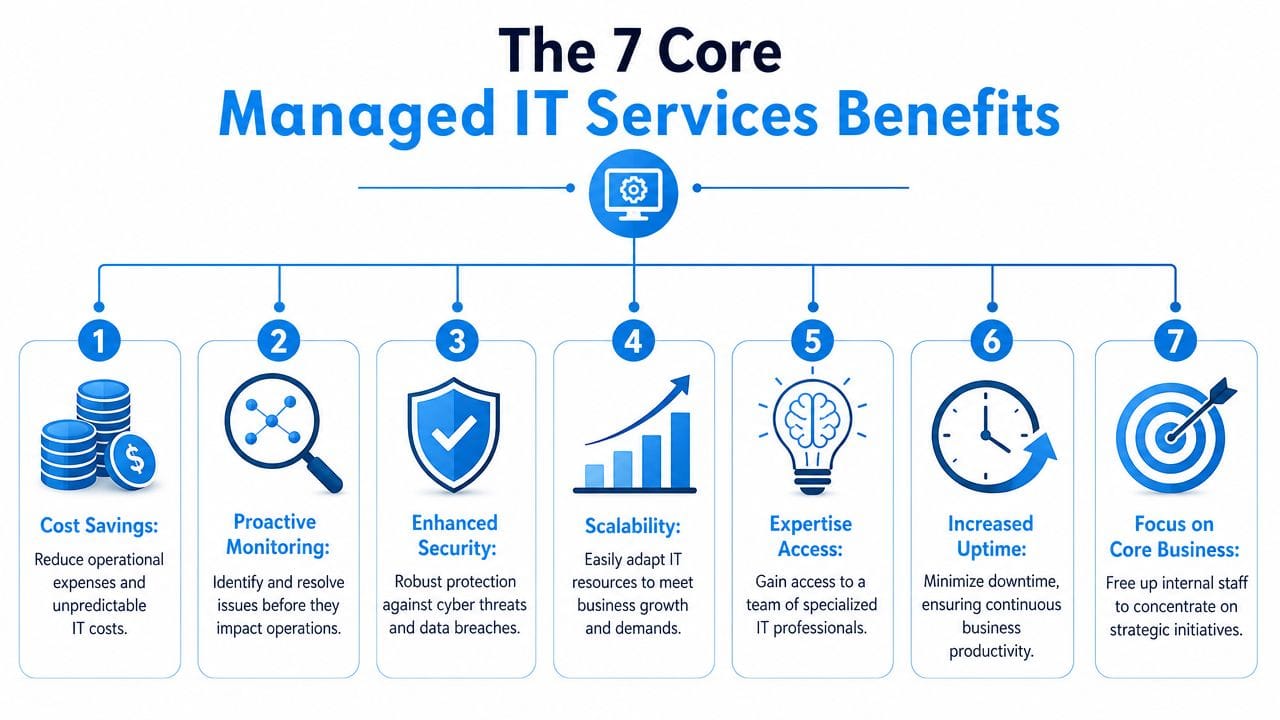
The businesses that get the most value from managed IT aren't chasing trendy tools. They want fewer disruptions, lower risk, and cleaner budgeting. That's the core argument.
A good visual summary helps before you go deeper.
Predictable monthly costs
Unplanned IT spending wrecks small business budgets. A failed laptop, after-hours emergency, firewall issue, or rushed Microsoft 365 cleanup can turn into a string of invoices fast. Managed services replace that chaos with a service plan you can budget for.
That doesn't mean every single project is included forever. It means the day-to-day support, maintenance, and oversight are packaged into a predictable operating cost. For most owners, that's a better financial model than waiting for surprise failures.
A local accounting office is a good example. During tax season, they can't afford random support delays or ad hoc bills every time a workstation stalls. Predictable support matters because predictable operations matter.
Problems get caught early
The best outage is the one your staff never notice.
With monitoring in place, providers can catch storage issues, failed backups, patching problems, overloaded devices, and suspicious behaviour before they become business-wide disruptions. That's one of the clearest managed IT services benefits because prevention protects both time and momentum.
For a small manufacturer in Ottawa South, that might mean a failing network switch gets flagged before office staff lose access to inventory files. For a clinic, it might mean device alerts trigger a fix before front-desk workflows grind to a halt.
Here's where this usually shows up first:
- Device health alerts: Aging hardware and failed services stop hiding in plain sight.
- Patch compliance: Systems don't sit unpatched because everyone was too busy.
- Service visibility: Email sync, shared drives, backups, and firewall status get reviewed continuously.
A provider that only reacts to tickets is not giving you the full value of managed service.
Security gets treated like an operating requirement
Cybersecurity isn't a once-a-year purchase. It's routine discipline.
That means endpoint protection, web filtering, firewall oversight, access controls, patching, account hygiene, and a response plan when something suspicious happens. It also means staff aren't left guessing what to do when a phishing email lands in the inbox.
For many Ottawa-Gatineau SMBs, this is the strongest case for managed support. Few small businesses have the time or internal skill set to run layered security properly every week. If you're relying on “be careful what you click,” your security posture is weak.
If you want a practical example of what layered protection can include, review the components typically found in managed security solutions for small businesses.
Later in this section, it helps to hear a plain-language overview of why this model works for growing businesses:
Backup and recovery become real, not assumed
Many businesses say they have backups. Fewer know whether those backups are complete, current, and restorable.
That distinction matters. A backup that hasn't been checked is a hope, not a recovery plan. Managed providers bring discipline to backup oversight and recovery procedures so that deleted files, failed devices, or larger incidents don't leave your team stranded.
Owner advice: Ask one hard question. “When did we last restore something successfully?” If nobody knows, fix that first.
A legal office with years of client documents, or a dental clinic with scheduling and records data, can't afford vague answers here. Recovery has to be organised before the problem shows up.
Cloud and telecom spending get cleaned up
A lot of SMBs overspend inadvertently. They keep old licences, stack overlapping cloud tools, pay for internet or phone services that don't fit current needs, and never revisit the setup because nothing is visibly broken.
Managed providers often spot this mess quickly. They review licences, usage, telecom contracts, internet service alignment, and cloud sprawl. The result isn't only cost control. It's simpler operations.
Common cleanup areas include:
- Microsoft 365 and Google Workspace licences: Remove waste and align plans to actual users.
- Voice and internet services: Match service levels to how the business really operates.
- Cloud tools: Consolidate scattered apps and reduce duplicate subscriptions.
Retail groups and multi-location businesses usually feel this benefit first because they tend to accumulate services location by location, without a single operating standard.
You get a broader bench of expertise
One internal generalist can be useful. A team with experience across networking, endpoint management, Microsoft 365, backup, cybersecurity, and telecom is better.
That's a core strength of managed support. You're not depending on one person's availability, memory, or comfort zone. If you need help with SharePoint permissions, wireless issues, firewall changes, cloud desktops, or email migration planning, there's usually someone on the provider side who handles that area regularly.
A small business doesn't need a massive IT department. It does need dependable access to people who know what they're doing.
Your team gets back to actual work
This is the benefit owners underestimate.
When staff keep losing time to account lockouts, printer problems, unstable Wi-Fi, patching interruptions, or recurring file access issues, the cost isn't just frustration. It's attention. Your office manager stops managing the office. Your operations lead becomes the default tech fixer. Your senior people waste billable time solving low-value IT headaches.
Managed services put a proper support structure in place so your employees can focus on healthcare, legal work, customer service, sales, operations, or finance. That's what they were hired for.
Calculating the Real ROI of Managed Services
Small business owners often ask the wrong financial question. They ask, “What does managed IT cost?” The better question is, “What does unmanaged or under-managed IT cost us now?”
ROI doesn't come from a single invoice comparison. It comes from looking at labour coverage, downtime exposure, security gaps, tool costs, vendor management, and the time your internal staff lose dealing with avoidable issues. For a typical Ottawa business with about twenty-five employees, the in-house option usually looks simpler on paper than it is in reality.
What an in-house model really includes
One staff member can't be your help desk, systems administrator, cybersecurity lead, Microsoft 365 specialist, backup owner, procurement adviser, and strategic planner all at once. Small firms that try this usually get one of two outcomes. Either they under-support the business, or they keep buying outside help anyway.
That's why the hidden costs matter:
- Coverage gaps: Vacation, sick days, and after-hours incidents don't disappear because one person is unavailable.
- Tool sprawl: Monitoring, remote access, backup oversight, endpoint security, and documentation tools still have to be paid for and managed.
- Specialist work: Firewall changes, cloud migrations, recovery planning, and security remediation often require outside expertise.
- Lost productivity: When users wait, the business absorbs the cost even if it never appears on an IT invoice.
Cost Comparison In-House IT vs. Managed IT Services 25-Employee Ottawa Business
| Cost Factor | Annual In-House IT Cost | Annual Managed IT Cost |
|---|---|---|
| Core support coverage | Salary and ongoing employment overhead for one internal resource, often with limited breadth | Monthly service agreement covering routine support and operations |
| Monitoring and maintenance tools | Separate subscriptions and administration effort | Commonly bundled into the service plan |
| Security management | Partial coverage unless additional products or outside help are added | Typically integrated with ongoing support and oversight |
| Backup and recovery administration | Internal time plus separate tooling and testing effort | Usually managed under a defined process |
| Specialist project support | Extra consulting cost when internal skills run out | Often reduced because a broader team is already involved |
| Vacation and after-hours coverage | Limited, or dependent on contractors | Built around a support model with wider availability |
| Vendor co-ordination | Internal staff time | Handled as part of ongoing service delivery |
| Productivity impact from reactive support | Higher risk of slow response and recurring interruptions | Lower risk when issues are caught and handled earlier |
This is why managed IT shouldn't be treated as a cost centre. It's an operating model. If your business needs stronger resilience around data recovery, review what a proper online disaster recovery approach should include and compare that to what you currently have.
The strongest ROI usually shows up in three places. First, ownership time stops leaking into technical firefighting. Second, staff lose fewer hours to recurring issues. Third, the business gets access to wider expertise without building a full internal department around it. That's a solid trade for most SMBs.
Managed IT for Key Ottawa-Gatineau Industries
The managed IT services benefits look different depending on what your business does. A law firm doesn't have the same risk profile as a retail chain. A dental clinic doesn't have the same operational pressure as a restaurant group.
The local context matters too. Ottawa-Gatineau has a mix of clinics, professional firms, retail operators, contractors, and growing service businesses that need reliable systems without building oversized internal IT teams.

Healthcare and dental clinics
Healthcare organisations need security, uptime, and disciplined access control. Patient information, appointment systems, imaging files, and electronic records can't be handled casually. In Ontario, PHIPA obligations make sloppy device management and weak account practices a serious operational risk.
A managed provider helps by enforcing patching, securing endpoints, controlling access, supporting backups, and tightening the environment around everyday tools like Microsoft 365, shared files, and mobile devices. Front-desk efficiency matters here too. When staff can't access records or schedules, the whole clinic feels it immediately.
Legal and professional services
Law firms, accounting offices, and consulting practices sell expertise by the hour. When systems are unstable, billable time disappears.
The priority for these firms isn't flashy infrastructure. It's confidentiality, reliable document access, secure remote work, and email that behaves properly. A managed provider can lock down laptops, support secure file access, reduce recurring user issues, and keep core systems stable enough that partners and staff aren't dragged into technical distractions.
For professional services firms, uptime is not just convenience. It protects revenue already sitting in the calendar.
Retail and hospitality
Retailers and hospitality businesses need dependable point-of-sale systems, stable internet, secure guest or public Wi-Fi separation, and support across multiple devices and locations. They also need issues solved quickly because front-line staff can't wait around for a vague ticket queue while customers are standing at the counter.
A managed setup brings standardisation. The Wi-Fi works the same way at each location. Devices are configured consistently. Guest access is separated from internal traffic. Vendor calls are handled properly. That's what keeps daily operations smooth.
If you run more than one site, this matters even more. Multi-location businesses suffer when each location evolves into its own little IT island.
How to Choose the Right IT Partner in Ottawa
Most providers sound similar at first. They all say they're proactive. They all mention support, security, and cloud expertise. That tells you almost nothing.
You need to assess how they operate, what they include, and whether they understand the realities of an Ottawa-Gatineau SMB. Local presence still matters. So does bilingual support for many workplaces. So does a provider's willingness to look at your environment before pushing a fixed package.

Questions you should ask every provider
Don't ask if they're “full service.” Ask practical questions that expose how they work.
- How do you handle urgent incidents: Ask who answers, when they answer, and what escalation looks like.
- What security controls are included: Get specific about endpoint protection, web filtering, firewall oversight, account security, and monitoring.
- What does onboarding involve: You want documentation, asset visibility, policy review, and a clear transition plan.
- How do you support backup and recovery: Ask how restore requests are handled and how recovery readiness is reviewed.
- Do you support both remote and onsite needs: Ottawa businesses often need both.
- What happens if we outgrow the current setup: A good partner should support cloud changes, growth, and process maturity.
A serious provider should also be comfortable offering an initial assessment. If you want an example of that kind of starting point, review what's included in a complimentary IT infrastructure analysis.
How pricing usually works
You'll usually see one of three pricing models.
| Model | Best fit | Watch for |
|---|---|---|
| Per user | Office-driven environments with standard device needs | What's excluded from support scope |
| Per device | Shared device environments or operations-heavy setups | Whether user support is limited |
| Tiered plans | Firms that want basic, standard, or advanced support levels | Gaps between tiers that force add-on costs |
The cheapest quote is often the worst one. If a provider strips out security oversight, backup administration, vendor co-ordination, onsite support, or after-hours response, you'll pay later in confusion and change orders.
Choose the partner that gives you operational clarity, not the one with the prettiest sales deck.
Your Next Steps to Smarter IT Management
If your business is still relying on ad hoc support, you're paying for IT the hard way. You're paying in interruptions, staff frustration, owner attention, and avoidable risk. Managed services fix that by replacing reaction with structure.
That's the payoff. Better security. Smoother daily operations. Fewer preventable issues. Budgeting that doesn't depend on the next emergency. For Ottawa-Gatineau SMBs, that's not a luxury. It's the baseline for running a stable business now.
Start with a simple review of your current environment. Look at support bottlenecks, recurring user issues, backup confidence, account security, vendor sprawl, and what happens when something goes wrong after hours. Be honest about where your business is exposed.
If you want a low-friction first step, get an outside view of your setup and your priorities. A good assessment will tell you quickly whether managed support would reduce risk, improve consistency, and save your team time.
If you're ready to get control of your systems instead of reacting to them, IT Experts Canada is a practical place to start. Their team works with Ottawa-Gatineau SMBs that need dependable support, stronger security, cloud guidance, and a clearer path forward. Ask for their complimentary initial analysis and get a direct view of where your current IT setup is helping the business, and where it's holding it back.
0 Comments