
You’re in a 60-person office in Ottawa on a Monday morning, and the inbox is already a mess. One person is chasing password resets, another is fielding a VPN complaint from a remote user, and your controller has just forwarded three suspicious login alerts that arrived after hours. Nobody has time to chase every signal, but you also can’t ignore the feeling that one bad click could turn into a real incident.
That’s why security operations center conversations keep landing on the desks of businesses your size. The pressure isn’t just from ransomware headlines. It’s from hybrid work, cloud apps, shared mailboxes, and the simple fact that small and mid-sized teams don’t have the luxury of endless staff to watch every alert.
Table of Contents
- Why SMBs Are Paying Attention to Security Operations Centers
- What a Security Operations Center Actually Does
- The Modern SOC Tool Stack Explained
- In-House vs Co-Managed vs Fully Managed SOC
- Cost, Staffing, and Implementation Considerations
- SOC Use Cases for Healthcare and Professional Services
- Questions to Ask a Managed SOC Provider
Why SMBs Are Paying Attention to Security Operations Centers
A few years ago, a security operations center sounded like something for banks, insurers, and giant public companies with compliance teams and deep budgets. That framing doesn’t match reality anymore. A clinic, an accounting firm, or a multi-location retailer can generate enough identity events, cloud logs, and endpoint alerts to justify a serious monitoring function, even if the business only has 25 to 150 people.
The shift is operational. Hybrid work means users connect from everywhere. Cloud apps push more identity and SaaS activity into the mix. Ransomware crews don’t care that the target is “too small to matter”, they care whether the network is reachable and the response is weak.
A SOC conversation starts when the owner realises the problem isn’t antivirus. It’s visibility, triage, and who responds when the alert arrives at 11:40 p.m.
The buyer question is different for SMBs than for enterprise IT. A large organisation can justify a big internal team and multiple layers of tooling. A smaller one usually can’t. That’s why the decision is whether you need an in-house SOC, a co-managed setup, or an outsourced model that gives you coverage without building a security department from scratch. The practical answer depends on staffing, response expectations, and whether your business can live with business-hours monitoring only.
For Ontario and Quebec buyers, the pressure is even more concrete because many organisations run bilingual, multi-office, and compliance-sensitive workloads. In those environments, a missed alert isn’t just an IT nuisance. It can become a governance problem, a customer trust problem, and a reporting problem.
If you want to see how this relates to broader network oversight, the basics of systems and network monitoring are the right starting point. A SOC builds on that discipline, but turns raw monitoring into investigation and response.
What a Security Operations Center Actually Does
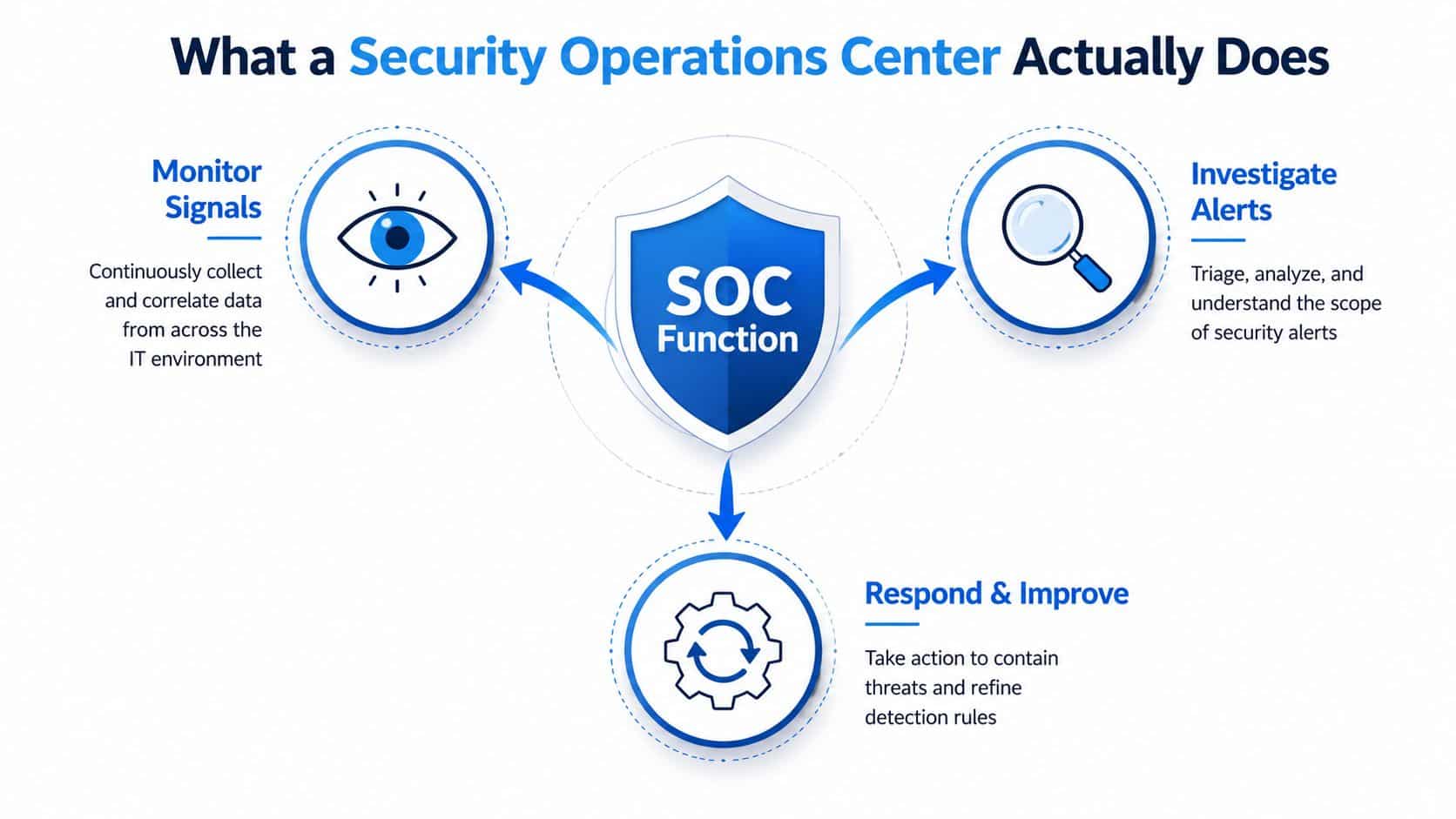
A security operations center is a function, not a room. It’s the part of the business that watches security signals, figures out which ones matter, and coordinates the response when something looks wrong. It operates much like a hospital emergency department. The goal isn’t to treat every cough the same way, it’s to triage fast, escalate the right cases, and keep the serious problems from getting worse.
Monitor signals across the environment
The first job is continuous monitoring. A SOC pulls in telemetry from identities, endpoints, servers, cloud workloads, networks, and applications, then correlates that data so one login, one file change, or one endpoint event can be seen in context. Without that joined-up view, analysts end up staring at isolated logs that don’t tell a useful story.
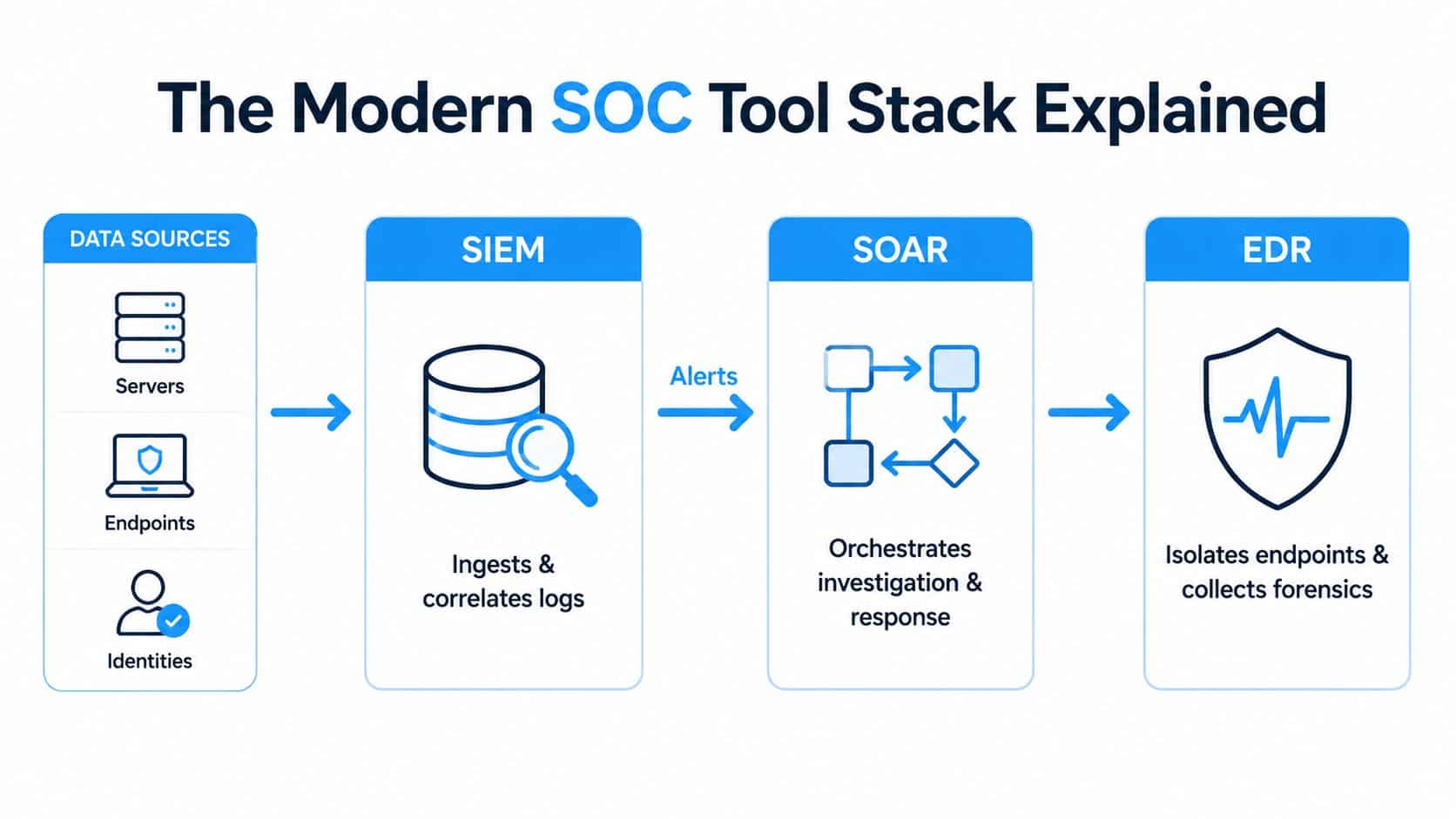
That’s why the architecture matters. IBM describes the modern model as SIEM + SOAR + EDR, where SIEM centralises log ingestion and correlation, SOAR automates repetitive response actions and case handling, and EDR adds endpoint isolation and behavioural visibility for rapid containment. In plain English, the SOC is only as good as its ability to see the whole environment at once. See how that fits with security solutions.
Practical rule: if the team can’t explain where the alert came from, what changed, and which account or device was involved, the monitoring layer is too shallow.
Investigate what matters
The second job is investigation. SOC analysts separate noise from real risk, then determine scope, likely impact, and whether the signal is a benign misfire or a confirmed incident. That’s where analyst tiers matter. Tier 1 handles first-line triage, Tier 2 goes deeper on suspicious activity, and a more senior incident lead coordinates decisions when the situation needs containment or business input.
Respond and improve
The third job is response. A SOC doesn’t just send a warning and walk away. It contains affected systems, coordinates with IT, and then improves detections so the same pattern is easier to catch next time. That feedback loop is what turns a pile of alerts into an operating model.
By the end of this process, you should be able to describe a SOC in two sentences. It monitors the environment continuously, investigates suspicious activity, and coordinates action so threats are contained before they spread. Anything less is just log collection with better branding.
The Modern SOC Tool Stack Explained
A usable security operations center stack is an operational loop, detect, decide, act, learn. If one layer is missing, the rest slows down or produces more noise than value. For a 25 to 150 person organisation, the goal is not to collect more tools. It is to make the team’s response faster and more consistent.
SIEM handles the signal flood
SIEM is the aggregation layer. It pulls in logs from identities, endpoints, servers, cloud workloads, and networks, then correlates those events so unusual patterns stand out. Without SIEM, security data stays scattered. With it, an analyst can line up an unusual login, a process launch, and a data transfer in one view instead of bouncing between separate consoles.
SMBs often buy SIEM as a reporting tool, but it functions as the place where security telemetry becomes something an analyst can reason about.
A security solutions stack still needs clean input and clear ownership, because SIEM only becomes useful when the team knows which alerts matter and who is responsible for acting on them. If the logs are incomplete or nobody tunes the rules, the platform turns into an expensive archive.
SOAR reduces the copy-paste work
SOAR is the automation layer. It handles repetitive response actions and case handling, which means analysts do not waste time copying details between tickets, email threads, and tools. For a small team, that matters. Known patterns can trigger workflows instead of manual chaos, and the SOC can keep pace without adding headcount every time alert volume climbs.
Tool sprawl and weak integration still cause trouble in real SOCs. If alerts land in one system, identity data sits in another, and the responder has to piece it together by hand, response time drags. Automation only helps when the tools exchange information cleanly and the workflows match the way the team works.
EDR gives you the containment lever
EDR is the endpoint visibility and response layer. It shows what happened on the device and gives the SOC a way to isolate the endpoint when the situation calls for it. That containment step matters because endpoint control is what stops a bad event from spreading across the rest of the environment.
If you can see a threat but cannot stop it from moving laterally, the stack has a monitoring problem, not a defence problem. EDR gives the SOC the fastest route to containment, especially when the first sign of trouble starts on a laptop, server, or user workstation.
Bottom line: SIEM finds and correlates, SOAR coordinates the workflow, and EDR gives the team the fastest route to containment.
Buy the workflow, not a single shiny product. A SOC stack that looks impressive on a sales slide but does not connect detection, triage, and containment will waste time and budget fast.
In-House vs Co-Managed vs Fully Managed SOC
This is the decision that matters for a 25 to 150 person organisation. You’re not choosing a logo, you’re choosing who owns monitoring, who investigates, and who gets the call at 2 a.m. The right answer depends on whether you have security depth in-house, whether you need 24/7 coverage, and how much control you’re willing to trade for speed.
| Model | Staffing Reality | Coverage Hours | Typical Best Fit |
|---|---|---|---|
| In-House SOC | Needs multiple skilled analysts, clear leadership, and enough process maturity to sustain shifts | Best when you can staff extended coverage, but expensive to run well | Larger organisations with serious internal security commitment |
| Co-Managed SOC | An internal IT or security lead stays in control, while a provider fills gaps in expertise and off-hours coverage | Good for nights, weekends, and specialist escalation | SMBs that want ownership without carrying everything alone |
| Fully Managed SOC | The provider handles most detection and response, your team stays focused on business remediation | Designed for continuous coverage without building a full team | Lean organisations that need 24/7 monitoring and fast escalation |
An in-house SOC gives you the most control, but it’s a hard sell for most SMBs. You need people, tools, and enough ongoing volume to justify both. Once you add multiple shifts and specialist coverage, the model becomes expensive fast.
A co-managed SOC is the best compromise for many Ottawa-area businesses. Your IT lead keeps context, decides business priorities, and owns relationships internally. The provider fills nights, weekends, detection engineering, and the specialist work that your team doesn’t have time or depth to do consistently.
A fully managed SOC is the blunt answer when your team is lean. It works best when you need coverage more than you need internal ownership of every alert. That’s common in clinics, professional services firms, and multi-site businesses that want predictable coverage instead of assembling a security team piece by piece.
If you’re evaluating managed options, managed IT services are relevant because the SOC function rarely lives in isolation. The support model around it matters just as much as the monitoring itself.
Direct advice: if you don’t already have security specialists on payroll, don’t pretend an in-house SOC is a “future goal”. Treat it as a major operating commitment and only choose it if you can sustain it.
Cost, Staffing, and Implementation Considerations
The biggest mistake buyers make is asking for a price before they scope the problem. A security operations center cost is driven by people, the SIEM/SOAR/EDR stack, log ingestion volume, and integration work. Two organisations with the same headcount can still face very different effort because one lives in Microsoft 365 and a handful of line-of-business apps, while the other runs multiple cloud platforms, a remote workforce, and regulated data in several systems.
Start with scope, not tools
The first step is to define what the SOC must cover. That means identities, endpoints, servers, cloud workloads, email, and any regulated applications that matter to the business. After that, define a small set of use cases that are worth responding to, not a giant wishlist that nobody can tune.
Then deploy telemetry, tune detections, and only after that layer on automation. If you try to automate before the detections are stable, you’ll just move bad logic faster.
Match the programme to the size of the business
A 25-person firm usually needs a tight, focused deployment with clear escalation paths and minimal noise. A 150-person multi-site operation has more log sources, more endpoint variety, and more after-hours risk, so the implementation naturally takes longer and needs stronger integration discipline. The point isn’t to build everything on day one. The point is to make the first set of alerts useful.
For SMBs, staffing shortages and weak orchestration are still the usual reasons SOC programmes disappoint. That’s not a theory. It’s what happens when teams buy tooling without enough people to tune it or enough integration to make the stack coherent.
Practical rule: if your team can’t describe who reviews alerts, who approves containment, and who gets notified after hours, the implementation isn’t ready for production.
Budget and timeline should reflect reality, not optimism. A lean business should expect a staged rollout, not a big-bang security transformation. The most reliable programmes are the ones that start narrow, prove value, and expand only after the alert flow is under control.
SOC Use Cases for Healthcare and Professional Services
In healthcare and dental clinics, the SOC has to care about patient records, unusual data exports, and the early signs of ransomware. That’s not a generic IT concern. It’s a workflow problem tied to regulated data, where who accessed what, when they accessed it, and whether the access pattern makes sense all matter.
Ontario adds another layer. For public bodies, FIPPA requires notification to the Information and Privacy Commissioner of Ontario after a privacy breach, and the provincial IPC annual report says the office received 2,136 privacy breach reports in 2023–2024 (Ontario IPC annual report summary). That makes incident handling more than technical containment. It becomes part of the privacy reporting process.
Healthcare and dental clinics need fast anomaly detection
A clinic SOC should look for abnormal access to patient records, strange export behaviour, and signs that an account is being used outside normal patterns. If ransomware precursors show up, the response needs to be immediate. Waiting until the charting system is locked is too late.
Legal, accounting, and consulting firms need identity-focused monitoring
Professional services firms face a different pattern. Partner mailbox compromise, client-portal abuse, and after-hours account activity are often the key warning signs. The SOC has to pay close attention to identity events because a stolen mailbox can become the launch point for invoice fraud, data theft, or client impersonation.
The key point is that compliance alone doesn’t tell you what to monitor. The SOC has to capture the behaviours that matter to the business, then preserve enough evidence for incident handling and reporting. That’s what makes it useful.
A good SOC in a regulated firm is not a giant alert machine. It’s a disciplined way to spot the few events that can create legal, operational, and reputational damage.
Questions to Ask a Managed SOC Provider
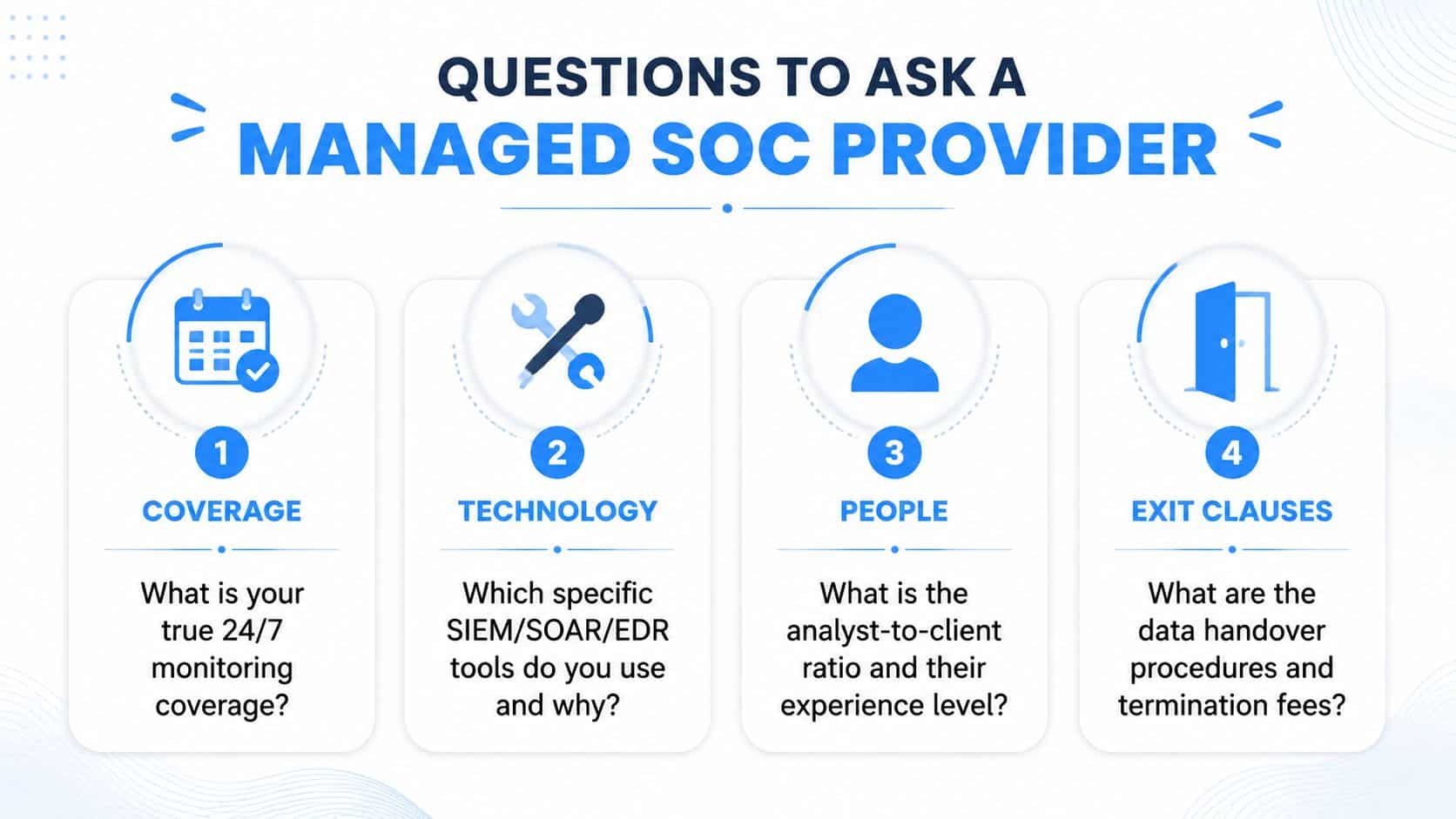
Don’t buy a managed SOC on a polished demo. Ask blunt questions and listen for specific answers. If the provider can’t explain coverage, analyst location, telemetry handling, and exit terms clearly, keep looking.
Coverage
- What is your true 24/7 monitoring coverage? A strong answer names actual monitoring hours and escalation flow. A weak answer talks around the clock without saying who is awake and who is on call.
- How do you handle after-hours incidents? You want containment, not just notification. If they only promise to email you in the morning, that’s not SOC coverage.
Technology
- Which SIEM, SOAR, and EDR tools do you use and why? The provider should explain how the stack fits your environment. If they can’t talk about cloud and SaaS telemetry in plain language, they probably don’t manage it well.
- What does your detection content come from? You want a clear answer about vendor logic, internal tuning, and how they adapt to your business context.
People
- Where are your analysts located? Location matters for responsiveness, language, and escalation. A vague answer usually means the provider doesn’t want you asking follow-up questions.
- Who reviews high-severity alerts? You should know whether a junior analyst is just forwarding work or whether an experienced responder is making decisions.
Exit clauses
- How do you hand over data if we leave? The provider should explain export format, retention, and transition support without hesitation.
- Are there termination fees or lock-in conditions? If the contract gets sticky when you try to leave, that’s a red flag.
Ask for a sample report and a walk-through of a real incident. A provider’s demo usually shows you what they’re proud of. A real incident walkthrough shows you what production will feel like.
If you want a straight answer on whether a security operations center makes sense for your business, IT Experts Canada can help you compare in-house, co-managed, and fully managed options without the fluff. Visit IT Experts Canada to talk through your current environment, your coverage gaps, and what a realistic response model looks like for your team.
0 Comments