

It's Tuesday morning. Your team logs in, the shared files won't open, email is lagging, and nobody knows whether the problem is your server, Microsoft 365, the internet provider, or a bad security update. Customers are waiting. Staff are standing around. You're already doing the mental math on lost billable time, delayed orders, and the awkward calls you'll need to make before lunch.
That's where a lot of small and mid-sized businesses in Ottawa and Gatineau live. Not because they ignore IT, but because they're stuck in a bad model. They call someone when something breaks, hope it gets fixed quickly, and absorb the disruption every time it doesn't. That approach feels cheaper until it isn't.
A managed IT services provider changes the conversation. Instead of reacting to failures, you put someone in charge of preventing them, monitoring your systems around the clock, securing your data, and giving your staff a real support desk when things go sideways. For a business owner, that means less downtime, fewer surprises, and a clearer path to growth.
Table of Contents
- From IT Chaos to Strategic Control
- What Exactly Is a Managed IT Services Provider?
- Unpacking the Core Services of an MSP
- The Strategic Business Benefits of an MSP Partnership
- Decoding Managed IT Services Pricing Models
- How to Choose the Right Managed IT Services Provider
- The Ottawa–Gatineau Advantage and Industry-Specific Needs
- Your Next Step Towards Proactive IT Management
From IT Chaos to Strategic Control
A business owner in the region usually starts in the same place. One person internally “handles computers” off the side of their desk. A local technician gets called for emergencies. Passwords are scattered, backups are assumed to exist, and nobody has a current map of the network. It works just well enough to keep going.
Then a serious outage hits.
Invoices can't go out. Point-of-sale terminals stop syncing. A clinic can't access patient records. A law office can't pull case files before a deadline. In that moment, you don't care about technical terminology. You care about whether your people can work and whether your clients notice.
A proper managed IT services provider brings order to that mess by changing responsibility. Someone is watching the network before users start complaining. Someone is patching systems before known issues pile up. Someone is accountable for support, backups, and security as part of an ongoing service, not a one-off repair.
You don't need more heroics from IT. You need fewer emergencies.
That shift matters because break-fix support rewards reaction. The problem has to hurt before anyone acts. Managed services reward prevention. If the provider does the job well, fewer things break, users stay productive, and your costs become easier to forecast.
For a small business owner, that's the essential upgrade. Not shinier technology. Control.
- Less scrambling: Problems get handled through a process, not panic.
- Fewer surprise invoices: You're not paying premium rates every time something fails.
- Clear accountability: One partner owns the health of your systems instead of everyone pointing at each other.
- Room to grow: Technology stops blocking expansion, hiring, and customer service.
What Exactly Is a Managed IT Services Provider?
A managed IT services provider is your outsourced IT department. Not a random technician you call when a laptop dies. Not a single overworked internal employee who has to do everything from printer problems to cybersecurity. An MSP is a team that manages, supports, secures, and improves your business technology for an ongoing monthly fee.
The easiest way to think about it is this. Hiring break-fix support is like buying a wrench and hoping that solves every mechanical problem your company will ever have. Working with an MSP is like renting a full service garage with specialists, tools, maintenance schedules, and someone at the front desk who answers the phone.
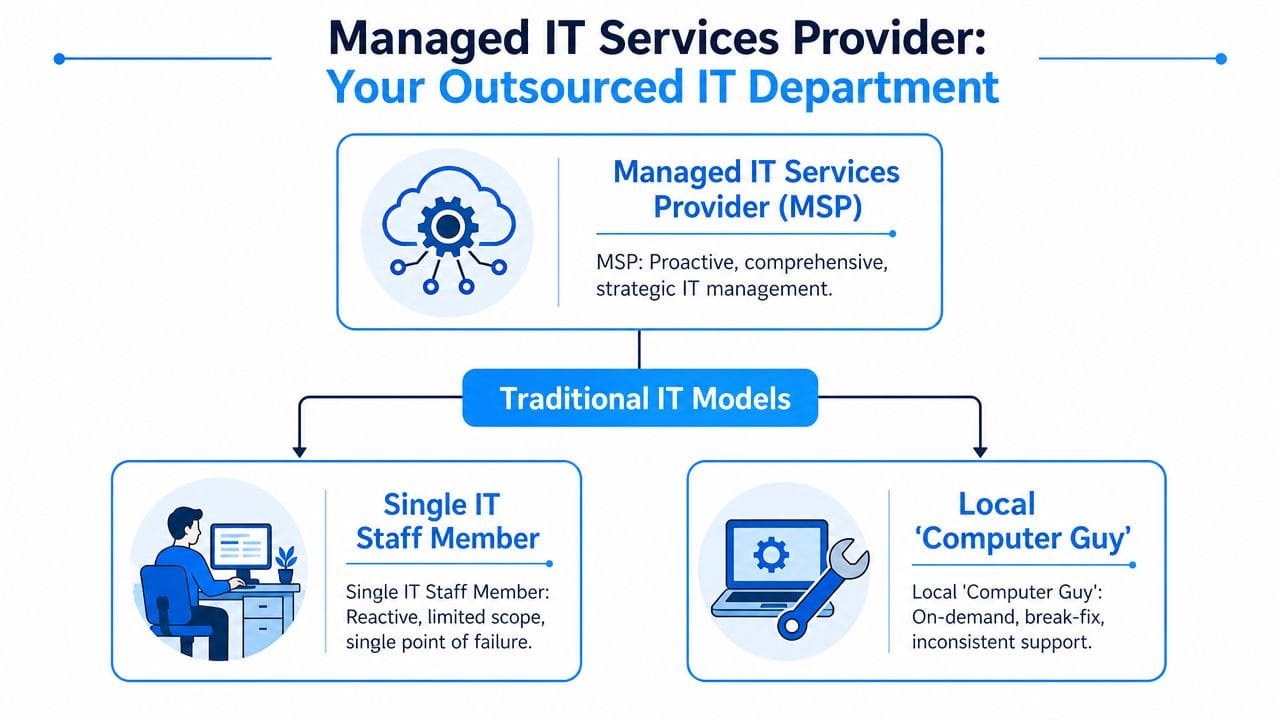
The real difference is proactive versus reactive
Traditional support waits for a problem. The server goes down, a user gets locked out, ransomware hits, or the office internet starts failing. Then the clock starts, the stress rises, and the repair bill shows up later.
An MSP works the other way around. The provider monitors systems, applies updates, reviews alerts, manages backups, supports users, and keeps security controls in place before those issues become business interruptions. That doesn't mean nothing ever goes wrong. It means fewer problems become full-blown disasters.
You're buying outcomes, not just labour
Small businesses often make a common mistake. They compare an MSP to the hourly rate of a technician. That's the wrong comparison.
You're not just buying time. You're buying:
- Continuity: staff can keep working
- Predictability: monthly support costs are easier to budget
- Coverage: help desk, security, cloud, backup, and vendor coordination under one roof
- Depth: you get access to a team with different specialties instead of one generalist
Practical rule: If your current IT arrangement depends on one person always being available, you don't have a system. You have a vulnerability.
Why this model fits growing businesses
Most Ottawa–Gatineau businesses don't need a large in-house IT department. They need reliable operations, fast support, and a plan. A managed IT services provider gives them that without forcing them to recruit multiple full-time specialists for networking, Microsoft 365, cybersecurity, backup, and telecom.
That's why this model works so well for companies with lean teams. You keep your focus on serving clients, running operations, and growing revenue. The MSP handles the day-to-day technology burden and helps you make smarter decisions when it's time to upgrade, migrate, or tighten security.
Unpacking the Core Services of an MSP
Business owners hear “managed services” and often think it means general tech support. It's much broader than that. A capable MSP handles the systems your staff rely on every day and the risks that can shut you down when nobody's looking.
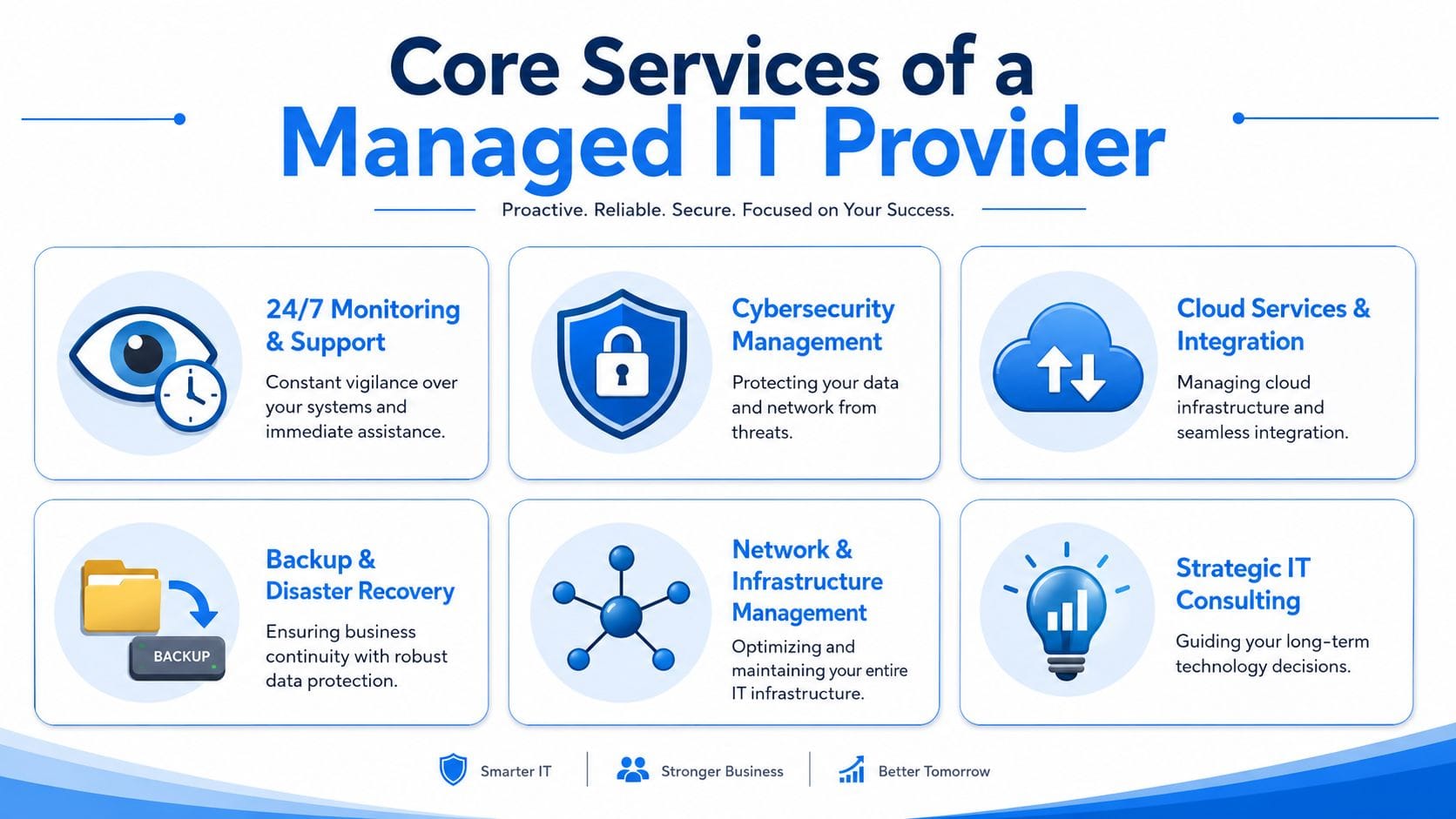
Support that keeps staff moving
The business problem is simple. Your employees lose time on small technical issues that pile up into big productivity losses. Password resets, printer failures, email sync issues, VPN access, slow laptops, and software glitches all eat time.
A solid help desk gives users a clear place to go by phone, email, or remote session. Good support doesn't just solve the ticket. It removes friction so your staff can get back to work quickly and stop improvising fixes that create more problems later.
For many businesses, this is the first visible improvement. Staff stop wandering around the office asking who knows computers. They submit a request and get help.
Monitoring that catches trouble early
The business problem here is unplanned downtime. If nobody is watching your servers, endpoints, firewalls, storage, or network alerts, you usually learn about a problem after users are already affected.
Proactive monitoring flips that. An MSP watches system health, capacity, updates, security alerts, and device status so issues can be addressed before they take down part of the business. That includes patching, routine maintenance, and keeping core equipment from drifting into neglect.
A provider like IT Experts Canada fits the model many local firms need. It offers managed support, network oversight, cloud services, cybersecurity, backup, and telecom management for Ottawa–Gatineau businesses under defined service plans.
Security that protects the business, not just devices
The business problem is risk. Most owners still think cybersecurity is mainly about antivirus. It isn't. It's about preventing operational damage, financial loss, and reputational fallout.
According to 2026 small business data breach reporting, the average cost of a single data breach for a small business has surpassed $150,000, which is why proactive security and backup are no longer optional. A serious MSP manages endpoint protection, web filtering, firewalls, access controls, threat monitoring, and user protection as a connected system.
If security is weak in your business, start there. Review your current posture, your response plan, and your layered controls through managed security solutions for Ottawa businesses.
Security spending feels expensive right up until you compare it to the cost of recovery.
Cloud tools that people can actually use
The business problem isn't “needing the cloud.” It's needing staff to collaborate, access files, work remotely, and use platforms like Microsoft 365 or Google Workspace without creating confusion or exposure.
An MSP helps with migrations, account setup, permissions, shared storage, device access, and ongoing administration. Done right, cloud services make work easier. Done badly, they create duplicate files, weak access control, and endless support tickets.
The key is usability. Fancy platforms don't help if your team can't find documents or log in from a job site, clinic room, or second office.
Backup and recovery that assumes failure will happen
The business problem is data loss. Hardware fails. Users delete the wrong folder. Malware encrypts files. Sync tools overwrite the wrong version. If your recovery plan is “we think it's backed up somewhere,” you don't have a plan.
An MSP should manage backup schedules, retention, recovery procedures, and restore testing. The point isn't just copying data. The point is restoring business operations quickly and cleanly when something goes wrong.
Owners often ask whether backup is really necessary if they use cloud apps. Yes. Cloud platforms help with availability, but they don't replace a business-grade recovery strategy.
Telecom and connectivity that stop draining money
The business problem is poor coordination between internet, phone systems, and office operations. Many companies overpay for circuits, drag along outdated voice setups, or have no one managing provider issues when service degrades.
An MSP that handles telecom can review your business phone setup, internet options, provider fit, and reliability requirements. That matters even more for hybrid teams, customer-facing offices, and multi-site businesses where dropped calls or unstable connectivity hit revenue directly.
The Strategic Business Benefits of an MSP Partnership
Most owners start by asking what an MSP does. The better question is what an MSP changes in the business.
First, it turns IT from erratic spending into something you can plan around. Break-fix support creates surprise costs at the worst possible moments. Managed services shift that into a steady operating expense with a defined scope. Budgeting gets easier. Decision-making gets easier. You stop approving emergency invoices under pressure.
Second, you get expertise that small businesses usually can't build internally. One person rarely covers networking, Microsoft 365, cybersecurity, backup, vendor management, and user support well. A managed model gives you access to multiple skill sets without building a full department.
Productivity is the real payoff
Downtime is expensive because it multiplies. One issue can stall accounting, sales, service delivery, and customer communication at the same time. A 2026 SMB Technology Council analysis found that businesses working with an MSP reduce annual IT-related downtime by up to 85% and can lower overall IT spending by 25-45% compared to in-house or break-fix models, according to the managed IT ROI analysis.
That matters more than any technical feature list. If your people can work, you protect revenue. If support is fast, managers stop acting as informal troubleshooters. If systems are stable, your business runs with less friction.
Risk gets pushed back where it belongs
A good MSP also gives you discipline. Security controls, patching, user support, backup routines, and documentation stop being optional admin tasks that get skipped when everyone is busy.
That discipline has direct business value:
- Fewer avoidable interruptions: systems stay available more consistently
- Better executive focus: ownership and managers spend less time babysitting IT problems
- Cleaner growth: adding staff, locations, and tools becomes less chaotic
- Stronger client confidence: customers notice reliability, even if they never see the work behind it
Good IT support shouldn't be memorable. If your staff talk about IT every day, something is wrong.
The biggest mindset shift is this. An MSP isn't just there to “fix computers.” The right partner protects operating time, reduces avoidable risk, and gives you a cleaner foundation for growth.
Decoding Managed IT Services Pricing Models
Pricing confuses a lot of business owners because different providers package similar services in different ways. That's normal. What matters is whether the pricing model fits how your business works.
Some companies have more people than devices. Others have shared workstations, warehouse terminals, servers, and specialty equipment. A law firm, dental clinic, and retail chain won't all buy support the same way. They shouldn't.
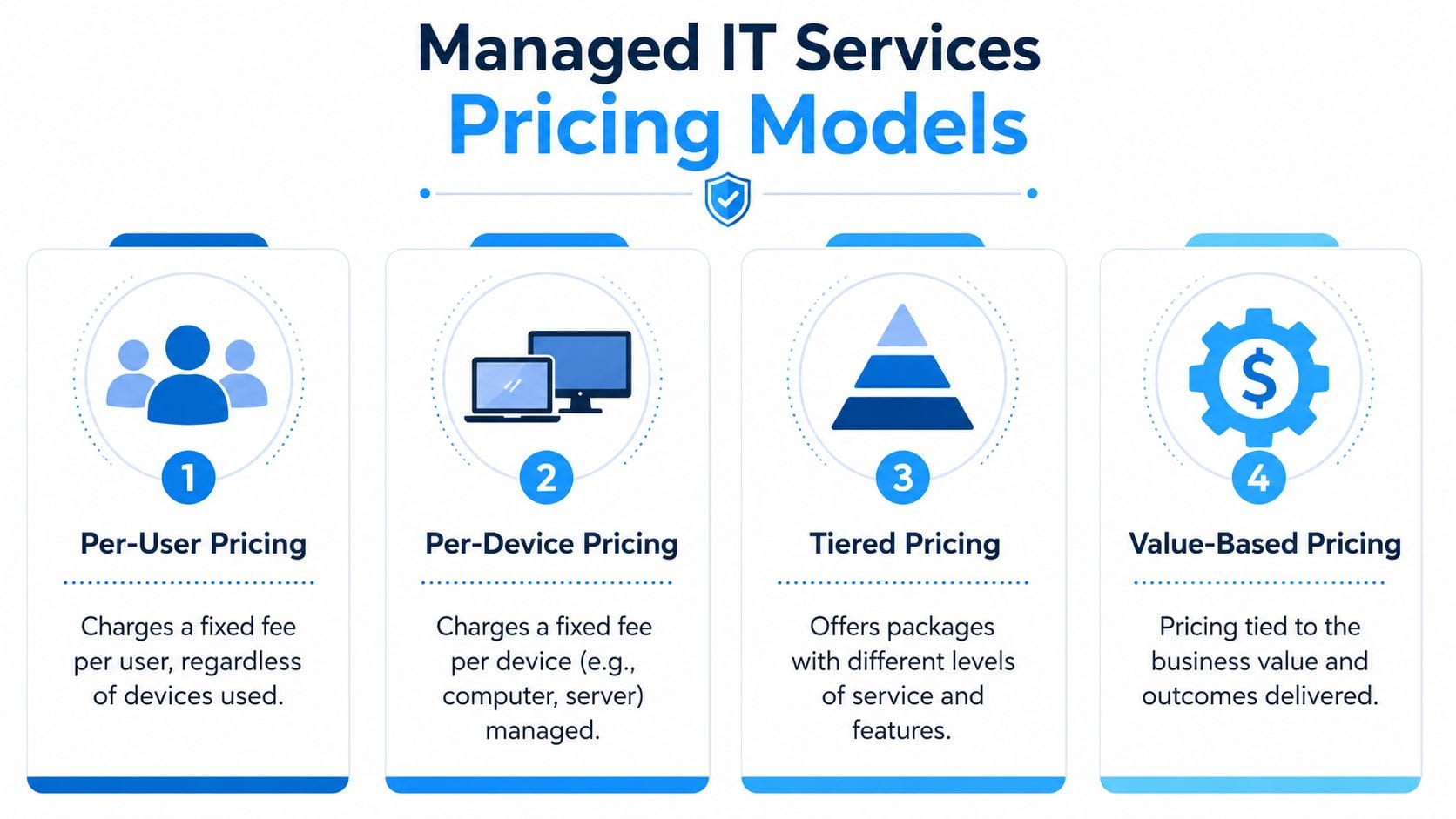
The four models you'll see most often
- Per-user pricing: You pay a set monthly amount for each user, regardless of how many devices that person uses. This works well for offices where employees move between desktops, laptops, and phones.
- Per-device pricing: You pay for each managed endpoint or system. This can fit environments with shared stations, front-desk machines, shop-floor devices, or a lot of infrastructure.
- Tiered pricing: The provider offers packages with different levels of support, security, and coverage. This can work if your needs are straightforward and the scope is clearly defined.
- Value-based pricing: The provider prices around business outcomes, service depth, and complexity rather than a simple device count. This tends to suit businesses with more operational dependency on IT.
If you want a Canadian view of how providers explain common cost drivers, review managed IT pricing guidance for businesses.
Comparison of MSP Pricing Models
| Model | How It Works | Best For | Pros | Cons |
|---|---|---|---|---|
| Per-user | Monthly fee per employee | Offices with mobile staff and multiple devices per person | Easy to budget, simple to understand | Can feel expensive if some users need little support |
| Per-device | Monthly fee per workstation, server, or other managed device | Shared environments, operations with many fixed devices | Ties cost to hardware footprint | Can get messy when one user has several devices |
| Tiered | Package levels with increasing service scope | Businesses that want a clear menu of options | Easy comparison between plans | Lower tiers may leave important gaps |
| Value-based | Price reflects service scope and business impact | Firms with critical uptime or compliance needs | Better alignment with business priorities | Harder to compare if providers define value differently |
What to watch for in the contract
Don't get distracted by the lowest monthly figure. Ask what's included, what triggers extra charges, whether onsite support is covered, how after-hours incidents are handled, and how projects are priced.
A cheap agreement that excludes essential support isn't a bargain. It's deferred frustration.
How to Choose the Right Managed IT Services Provider
Choosing an MSP is a buying decision, not a technical quiz. You're selecting a partner that will have access to your systems, staff, vendors, and operational weak points. If they're disorganised, slow to respond, or vague about security, you'll feel it fast.
Start with the provider's operating model. Do they prevent issues or mostly react to tickets? Can they explain their service in business language? Do they have local onsite capability for Ottawa and Gatineau when remote support isn't enough?
Here's a useful checklist to keep the conversation grounded.
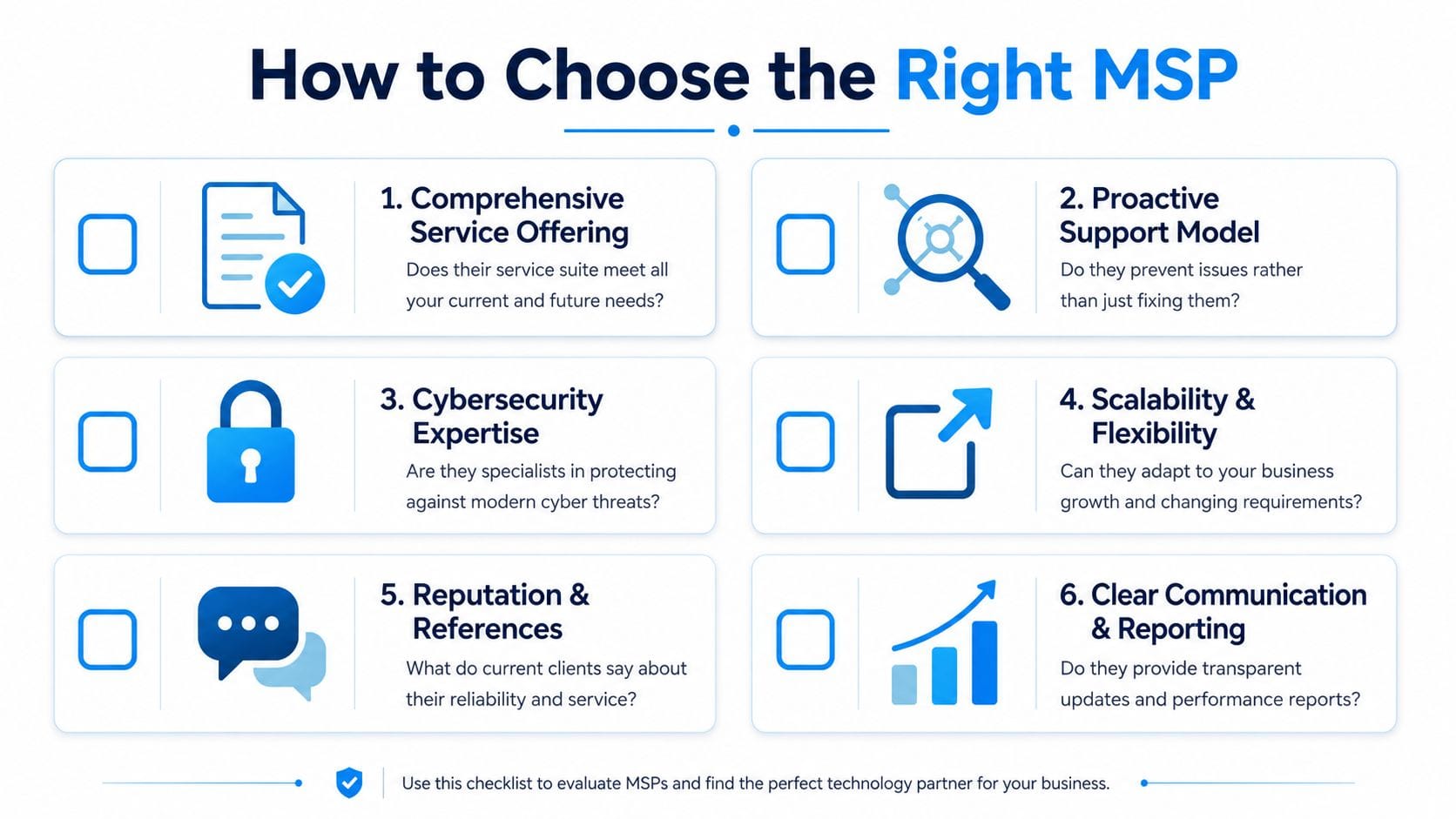
Questions you should ask before signing anything
- How do you handle response times and service levels? Ask what happens when a user can't work, when a server fails, or when a security issue appears after hours.
- What does onboarding look like? A competent provider should have a clear process for documentation, access review, device setup, baseline security, and transition planning.
- What industries do you already support? Healthcare, legal, accounting, and retail all have different operational pressures.
- How do you approach cybersecurity? You want layered protection, ongoing monitoring, and a credible answer on access control, patching, and user risk.
- Can you support both remote and onsite issues? Some problems can't be solved through a screen share.
- How do you report on what you're doing? Monthly reviews, ticket trends, asset visibility, and security updates should not be a mystery.
A short explainer can help frame what to look for in a provider:
Red flags that should end the conversation
Some warning signs are obvious. Others get missed because the sales process sounds polished.
- No clear scope: If they can't explain what's included, expect disputes later.
- Weak communication: If they drown you in jargon during sales, they'll probably do the same during incidents.
- No local presence: In Ottawa–Gatineau, onsite support still matters for hardware failure, network issues, office moves, and emergencies.
- Security as an add-on afterthought: That tells you how they prioritise risk.
- No structured onboarding: A sloppy transition usually creates months of cleanup.
- No willingness to understand your business: A provider who treats a clinic, law office, and retailer the same way is taking shortcuts.
Ask one simple question: “How will your service reduce interruptions for my staff over the next year?” If the answer is vague, keep looking.
The right MSP should leave you with clarity. You should understand how they work, what they'll own, how they'll communicate, and what success looks like.
The Ottawa–Gatineau Advantage and Industry-Specific Needs
Generic IT support advice falls apart quickly in this region. Ottawa and Gatineau businesses deal with bilingual communication, cross-river operations, varied compliance demands, and a mix of private sector, professional services, healthcare, and multi-location organisations. A provider that only offers remote support from somewhere else may still solve tickets, but that doesn't mean they fit the realities on the ground.
Local presence matters. When a firewall dies, an office move is underway, or a line-of-business device fails, having someone who can get onsite in the region is not a luxury. It's operational common sense. Bilingual support matters too. If your staff, front desk, or management team work in both English and French, your IT partner should be able to communicate clearly in both.
Healthcare and dental clinics
Clinics don't have much tolerance for downtime. Staff need access to scheduling systems, patient files, imaging, and secure communications. They also handle sensitive health information and can't be casual about privacy obligations, access control, or recovery planning.
A one-size-fits-all MSP usually misses the daily pressure points. Clinics need stable exam-room devices, secure Wi-Fi separation, dependable backup, and support that respects how a patient-facing environment functions.
Legal, accounting, and consulting firms
Professional services firms live on trust, deadlines, and document access. When email stalls, document systems lag, or remote access fails, the damage is immediate. Client confidence drops fast when a firm looks disorganised or unavailable.
These businesses need confidentiality, uptime, and tight control over who can access what. They also need technology that supports hybrid work without turning every partner or senior manager into their own help desk.
Retail and multi-location operations
Retail, hospitality, and franchise businesses have a different challenge. They need standardisation across sites. Internet service, point-of-sale connectivity, guest or public Wi-Fi, phones, and device management all have to work consistently from one location to the next.
That's where a local MSP with regional knowledge has an edge. They can align vendors, streamline support, and apply the same security and operational standards across sites instead of letting each location become its own mini IT problem.
The best fit in Ottawa–Gatineau is usually a provider that can combine local responsiveness, bilingual communication, and industry awareness. Anything less is generic support dressed up as strategy.
Your Next Step Towards Proactive IT Management
If your current setup depends on luck, memory, and whoever answers the phone first, it's time to change it. A managed IT services provider gives you structure where you currently have risk. That means steadier operations, clearer support, better security, and fewer expensive surprises.
This isn't about handing over control. It's about gaining it. The right provider documents your environment, supports your staff, strengthens your defences, and helps you make technology decisions with a business outcome in mind.
If you're evaluating options in the region, start with a practical review of what you already have. Map your weak points. Look at support gaps. Check how backup, security, cloud tools, and connectivity are being managed. A proper free IT infrastructure analysis for Ottawa–Gatineau businesses is a sensible first move because it gives you a baseline before you commit to anything.
You don't need another emergency to justify getting serious about IT. You need a better operating model.
If you're in Ottawa or Gatineau and you want a clearer view of where your systems are exposed, IT Experts Canada is one option to review for managed support, cybersecurity, cloud services, backup, and telecom coordination built for small and mid-sized businesses.
0 Comments