
The phone rings, someone in your Ottawa office can’t reach the shared drive, and a clerk in Gatineau is staring at a frozen login screen. By the time someone “takes a look,” emails are delayed, the VoIP system is glitching, and nobody is sure whether this is a network fault or a security incident. That’s the normal reality for small businesses now, and it’s exactly why network and security solutions have to be treated as one operating system for the business, not a pile of separate gadgets.
Small teams don’t fail because they ignore security. They fail because they buy tools they can’t sustain, leave gaps between vendors, and hope the next outage isn’t the one that exposes everything. In the Ottawa–Gatineau market, that’s a bad bet.
Table of Contents
- What Network and Security Solutions Cover
- Core Components Every Business Needs
- Managed Service Delivery and Continuous Monitoring
- Benefits for SMBs and Regulated Industries
- How to Choose the Right Provider in Ottawa–Gatineau
- Example Architectures and Real Outcomes
- Your Next Steps to Secure Your Business
What Network and Security Solutions Cover
A lot of owners hear “network and security solutions” and picture one firewall box in a closet. That view is too narrow. In practice, these solutions cover the full setup that keeps people connected, keeps threats out, and keeps the business recoverable when something breaks.
A clinic in Ottawa can have fast internet and still be one phishing click away from a bad week. A professional services firm in Gatineau can have solid laptops and still get flattened by poor segmentation, weak remote access, or a backup that’s never been tested. The fix is the system around those problems, not one product.
The system, not the sticker
The stack includes firewalls, switches, segmentation, endpoint protection, VPN or secure remote access, monitoring, patching, backups, and incident response. It also includes the policies that tell staff what gets updated, who can access which systems, and what happens when an alert fires.
The Canadian Centre for Cyber Security’s guidance matters in practical terms. It says organizations should have a policy to update by default, applying updates as soon as possible and ideally automatically, and it says monitoring should be built so teams understand what they’re watching, have the necessary logs, detect misuse, and extract useful insights from analysis. That is the operational backbone of a working environment.
Practical rule: If a provider only talks about hardware, you are not buying network and security solutions, you are buying a box.
Security needs differ by business type, but the discipline does not change. A retail branch, a law office, and a healthcare practice need different access patterns, yet each one still needs controls that are consistent, visible, and manageable. The stack has to fit the staff you have, not the team you wish you had.
That point matters even more for Ottawa–Gatineau SMBs with distributed offices and limited in-house support. A good setup is stable, simple to operate, and built to withstand turnover, remote work, and the routine pressure of day-to-day operations. If the environment needs constant heroics, it is too complicated.
For local owners, the right question is not “What is the most powerful product?” It is “What combination of controls keeps us running, visible, and recoverable without creating a mess we cannot operate?” That is the filter that cuts through vendor noise and points you toward something sustainable.
Core Components Every Business Needs
Start with the front door. The firewall decides what comes in and what gets blocked, and it should be tuned to the business, not left on default. A misconfigured firewall is worse than an absent one because it gives people false confidence while exposing the wrong services.
Next is the internal traffic control layer. Switches move traffic around the office or across locations, but they also define where traffic can travel. If they’re unmanaged or poorly segmented, every device can end up sharing the same trust zone, and that’s exactly how a small issue turns into a broad outage.
The controls that stop one mistake from becoming a crisis
Network segmentation is what keeps the whole building from becoming one open room. Separate finance, guest Wi-Fi, VoIP, servers, and regulated data into distinct VLANs or subnets, then enforce traffic between them with policy. Microsoft’s Zero Trust guidance explicitly recommends dividing networks into segments, using a perimeter zone for untrusted networks, and isolating critical resources, and that’s the right model for small Canadian businesses that can’t afford lateral movement after a compromise.
Endpoint protection covers each laptop, desktop, and server. If staff work from home, travel, or rotate between locations, every device needs the same baseline protection because the perimeter is no longer a wall, it’s a moving target.
VPNs or secure remote access matter when people work from outside the office, but access should never be trusted just because someone is “on the VPN.” Microsoft’s Zero Trust guidance recommends explicit verification using identity, network, location, device health, workload, user and device risk, data classification, and anomalies. That’s the right approach because location alone tells you nothing about whether the user or device should be trusted.
Backups and recovery are not optional
Backups are the safety net. If ransomware lands, a server fails, or someone deletes the wrong data, backups decide whether the event is a short disruption or a business problem that lingers for days.
Disaster recovery is the playbook for getting back to work. It should define restore order, contact paths, and what gets rebuilt first. If you’ve never tested restores, you don’t really have recovery, you have hope.
If you need help tracing how those parts fit into a wider telecom and infrastructure stack, this overview of telecom infrastructure is a useful reference point. The point isn’t to collect tools, it’s to build a structure that still works when a device fails, a site drops, or a user makes a bad click.
A good architecture reduces the number of decisions you have to make during an incident.
Managed Service Delivery and Continuous Monitoring
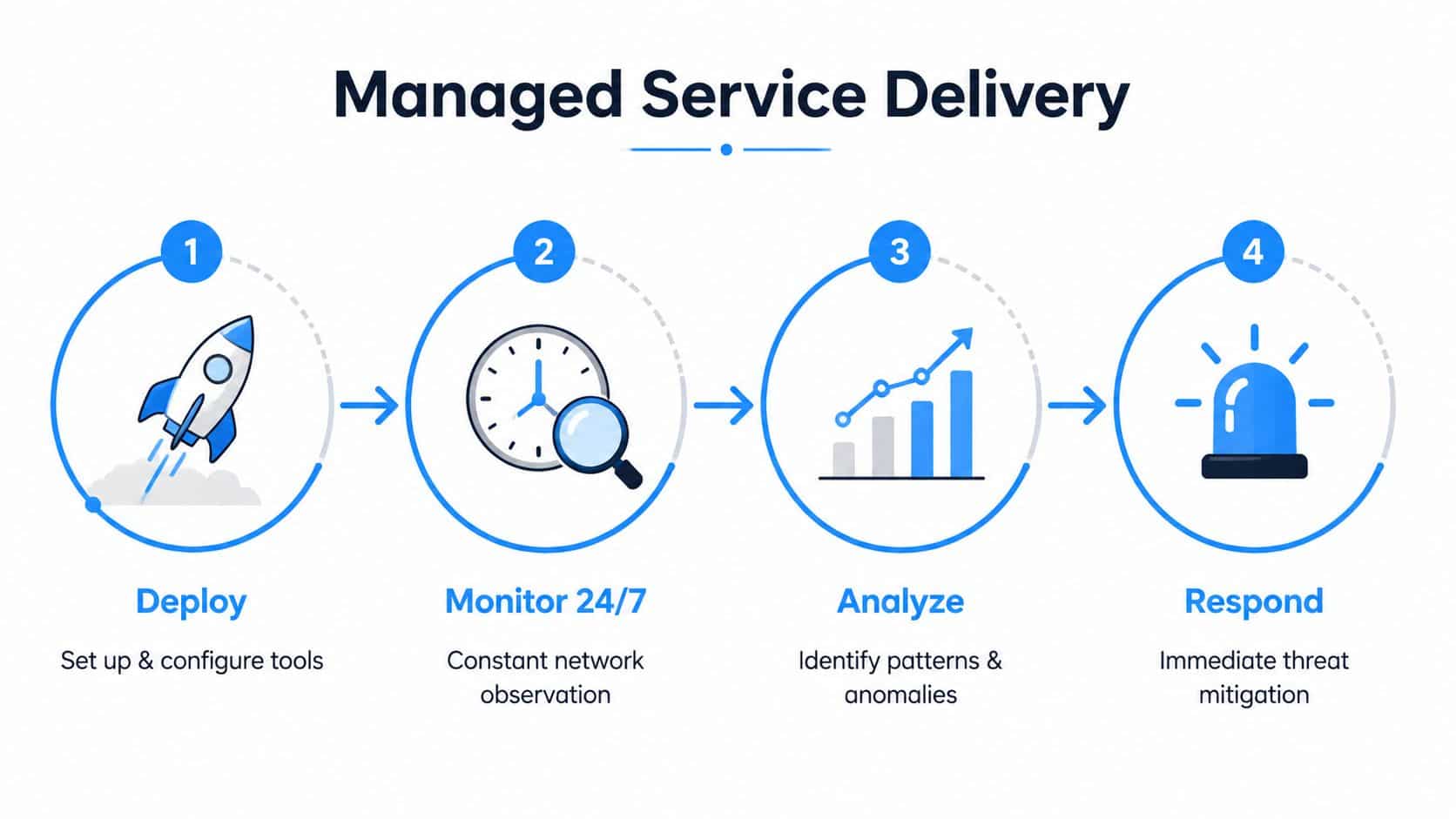
Buying security tools and running security tools are different jobs. Small teams usually handle the first part badly and the second part not at all. Managed service delivery matters because someone has to watch alerts, patch systems, and respond while the business is busy doing business.
The Canadian reality is not abstract. The 2023 Canadian Survey of Cyber Security and Cybercrime found that 11% of businesses were impacted by at least one cyber security incident in the previous 12 months, and affected firms reported direct costs from incident response, recovery, lost revenue, and downtime. Passive ownership is a poor strategy for SMBs.
What the managed model changes
In a DIY setup, your internal team installs the firewall, handles updates when they remember, and notices trouble only after users complain. In a managed model, the provider owns routine work, watches the environment, and escalates problems before they spread. That shift matters more than any single product because it turns security from a side task into an operating discipline.
The network security market is already built around that reality. In North America, it held a major share of global demand in recent market research, with estimates ranging from 35.1% of revenue in 2025 to 41.8% in another 2025 assessment, and one forecast puts the global market at USD 84.5 billion in 2025 rising to USD 119.7 billion by 2030 at a 7.2% CAGR. Another projects USD 27.76 billion in 2026 rising to USD 47.37 billion by 2031 at 11.28% CAGR from Mordor Intelligence. The practical takeaway is simple, network security is core infrastructure, not a specialty add-on.
Monitoring only works if it is operational
Effective monitoring is not one screen full of coloured alerts. Carnegie Mellon’s CERT says strong analytics combines network packet monitoring, flow collection, DNS records, third-party threat intelligence, vulnerability scanning, and host-based logs because each source shows a different part of the problem in its network security analytics guidance. Flow data shows who talked to whom. DNS reveals suspicious name-resolution patterns. Vulnerability and configuration data tie exposure to specific assets.
Useful test: If your provider can’t explain how an alert becomes a ticket, how a ticket becomes containment, and how containment becomes a restore, the monitoring isn’t mature enough.
If you are comparing operational models, IT Experts Canada’s systems and network monitoring approach fits the kind of ongoing oversight small teams need, because it focuses on visibility, maintenance, and response rather than one-off installs. IT Experts Canada also lists Network and Security Monitoring as part of its service set, which is the right kind of offer for businesses that need steady operational coverage rather than another isolated tool.
The SLA conversation should be blunt. Ask who sees the alert, how fast they acknowledge it, how they escalate, and what happens after hours. If the answer is vague, the service will be vague when it matters most.
Benefits for SMBs and Regulated Industries
For SMBs, the main gain is not abstract cybersecurity. It is fewer interruptions, quicker recovery, and less internal scrambling when a device fails or someone clicks the wrong thing. That is what owners need.
Regulated sectors feel the impact faster because they handle sensitive data and cannot brush off downtime. Clinics, legal firms, accountants, and financial services offices need systems that are controlled, traceable, and easy to support. A sensible setup reduces the number of things that can fail at once.
Why layered control beats scattered tools
North American demand for network security keeps pulling the market in that direction, and the broader research is consistent on one point, the region stays dominant from Grand View Research. The exact figures vary by methodology, but the practical lesson does not. Canada operates inside a security-heavy commercial environment, so weak setups get exposed quickly.
For smaller businesses, the value comes from layered controls that stay in place. Firewall policy, segmentation, monitoring, patching, and backup discipline shrink the blast radius of common incidents. That matters when you do not have a large internal team to chase every alert by hand.
Simplicity is a security feature
A lot of providers sell complexity as sophistication. I do not buy it. Small and distributed organisations need setups that staff can understand, maintain, and recover, especially when people work across the Ottawa and Gatineau sides of the river, from home, or across multiple sites.
The underserved-business angle matters too. Research on accessible cybersecurity argues that accessibility has to be designed through the full lifecycle, and underserved groups often have lower cybersecurity awareness and confidence. In one survey of underserved residents, 20% did not know about online crime, 21% did not know about email spam, 26% did not know about computer or phone viruses, and 31% did not know about anti-virus software in the accessible cybersecurity literature. That is a reminder that security controls need to be usable, not just technically impressive.
When you make security easier to understand, you lower training friction, reduce mistakes, and improve adoption. That is not a soft benefit. It is what keeps the system alive after the initial rollout.
How to Choose the Right Provider in Ottawa–Gatineau
The best provider is not the one with the loudest sales pitch. It’s the one that can keep your environment stable with the staff and budget you have. In Ottawa–Gatineau, that means local presence, bilingual support, clear escalation paths, and a service model that doesn’t fall apart when something needs hands-on work.
Start with the basics. Ask how they handle after-hours incidents, whether they can provide onsite support when remote repair isn’t enough, and who owns the relationship when an outage happens. If they dodge those questions, move on.
What to ask before you sign anything
- Response and escalation: Ask who answers first, who takes over next, and what triggers a senior technician. You want a named process, not “we’ll get back to you.”
- Local coverage: Ask whether they have technicians who can come onsite in the Ottawa–Gatineau area when remote work won’t solve the issue.
- Bilingual support: Ask how they support English and Canadian French users, especially during incidents when confusion costs time.
- Pricing clarity: Ask what’s included in the base plan, what’s billable, and what happens when you add sites, devices, or users.
- Security operations: Ask how they monitor, patch, log, and report. A provider that can’t explain the operational layer is just reselling tools.
| Evaluation Criteria | What to Look For | Red Flags |
|---|---|---|
| Response process | Clear escalation path, named contacts, after-hours coverage | “We’ll figure it out when it happens” |
| Local support | Ottawa–Gatineau onsite capability | No local technicians |
| Communication | English and Canadian French support | Reliance on a single language during incidents |
| Pricing | Transparent service scope and billable items | Vague bundles and hidden extras |
| Monitoring | Regular review of logs, alerts, and remediation | Tool sales without operational ownership |
A provider should also understand Canadian privacy expectations and the reality of distributed teams. If they only talk about the best-case cloud story, they’re not thinking about branch outages, VPN failures, VoIP issues, or the messy middle where most SMB incidents live.
There’s one more red flag worth calling out. If a provider seems more interested in selling you features than reducing your burden, they’re solving for their revenue model, not your operations. For small businesses, that’s a deal-breaker.
Example Architectures and Real Outcomes
A healthcare clinic in the region needs strict segmentation first. Patient systems, guest Wi-Fi, admin workstations, and connected devices should not sit in one flat network. The clinic should pair that layout with identity-based access, regular patching, and monitored backups so one mistake doesn’t move laterally into everything else.
A legal or accounting firm needs secure remote access without overcomplicating the user experience. Staff should reach only the systems they need, on devices that meet policy, with logging in place for accountability. That’s the kind of environment where access control has to be boring, predictable, and easy to support.

Different businesses, same discipline
A multi-location retail operation needs central visibility more than clever one-off fixes. Branch networks should be standardised, monitored from one place, and designed so an issue at one site doesn’t spill into the others. That’s the operational difference between a business that can absorb a problem and one that spends the day improvising.
The unmanaged pattern is easy to spot. Each location has its own ad hoc setup, passwords drift, updates happen at random, and nobody has a clean view of what’s online. The managed pattern is cleaner, because the architecture is repeatable and the response path is already defined.
The right architecture makes the next incident smaller, not just less frequent.
There’s a market reason this approach is becoming essential. In North America, service models are rising in importance, with one analysis finding services projected to grow at 14.55% CAGR through 2031 and cloud deployment accounting for 52.35% of the market in 2025 from Grand View Research. That aligns with what small businesses already know, which is that they need ongoing oversight more than another shelfware purchase.
The better outcome isn’t flashy. It’s stable internet, fewer surprise outages, faster recovery, and a setup that still makes sense when a technician isn’t standing beside the rack. That’s what real network and security solutions look like in the field.
Your Next Steps to Secure Your Business
Start with a plain assessment of what you have. List the sites, devices, remote users, backups, and security tools in play, then identify what’s monitored, what’s patched automatically, and what would fail if one person was absent for a week. That exposes the weak points fast.
Then ask a provider to show you how they would support your environment day to day, not just during a sales demo. A useful partner should be able to review access, monitoring, patching, backups, and response without turning it into a project that drags on for months. If you want a no-pressure starting point, IT Experts Canada offers a complimentary infrastructure analysis that’s built for that first conversation.
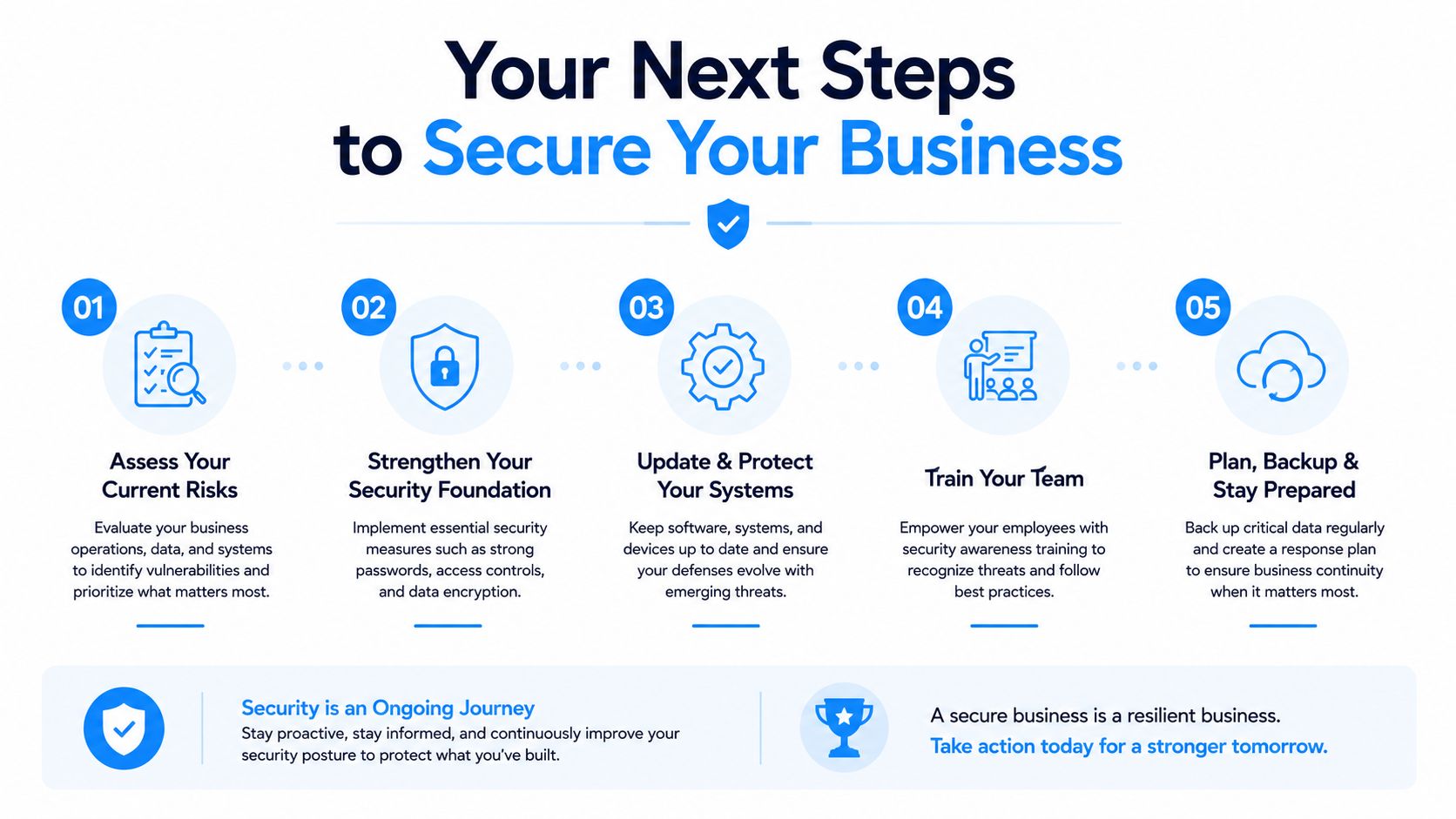
Pick the gaps that create the most operational pain first. For most Ottawa–Gatineau SMBs, that means monitoring, patching, segmentation, and recovery, in that order. Anything else is decoration.
If your business needs steadier uptime, clearer security, and support that can handle limited in-house staff, talk to IT Experts Canada. They work with Ottawa–Gatineau organisations on monitoring, cybersecurity, backups, cloud, and telecom planning, so your network and security setup is built to be operated, not just purchased. Visit IT Experts Canada and start with a practical review of what’s working, what’s exposed, and what should change next.
0 Comments